Gvr-unity-sdk: Can't move camera with GvrEditorEmulator?
I'm new to Unity and GVR, so possibly I'm missing something obvious, but it seems like I am unable to move the camera's position while using GvrEditorEmulator. Is this intended?
Looking here:
https://github.com/googlevr/gvr-unity-sdk/blob/master/GoogleVR/Scripts/GvrEditorEmulator.cs#L86-L90
Should it be:
m_camera.transform.localPosition = camPosition;
?
 Catsync
All 10 comments
@Catsync you generally want to move a game object (often called "player") that encapsulate the camera.
 pozil
on 13 Jun 2017
pozil
on 13 Jun 2017
I second this issue. @pozil The real problem is that the camera behavior of the GvrEditorEmulator and builded apps are different. I think we need to be sure the design in editor is consistent with the result in the builded app. It was very consistent in the previous double vision version which makes it easy to construct complex scenes and interactions.
For example Gear VR also takes over camera completely and requires a container game object, but the behavior is consistent between build and editor. It gets even more diverse if you have more complex camera setups. I want to know if container objects are required by design or by coincidence.
Inconsistencies I noticed that work well in builds but not with GvrEditorEmulator are:
- The new emulator repositions the camera to (0,0,0).
- Using different layers with multiple cameras results in strange behavior in emulator (for example UI).
Videos.zip
This can be fixed by putting an emulator to all cameras but each GvrEditorEmulator script present in scene adds 1x to the movement speed and some jiggle.
As an example to a complex camera setup, I use a top-down camera that allows the player to look to the whole scene like a TV in front of him/her. I child Player Camera to a GameObject with a rotation (90,0,0) to be able to get the top-down view to in front of the player in VR. And set Player Camera's local rotation from a dummy camera controlled by Gvr.

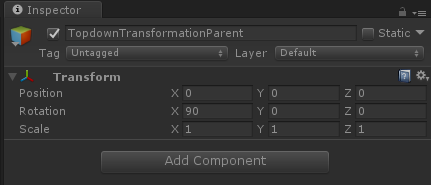
Currently the emulator movement speed is 3x for this setup and I need to modify my code to fit a setup with a camera container although there is no need to have it work on builds.
 guneyozsan
on 13 Jun 2017
guneyozsan
on 13 Jun 2017
Fair point @guneyozsan, I have not made the move to GVR 1.50 myself yet.
pozil
on 13 Jun 2017
@guneyozsan @Catsync you can fix/hack this issue by editing the code of GvrEditorEmulator.
Here is what I did:
- Commented line 88 to 90 (be carefull to leave line 91):
Vector3 camPosition = m_camera.transform.position;
camPosition.y = neck.y;
m_camera.transform.localPosition = neck;
- Commented line 103:
m_camera.transform.localPosition = Vector3.zero;
i made move the camera, i remove the lines that make the camera return at intial position. In the editor all its good but when i build the aplication, the camera not moves, stay in the initial position. the same thing happend when i put a rigybody in the camera, it move perfectly in the editor but in the app its static.
ahh, sorry for my english, i am from colombia and i not found information or blogs about this kind in spanish. I hope that you can understand and help me. thank you
 Luigui001
on 14 Jun 2017
Luigui001
on 14 Jun 2017
@pozil I couldn't migrate to 1.60 until now. Finally I'm there and your trick https://github.com/googlevr/gvr-unity-sdk/issues/606#issuecomment-308382227 worked very well. Thanks.
guneyozsan
on 3 Jul 2017
I know this is old/closed, however this issue is one of the top search results and there are still problems with previewing in Unity in later versions of GVR and Unity - for anybody still needing help, #778 solved my issue (add the 'Controller > GVRControllerMain' prefab).
 learnwithus
on 27 Dec 2017
learnwithus
on 27 Dec 2017
@learnwithus thank you!
 Frizau
on 31 Dec 2017
Frizau
on 31 Dec 2017
Hey guys,
I just signed up for this udemy course, now I am aware that it may be a bit outdated because the instructor is version 5.6 and I know unity has made several upgrades since then. I did down load the SDK pkg 1.2 and I have unity version 2017.3 so I'm all up to date and I'm trying to follow along but I am having the same problem controlling the editor emulator to get it into the position that I want it to go into. @pozil I went into the emulator script and saw what you posted about changing that around a bit but you posted this change of script almost 9 months ago so I don't know if the script was updated in the 1.20 pkg or not. I'm fairly new at this and I want to be sure I'm making the correct changes. Now this script from line 93to 111 goes like this:
UpdateHeadPositionAndRotation();

IEnumerator<Camera> validCameras = ValidCameras();
while (validCameras.MoveNext()) {
  Camera cam = validCameras.Current;
  cam.transform.localPosition = HeadPosition * cam.transform.lossyScale.y;
  cam.transform.localRotation = HeadRotation;
}
}
void Awake() {
if (Instance != null) {
Debug.LogError("More than one GvrEditorEmulator instance was found in your scene. "
+ "Ensure that there is only one GvrEditorEmulator.");
this.enabled = false;
return;
}
Instance = this;
}
This is different then what @pozil suggested in his post that is why I am coming here because like I said I want to make sure I'm making the correct necessary alterations to this script so I can have better control over My positioning and overall handling of the position of the Gvreditoremulator, thanks
 NewLifeDeveloper
on 16 Feb 2018
NewLifeDeveloper
on 16 Feb 2018
@NewLifeDeveloper I decided to downgrade to Unity 5.6 from 2017.x because of some GVR issues, and that solved the problem — this might be bad advice (I don't know what the plan is for the 5 series) but for my purposes, Unity 5.6 has been working great.
Edit: I also didn't need to modify any scripts to get to a solution.
learnwithus
on 21 Feb 2018
Related issues
 vinhui
·
6Comments
vinhui
·
6Comments
vinhui
·
6Comments
vinhui
·
6Comments
 varumora
·
7Comments
varumora
·
7Comments
 jahKIper
·
3Comments
jahKIper
·
3Comments
 pandailing
·
4Comments
pandailing
·
4Comments
Most helpful comment
@guneyozsan @Catsync you can fix/hack this issue by editing the code of GvrEditorEmulator.
Here is what I did: