Gutenberg: Site Editor: Overwrite and Revert Templates
In #25739 we temporarily removed the "overwrite/revert" functionality from the new template navigation sidebar.
We want to put it back ASAP, but we need to figure out a clearer way to handle it.
cc @epiqueras @shaunandrews @jameskoster
Original Behavior
See:
- https://github.com/WordPress/gutenberg/blob/029b1d3ce7ee9b32b49396c1a030b2f22b10b0ae/packages/edit-site/src/components/left-sidebar/navigation-panel/template-switcher/index.js
- https://github.com/WordPress/gutenberg/blob/029b1d3ce7ee9b32b49396c1a030b2f22b10b0ae/packages/edit-site/src/components/left-sidebar/navigation-panel/index.js
The original TemplateSwitcher worked roughly like this:
- The default state is the default
indextemplate with the "all posts" content. - Changing content would give the opportunity of "overwriting" the relative default template, by creating a new content-specific template.
E.g.
- Select the category Foo as content: the template is now
index, but it can be overwritten into a newcategory-footemplate.
Once overwritten, it can be reverted to the defaultindextemplate. - Select the page Bar as content: the template is now
singular, but it can be overwritten into a newpage-bartemplate.
Once overwritten, it can be reverted to the defaultsingulartemplate.
- Select the category Foo as content: the template is now
| All Posts | Single Page (default template) | Single Page (custom template) |
| - | - | - |
|  |
|  |
|  |
|
I've personally always found this behaviour hard to understand, but in the interest of retaining the same behavior in the new template sidebar, we should figure out where to put the "Overwrite Template" and "Revert to Parent" button.
For context, this is how the sidebar looks like right now:
| All Posts | Single Page (default template) | Single Page (custom template) |
| - | - | - |
|  |
|  |
|  (note: this is a submenu) |
Possible Options
Add the Overwrite button under the default template, and the Revert button under the specific template.
The Revert button might appear in a nested submenu.Add both button under the default template, indicating that that template is the target of both actions.
Add both buttons in the "root" Templates menu, in a location unrelated to their target.
Add both buttons _outside_ of the menu (still in the sidebar), and differentiate them from the menu (e.g. buttons with a different color). Maybe we could add context in the button label itself. E.g.
- Instead of "Overwrite Template" -> "Overwrite index template".
- Instead of "Revert to Parent" -> "Revert to index template".
 Copons
All 5 comments
I'd love to hear more thoughts on this, but my opinion is that neither of these actions should live in the sidebar, as they are not navigational in nature.
I see four common/related use cases around these behaviours that we need to design for:
- I'm editing content and want to create a new template for this piece of content
- I want to create a new template based on an existing template
- I want to revert a template back to the theme default
- I want to delete one of my custom templates
There are probably others that I'm missing :)
Due to the overlap in these actions they should probably appear in close proximity in the UI. A simple popover menu feels like a good candidate as we may need to display these actions (and others in the future) in multiple locations – potentially outside of the Editor even. Two quick examples of that:
- I should be able to delete my custom template from the template mosaic view, or while editing it directly.
- I should be able to create a new template for a specific post category, while editing that category.
Circling back to the use cases above, here are some design options of how we might present these actions in the Editor:
I'm editing content and want to create a new template for this piece of content
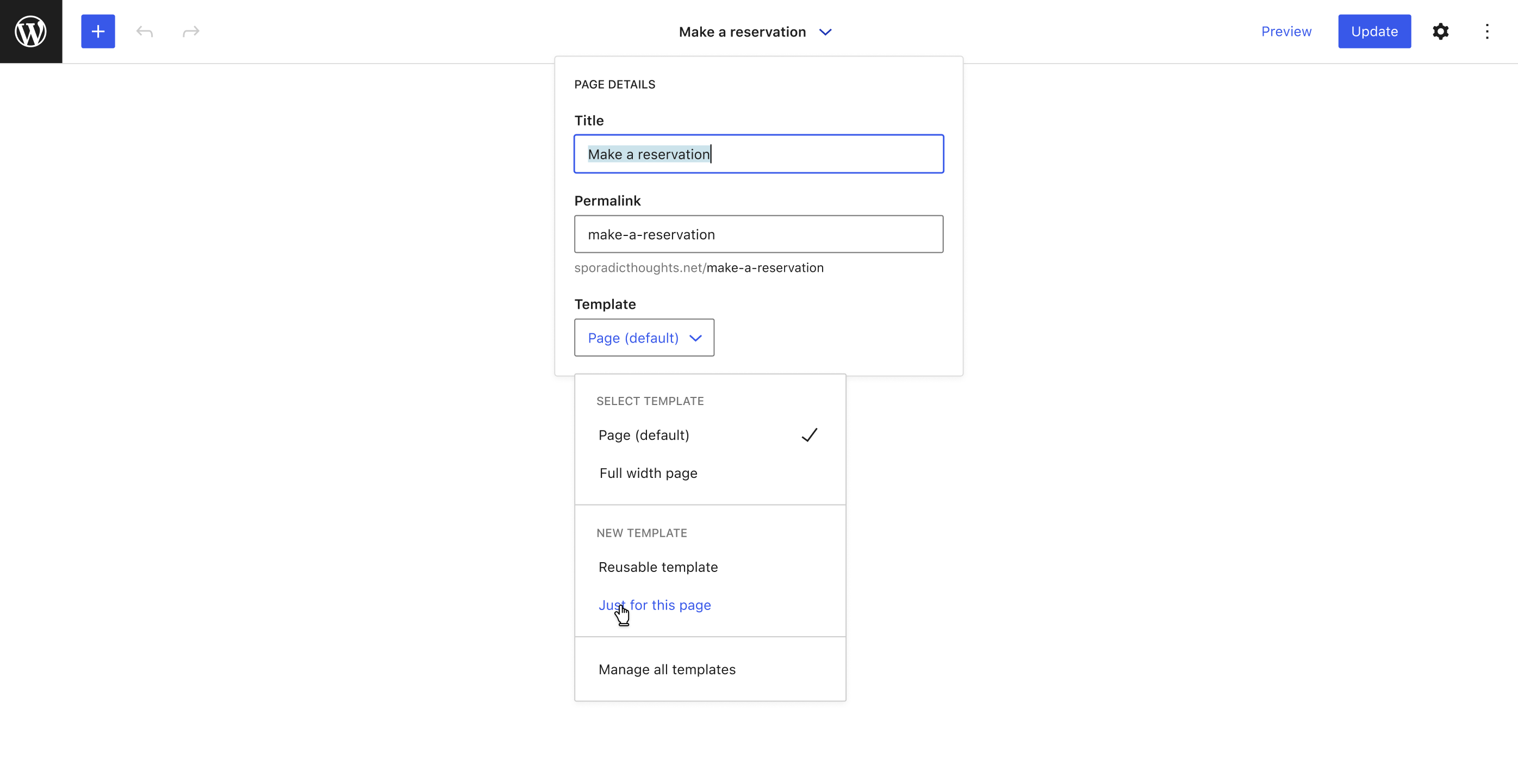
I want to create a new template based on an existing template
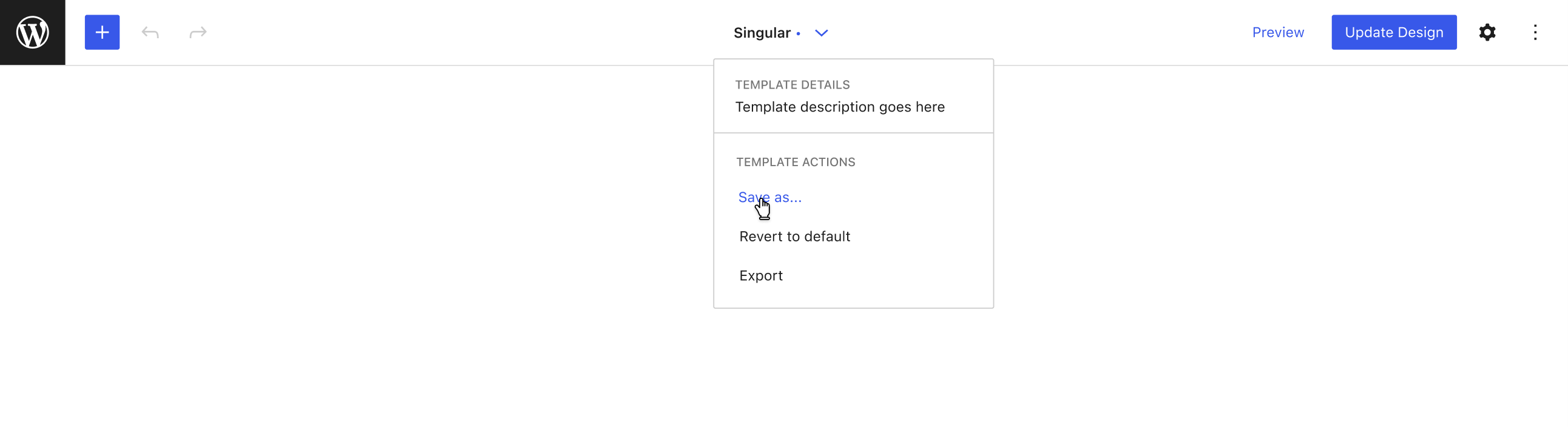
I want to revert a template back to the theme default
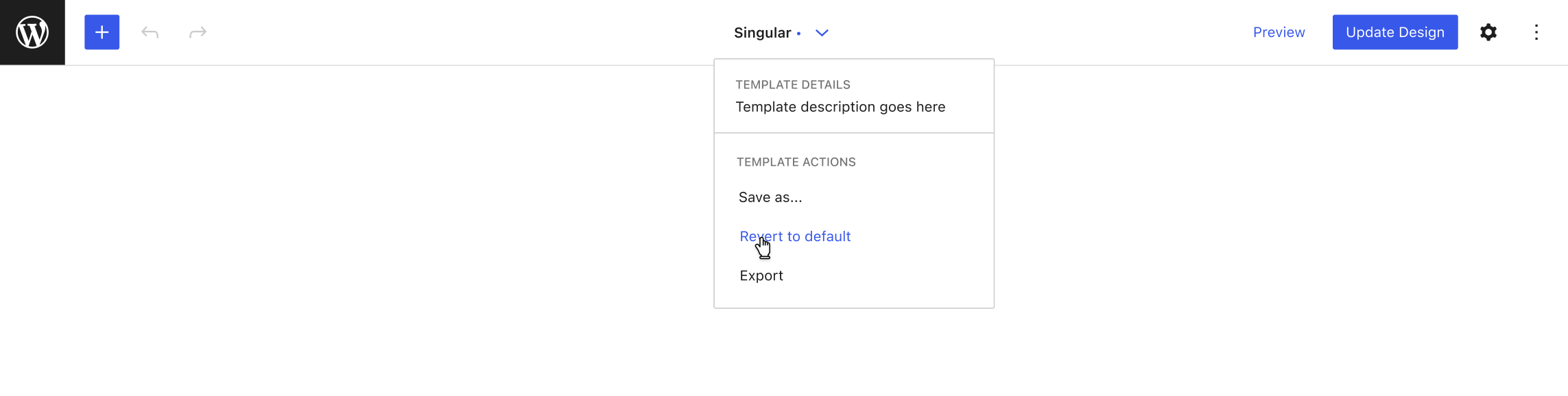
I want to delete one of my custom templates
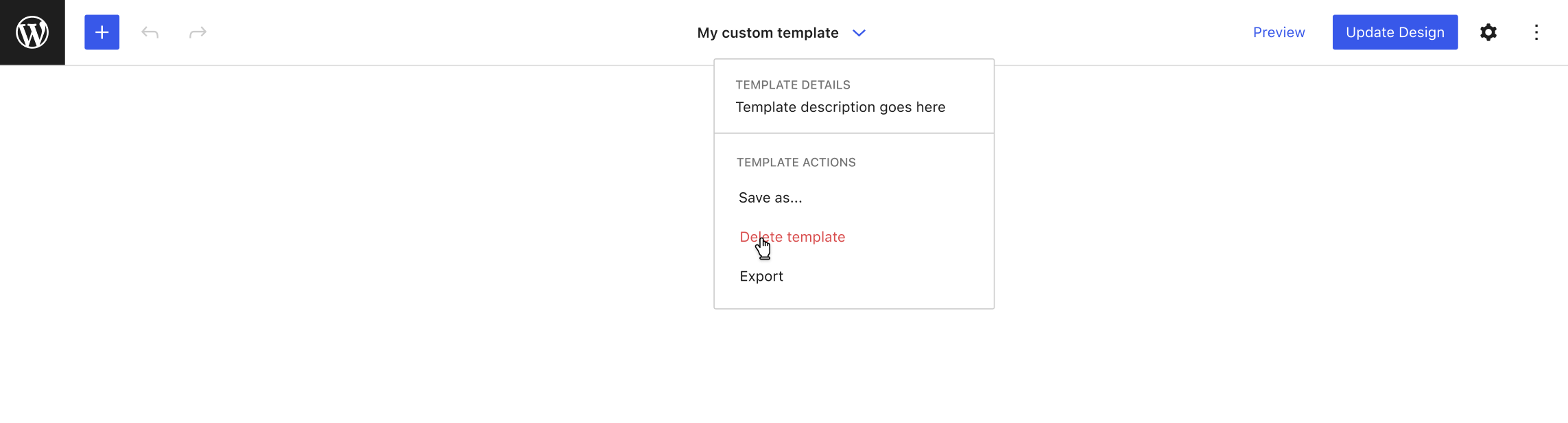
Hopefully these design concepts illustrate their portability to other areas of site management, such as the template mosaic view, or category management screens that I alluded to above.
 jameskoster
on 12 Oct 2020
jameskoster
on 12 Oct 2020
I'd love to hear more thoughts on this, but my opinion is that neither of these actions should live in the sidebar, as they are not navigational in nature.
I agree with this. 💯
I'm editing content and want to create a new template for this piece of content
I really like how template selection and creation is exposed through the content here. As a side note, given that only entities that can be navigated to via sidebar appear in the top title (templates, template parts), this could be viewed as one point in favor of also exposing content selection through the sidebar too.
 vindl
on 14 Oct 2020
vindl
on 14 Oct 2020
this could be viewed as one point in favor of also exposing content selection through the sidebar too.
Which sidebar do you mean, left or right? 😅 I wouldn't rule out putting content selection in the nav sidebar, but my gut says it might feel a bit awkward.
Another option would be to put it in the template menus above. Kind of like an inverse of the template selector in the document menu.
| Template menu | Document menu |
|---|---|
|  |
|  |
|
We can explore this more in the relevant issue :)
jameskoster
on 14 Oct 2020
Which sidebar do you mean, left or right? 😅 I wouldn't rule out putting content selection in the nav sidebar, but my gut says it might feel a bit awkward.
Yes, I meant the nav sidebar. 😄
vindl
on 14 Oct 2020
Related: #26284
Copons
on 20 Oct 2020
Related issues
 youknowriad
·
3Comments
youknowriad
·
3Comments
 BE-Webdesign
·
3Comments
BE-Webdesign
·
3Comments
 aduth
·
3Comments
aduth
·
3Comments
 jasmussen
·
3Comments
jasmussen
·
3Comments
 ellatrix
·
3Comments
ellatrix
·
3Comments