Gutenberg: You are probably offline
Describe the bug
Unable to save and update posts. Error message "You are probably offline".
To reproduce
Steps to reproduce the behavior:
Install Wordpress 5.4.2
Install Nginx
Install Let's Encrypt SSL
Nginx config:
```server {
listen 80;
listen [::]:80;
server_name *.sub.server.com sub.server.com;
return 301 https://$host$request_uri;
}
server {
listen 443;
listen [::]:443 ssl;
ssl on;
ssl_certificate /etc/letsencrypt/live/sub.server.com/fullchain.pem;
ssl_certificate_key /etc/letsencrypt/live/sub.server.com/privkey.pem;
root /home/http/sub.server.com/wordpress;
index  index.php index.html index.htm;
server_name *.sub.server.com sub.server.com;

client_max_body_size 100M;

location / {
    try_files $uri $uri/ /index.php?$args;
}

location ~ \.php$ {
    include snippets/fastcgi-php.conf;
    fastcgi_pass             unix:/var/run/php/php7.3-fpm.sock;
    fastcgi_param   SCRIPT_FILENAME $document_root$fastcgi_script_name;
}
}
Add a new post/page using Gutenburg.

Error in Chrome console when editing a post:
Mixed Content: The page at 'https://sub.server.com/wp-admin/post.php?post=4&action=edit' was loaded over HTTPS, but requested an insecure resource 'http://sub.server.com/wp-json/wp/v2/users/me?_locale=user'. This request has been blocked; the content must be served over HTTPS.
Mixed Content: The page at 'https://sub.server.com/wp-admin/post.php?post=4&action=edit' was loaded over HTTPS, but requested an insecure resource 'http://sub.server.com/wp-json/wp/v2/users/?who=authors&per_page=100&_locale=user'. This request has been blocked; the content must be served over HTTPS.
data.min.js?ver=e80048e7b309581a40e44b8bd8aaba41:2 Uncaught (in promise) {code: "fetch_error", message: "You are probably offline."}
```
Saving the post gives an error message: "Publishing failed. You are probably offline."
The post is also stuck in draft mode and not able to update or publish it.
Problem does not persist when installing classic editor.
Expected behavior
Be able to update/save post.
Editor version (please complete the following information):
- WordPress version: 5.4.2
- Does the website has Gutenberg plugin installed, or is it using the block editor that comes by default? Default gutenberg
- If the Gutenberg plugin is installed, which version is it? Don't know.
Desktop (please complete the following information):
- OS: Windows 10
- Browser Chrome
 Zyles
Zyles
All 3 comments
Hi @Zyles I dug into this to see if anyone else had experienced something similar and found this thread: https://wordpress.org/support/topic/publishing-failed-you-are-probably-offline/ Can you try following the advice given there as a next step? If that doesn't resolve the problem, feel free to re-open this. Otherwise, this seems to be site specific rather than gutenberg specific which is what this repo is for.
 annezazu
on 15 Jul 2020
annezazu
on 15 Jul 2020
Hey @annezazu and @Zyles just to add a bit more context as it's not so much of "site specific" because it also includes how Core works in general.
The issue seems to be coming from making requests to subsites via http so they actually return a Mixed-Content error. The "offline" error returned is kind of misleading and could be updated in these cases.
All subdomain subsites are by default created with http ( see https://core.trac.wordpress.org/ticket/27499 ) so when you are loading Gutenberg you end up having mixed-content issues due to that.
Example:
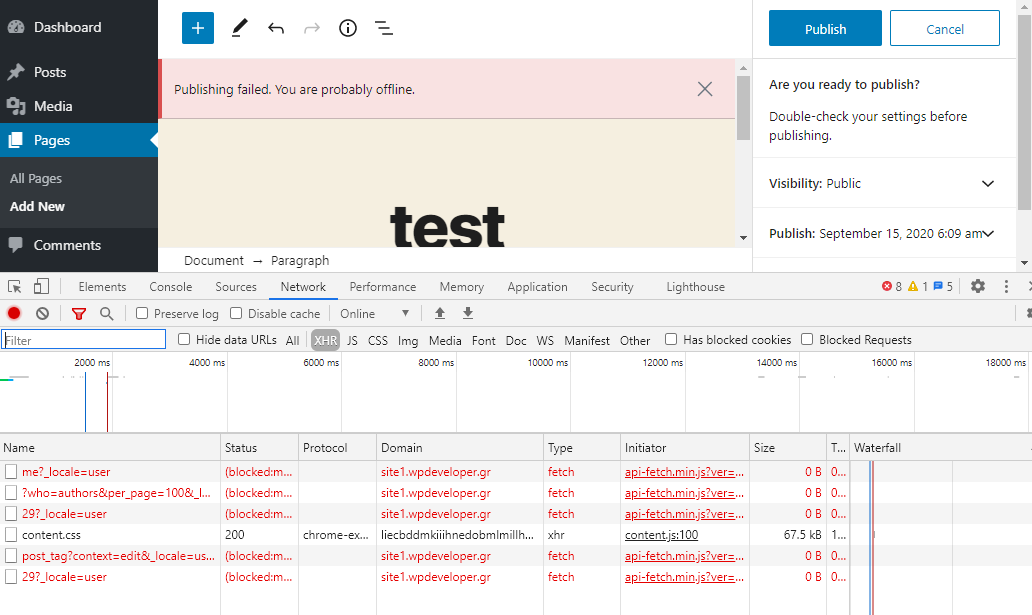
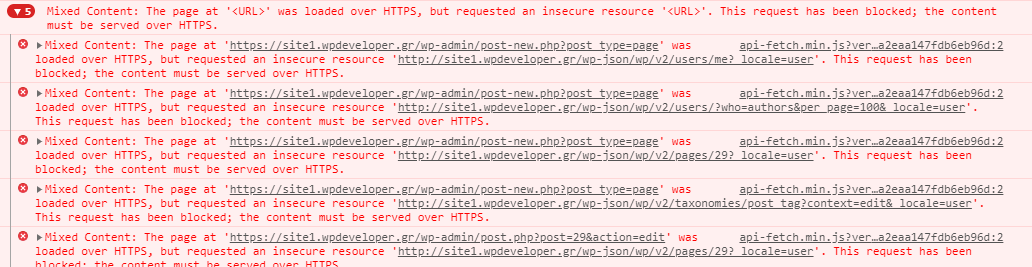
If the subsites address is edited and changed to https instead everything starts to work as expected since mixed-content issues are avoided/resolved.
Just my 2c in case it can help others that reach this issue, as I stumbled on this recently myself and had a chat with @SergeyBiryukov via slack briefly yesterday :) .
 mrxkon
on 15 Sep 2020
mrxkon
on 15 Sep 2020
Marked this one as a core bug.
I'll leave it closed since tracking and discussion is already on the core ticket.
 aristath
on 15 Sep 2020
aristath
on 15 Sep 2020
Related issues
 maddisondesigns
·
3Comments
maddisondesigns
·
3Comments
 davidsword
·
3Comments
davidsword
·
3Comments
 ellatrix
·
3Comments
ellatrix
·
3Comments
 nylen
·
3Comments
nylen
·
3Comments
 pfefferle
·
3Comments
pfefferle
·
3Comments
Most helpful comment
Hey @annezazu and @Zyles just to add a bit more context as it's not so much of "site specific" because it also includes how Core works in general.
The issue seems to be coming from making requests to subsites via
httpso they actually return a Mixed-Content error. The "offline" error returned is kind of misleading and could be updated in these cases.All subdomain subsites are by default created with
http( see https://core.trac.wordpress.org/ticket/27499 ) so when you are loading Gutenberg you end up having mixed-content issues due to that.Example:


If the subsites address is edited and changed to
httpsinstead everything starts to work as expected since mixed-content issues are avoided/resolved.Just my 2c in case it can help others that reach this issue, as I stumbled on this recently myself and had a chat with @SergeyBiryukov via slack briefly yesterday :) .