Gutenberg: With the latest Update you can no longer click the + to add an image block
Describe the bug
I just updated to the newest version of Gutenberg and with that update some functionality was lost. While creating a new post, and adding blacks, I click on the + sign to create a new block. I then go to the top to search for a block after typing: "Image" Image is no longer found. If I go to the bottom "Brows All" another tab opens that gives me all of the block options. Again I type in the word "Image" and again it is not found. However, if I scroll down to the Media Area I can find the "Image" block. The problem with this is that when I create Columns, I can no longer add Images into the column because the Image Block can no longer be found using the + sign. I did figure out a new way of adding multiple pictures side by side, however, that only allows me to add a hyper link to the caption of the photo and not the photo itself. While the columns allows me to add a hyper link to both the caption and the image.
Additionally it no longer saves your most recently used blocks when you click on the +. Before the update the blocks I used often would show up first which made it even easier to add a new block.
To reproduce
Steps to reproduce the behavior:
- Go to "New Post"
- Click on '+' to add a new block
- At the top of the Block Options that opens, go to the top in the 'Search For A Block'
- Type in the word 'Image'
- Error: Image is no longer found with the new Gutenberg update.
Expected behavior
Before the update I could type in the word 'Image' and the image block would show up for me to select. It is as if the word "Image" can no longer be searched.
Editor version:
- WordPress version: 5.4.2
- Does the website has Gutenberg plugin installed, or is it using the block editor that comes by default: I am using the Gutenberg Plugin
- If the Gutenberg plugin is installed, which version is it? 8.5.1 is the version I am Using.
*Laptop *
- iOS: MacBook Pro
- Browser: Safari
- Latest Version
Additional context
- To report a security issue, please visit the WordPress HackerOne program: https://hackerone.com/wordpress.
 ADashOfMacros
All 8 comments
I am working with WP 5.4.2 too, and I've updated Gutenberg to version 8.5.1 a couple of hours ago. I've just tested what you mentioned in this issue, and the block is showing as it should.
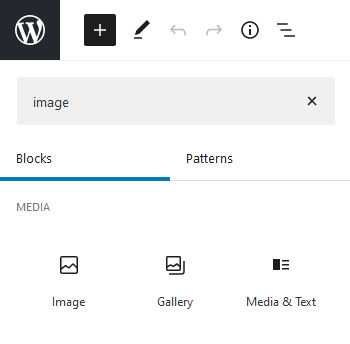
For further reference, I've also added the popup that shows when clicking on the editor content's “+”:
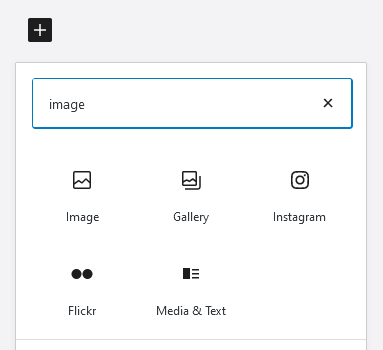
My best guess is that some other plugin might be interfering.
 rodrigodagostino
on 10 Jul 2020
rodrigodagostino
on 10 Jul 2020
I’m able to search for all other blocks I type into the search area, except Image. So I don’t believe that it could be another plugin interfering for only one particular word. I also haven’t added any new plugins in a few weeks and it worked until I updated Gutenberg. This leaves me to believe it is a Gutenberg issue.
ADashOfMacros
on 10 Jul 2020
@ADashOfMacros I tried to replicate this using the TwentyTwenty theme, WordPress 5.4.2, and Gutenberg 8.5.1 but wasn't able to. I don't have any additional plugins installed on this test site either. Like @rodrigodagostino this makes me think it's a plugin conflict. Even though you didn't add any new ones, this latest release of Gutenberg could still cause a conflict. Can you try disabling plugins one by one to see if you can identify the problem?
 annezazu
on 10 Jul 2020
annezazu
on 10 Jul 2020
I dont have many plugins on my site, but the ones that I do have I use. I dont understand why it is only "Image" that cant be searched. How would that be another plugin conflict. I can search all other blocks and find them. The only one that cant be found through the search option is the "Image" Block. This is what doesn't make sense to me. Inactivating and reactivating other plugins doesn't make sense to me when the rest of Gutenberg is working fine, with the exception of the search for Image.
ADashOfMacros
on 15 Jul 2020
@ADashOfMacros it is common practice to discard plugin conflicts as the first step. It does make sense since what you did was to update the content of one of your plugins, so maybe now there is a conflict that was not there before. Even if you need every single one of the plugins you've installed, it would still be very helpful if you could try that first and see if anything changes. The intention here is to try to discard possible causes.
Remember we're only here to try to help you out ;)
rodrigodagostino
on 15 Jul 2020
Ok I found the problem, it is with the Plugin CoBlocks. Is this plugin not needed to use the Gutenberg Plugin? If not then I will go ahead and delete it completely.
ADashOfMacros
on 15 Jul 2020
That's great news! :) Nope, Gutenberg works perfectly fine on its own. CoBlocks is a different plugin that adds a series of additional blocks and functionalities that are not included in Gutenberg. But if you don't need any of those, you can go ahead and uninstall it.
rodrigodagostino
on 16 Jul 2020
If you do still need to use the CoBlocks plugin, I'd recommend filing an issue with them here: https://github.com/godaddy-wordpress/coblocks/issues For now, I'm going to close this out since you found the culprit. Thank you both for following up ❤️
annezazu
on 16 Jul 2020
Related issues
 spocke
·
3Comments
spocke
·
3Comments
 pfefferle
·
3Comments
pfefferle
·
3Comments
 JohnPixle
·
3Comments
JohnPixle
·
3Comments
 jasmussen
·
3Comments
jasmussen
·
3Comments
 moorscode
·
3Comments
moorscode
·
3Comments
Most helpful comment
Ok I found the problem, it is with the Plugin CoBlocks. Is this plugin not needed to use the Gutenberg Plugin? If not then I will go ahead and delete it completely.