Gutenberg: Block icons are reordered when adding new blocks
Describe the bug
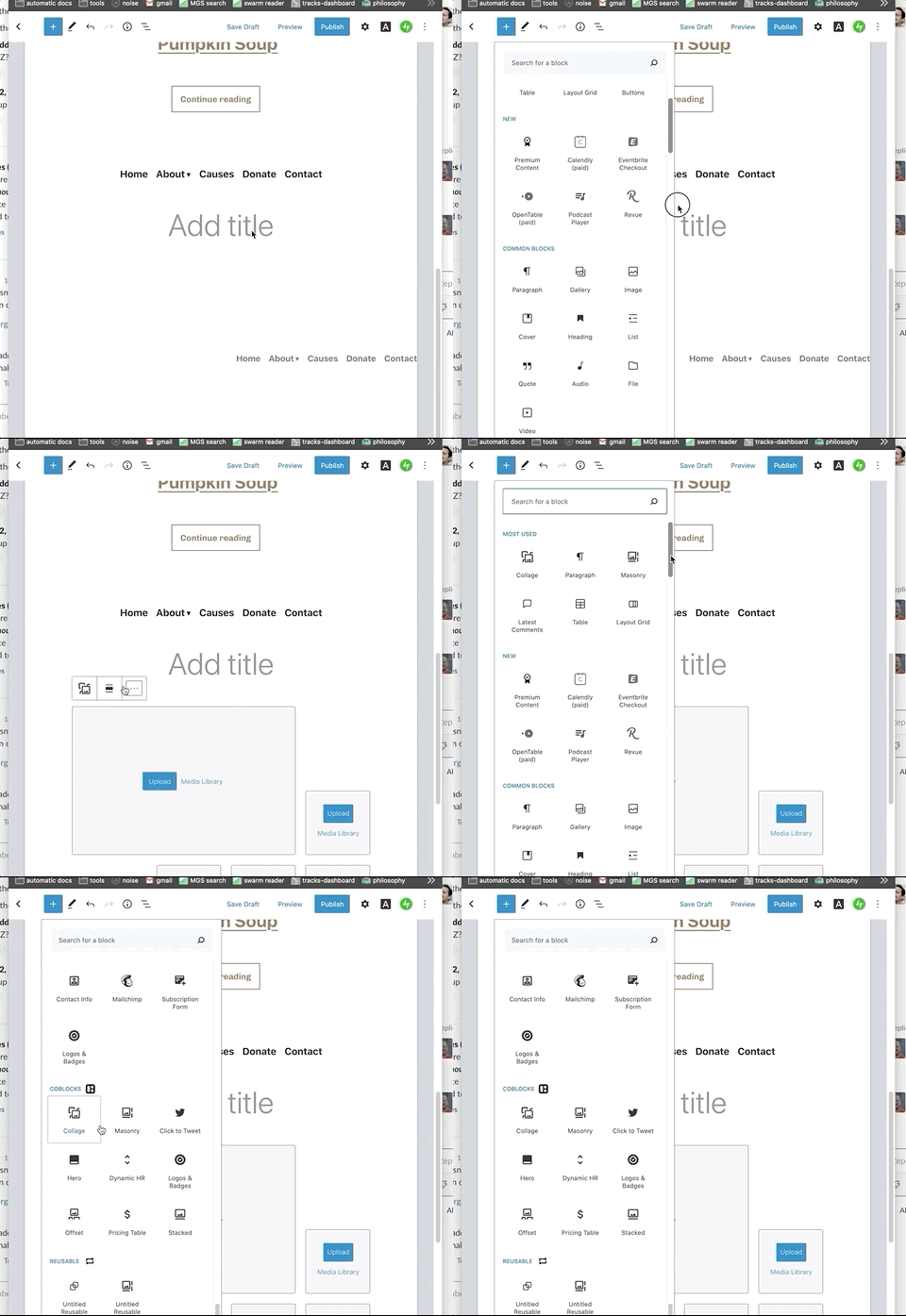
When selecting blocks from the block selector, the order of blocks changes unexpectedly.

To reproduce
Steps to reproduce the behavior:
- Open the gutenberg editor
- Click on the New Block (+) icon
- Scroll down to the Layout Grid block ( I tested with other blocks too )
- Click on the block to add it to the page
Expected behavior
The block icon in the block selector panel stays in the same place
Actual behavior
The Block icon changes positions! moving further up the list of blocks
Screenshots
Editor version (please complete the following information):
- Tested with gutenberg v8.1.0 which is currently deployed to wordpress.com edge sites and also v8.0.0
**Desktop
- OS: macos
- Browser Chrome
I'm sorry if this is an existing issue already
 roo2
roo2
All 4 comments
Certainly very interesting note!
“Most Used” or "Common Blocks" are a bit obscure and lack contextuality of the content or intent, more so with FSE.
It’d be ok to keep it as a functionality people opt-in, but hide it as a default. Which would solve this particular issue.
If users want to activate those views, blocks directory shall not update in the same inserter session. If the inserter closes or the editing session closes, the blocks can be arranged to reflect the usage.
 pablohoneyhoney
on 29 May 2020
pablohoneyhoney
on 29 May 2020
Hey thanks for looking into it! yea it's surprising behavior to me, also, this behavior doesn't only affect the "most used" and "common blocks" it affects other block categories too!
Collage block changes from 2nd to 1st place in its category:
roo2
on 1 Jun 2020
I confirmed this happens with blocks in all categories and agree they should not be moving around on insert.
 richtabor
on 10 Jun 2020
richtabor
on 10 Jun 2020
@pablohoneyhoney I agree that the inserter should not update in real-time. If we do the opt-in functionality, do you know of a similar behavior where I can look up how it is implemented?
 kirilzh
on 22 Jun 2020
kirilzh
on 22 Jun 2020
Related issues
 moorscode
·
3Comments
moorscode
·
3Comments
 pfefferle
·
3Comments
pfefferle
·
3Comments
 mhenrylucero
·
3Comments
mhenrylucero
·
3Comments
 maddisondesigns
·
3Comments
maddisondesigns
·
3Comments
 hedgefield
·
3Comments
hedgefield
·
3Comments
Most helpful comment
Certainly very interesting note!
“Most Used” or "Common Blocks" are a bit obscure and lack contextuality of the content or intent, more so with FSE.
It’d be ok to keep it as a functionality people opt-in, but hide it as a default. Which would solve this particular issue.
If users want to activate those views, blocks directory shall not update in the same inserter session. If the inserter closes or the editing session closes, the blocks can be arranged to reflect the usage.