Gutenberg: Vertical navigation block is missing a class on the front
Describe the bug
In the editor, the vertical variation of the navigation block can be identified with
is-vertical but this CSS class is not present on the front, so there is no way to tell the
horizontal and vertical styles from the other.
To reproduce
Steps to reproduce the behavior:
- Add a vertical navigation block to a post or page
- Add a horizontal navigation block too, in case you wish to compare them.
- Save
- View the front
Expected behavior
I expect the CSS class and the existing styles to be applied to block.
Screenshots
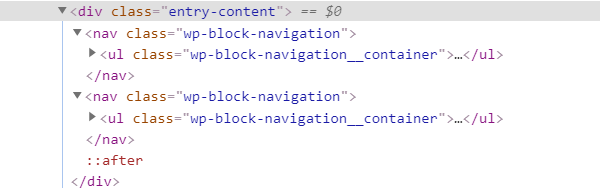
Editor version (please complete the following information):
- WordPress version: 5.4
Gutenberg 7.9.1
Desktop (please complete the following information):
- OS: win 10
- Browser: Chrome Version 81.0.4044.122
 carolinan
All 3 comments
Great catch @carolinan as that makes sense for me too.
 karmatosed
on 27 Apr 2020
karmatosed
on 27 Apr 2020
Just changing this to a bug as currently the editor and front end versions of the block don't match (Navigation (vertical) is displayed horizontally in the post, but vertically in the editor) due to the missing classname.
 talldan
on 28 Apr 2020
talldan
on 28 Apr 2020
Edit: Current workaround:
Add is-horizontal or is-vertical as extra CSS class to each navigation blocks.
 strarsis
on 11 May 2020
strarsis
on 11 May 2020
Related issues
 hedgefield
·
3Comments
hedgefield
·
3Comments
 mhenrylucero
·
3Comments
mhenrylucero
·
3Comments
 wpalchemist
·
3Comments
wpalchemist
·
3Comments
 ellatrix
·
3Comments
ellatrix
·
3Comments
 franz-josef-kaiser
·
3Comments
franz-josef-kaiser
·
3Comments
Most helpful comment
Just changing this to a bug as currently the editor and front end versions of the block don't match (Navigation (vertical) is displayed horizontally in the post, but vertically in the editor) due to the missing classname.