Gutenberg: Cover block uses absolute unit [px] for min-height
Describe the bug
The user can specify the min-height/height of the cover block.
However, the height is applied in absolute units [px], while the cover blocks (and most elements usually) got widths with relative units ([%], [vw], ...). The specified height of cover block looks grossly different when the cover block elements are changed in their height.
To reproduce
Steps to reproduce the behavior:
- Insert a cover block, assign it some image.
- Now specify the height of the cover block, either using the drag handle at its bottom or the manual input.
- Notice that the applied min-height is in [px].
- Stretch the cover blocks further, e.g. in a breakpoint, etc. Notice that the min-height won't grow proportionally with the cover block width, the intended part of the image differs now from the actual visible one.
Expected behavior
Relative min-height is applied so the cover block height grows proportionally with the cover block width.
Possible solutions
A ratio padding by a pseudo-element with padding-top/padding-bottom would be very useful here.
 strarsis
All 7 comments
@jorgefilipecosta: IMHO this is not only an enhancement possibility but rather a bug.
Because the height control and minHeight attribute of cover block use absolute units for a specific width inside the editor, the minHeight value cannot be used for any relative adjustments.
E.g. when the height of a cover block inside a three columns column is set and the columns switch to one column on the breakpoint, the height set by the user won't fit anymore because the width of the cover block changed drastically, hence the set minHeight can be far too narrow suddenly.
When at least the height control and the user-set minHeight could be using relative units, relative to the overall image width, maybe even adding some info about the background-size mode used, the theme could at least filter in a CSS variable for the correct ratio.
strarsis
on 9 Mar 2020
This should be a general issue about allowing control over what units are used. cc @ItsJonQ as he had been thinking about a way to present that.
If we add support to change units, themes should be able to say which are preferred and which should be disabled (i.e. if a theme only wants "rems" to be used).
 mtias
on 12 Mar 2020
mtias
on 12 Mar 2020
👋 Hallo! Yesterday, I experimented with UI controls for padding. Specifically, how to set varying sides (top, right, bottom, left) as well as units.
I recorded a brief demo here:
https://d.pr/v/90HQQK
Live example/demo here:
https://0leig.csb.app/
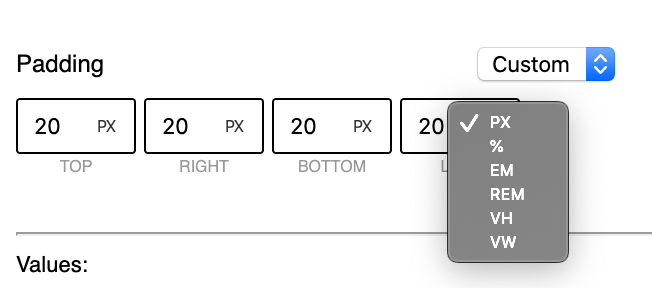
An individual control allows for value setting (input[type="number"]) and unit setting (select), and is presented in a single compact unit.
I think this works quite well!
We can create a component from this! 🎉
 ItsJonQ
on 12 Mar 2020
ItsJonQ
on 12 Mar 2020
Yes, this is better. The user can state the intent for how the height should be interpreted,
either relatively or absolutely. When the user enters a height in relative units it is important to also store the current width of the block - otherwise the theme cannot use the height value in a meaningful way.
strarsis
on 12 Mar 2020
For future implementation reference: recently the GOV.UK blog has shared their experiences with input[type="number"] and why they've replaced it by <input type="text" inputmode="numeric" pattern="[0-9]*">.
Here we're talking about incremental numbers, but even so there seems to be a lot of accessibility issues: https://technology.blog.gov.uk/2020/02/24/why-the-gov-uk-design-system-team-changed-the-input-type-for-numbers/
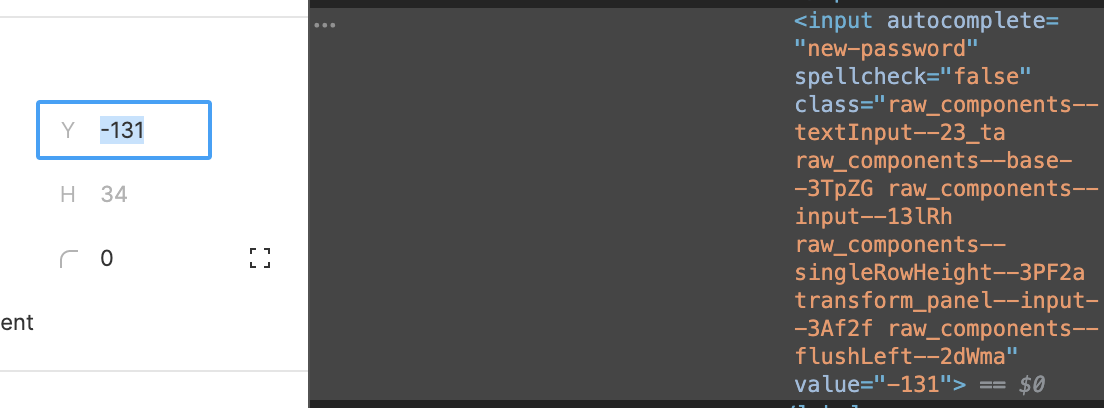
I did a quick check on how Figma does it, and it looks like they use a normal input with arrow key event handlers to increment and decrement the value (Shift increments/decrements by 10).
 diegohaz
on 12 Mar 2020
diegohaz
on 12 Mar 2020
Oh, interesting, thanks for sharing. I've found our number-based inputs to be quite awkward to use with the tiny arrows.
mtias
on 12 Mar 2020
Updates!! Here's a single UnitControl component so far :)

It still uses input[type="number"], but it has the enhancements @diegohaz suggested. shift+up or shift+down will increment by 10.
Note: Under the hood, it uses a smaller NumberControl input to handle the shift interactions. I created this separately in case we'd like to use it elsewhere
Working branch:
https://github.com/WordPress/gutenberg/tree/try/cover-height-custom-units
ItsJonQ
on 12 Mar 2020
Related issues
 ellatrix
·
3Comments
ellatrix
·
3Comments
 JohnPixle
·
3Comments
JohnPixle
·
3Comments
 maddisondesigns
·
3Comments
maddisondesigns
·
3Comments
 aduth
·
3Comments
aduth
·
3Comments
 mhenrylucero
·
3Comments
mhenrylucero
·
3Comments
Most helpful comment
For future implementation reference: recently the GOV.UK blog has shared their experiences with
input[type="number"]and why they've replaced it by<input type="text" inputmode="numeric" pattern="[0-9]*">.Here we're talking about incremental numbers, but even so there seems to be a lot of accessibility issues: https://technology.blog.gov.uk/2020/02/24/why-the-gov-uk-design-system-team-changed-the-input-type-for-numbers/
I did a quick check on how Figma does it, and it looks like they use a normal input with arrow key event handlers to increment and decrement the value (Shift increments/decrements by 10).