Gutenberg: Full site editing: Template parts editing and saving
With the merging of https://github.com/WordPress/gutenberg/pull/19203 (template parts) and https://github.com/WordPress/gutenberg/pull/18029 (multi-entity saving) we should iterate on the UX behind these initial explorations.
Editing and Saving Template-parts
A template-part is a global block that effects all pages on a site. It is often recognized as a Header, Footer, or Sidebar. When a change is made on a template-part it affects all pages/posts that include that template-part.
User journey
As a user, I'd like to edit the navigation block in my header and save it, essentially updating across all pages on my site.
Features
- Allow editing of nested blocks.
- Introduce various template-part layouts that can be swapped with the current layout.
- Communicate to the user what is being saved and how it affects their site (ei. global change).
 mapk
mapk
All 15 comments
Looks like this is related to: https://github.com/WordPress/gutenberg/issues/19886
mapk
on 18 Feb 2020
Following the user journey stated above:

mapk
on 18 Feb 2020
I've seen that pop-up confirmation in a few places with FSE, and I find it really confusing. I also don't expect that people will actually read what is presented there without just clicking "Continue".
In my opinion, the need for this pop-up is a sign that this interface might be doing too much.
 johnstonphilip
on 19 Feb 2020
johnstonphilip
on 19 Feb 2020
What if we explore solutions that instead of a popup, are contained in the sidebar? The attention of the user is already there, so if we keep it there, then it should be easier to design a working solution instead of bouncing them back and forth on the screen?
 folletto
on 19 Feb 2020
folletto
on 19 Feb 2020
@folletto I just had another thought on a flow that I posted here: https://github.com/WordPress/gutenberg/issues/19886#issuecomment-588409779
johnstonphilip
on 19 Feb 2020
Yes, that seems going in a similar direction.
folletto
on 19 Feb 2020
So right now, the pre-publish sidebar can be turned off by the user. My proposal to include the changes there is already going to require some modifications to be done to the sidebar so that it is persistent no matter what. I think that's okay.
Keeping them in the sidebar for the final confirmation sounds quite reasonable too. Definitely worth an exploration.
mapk
on 19 Feb 2020
If the sidebar is the solution... we're going to need to figure out a better approach to those Publish buttons. 😆 I just won't allow a third Publish button to occur.
mapk
on 19 Feb 2020
mapk
on 12 Mar 2020
Reposting from #20421
Another iteration (riffing off @shaunandrews) that utilizes a sidebar (notably not pre-publish).
Try out the Prototype.
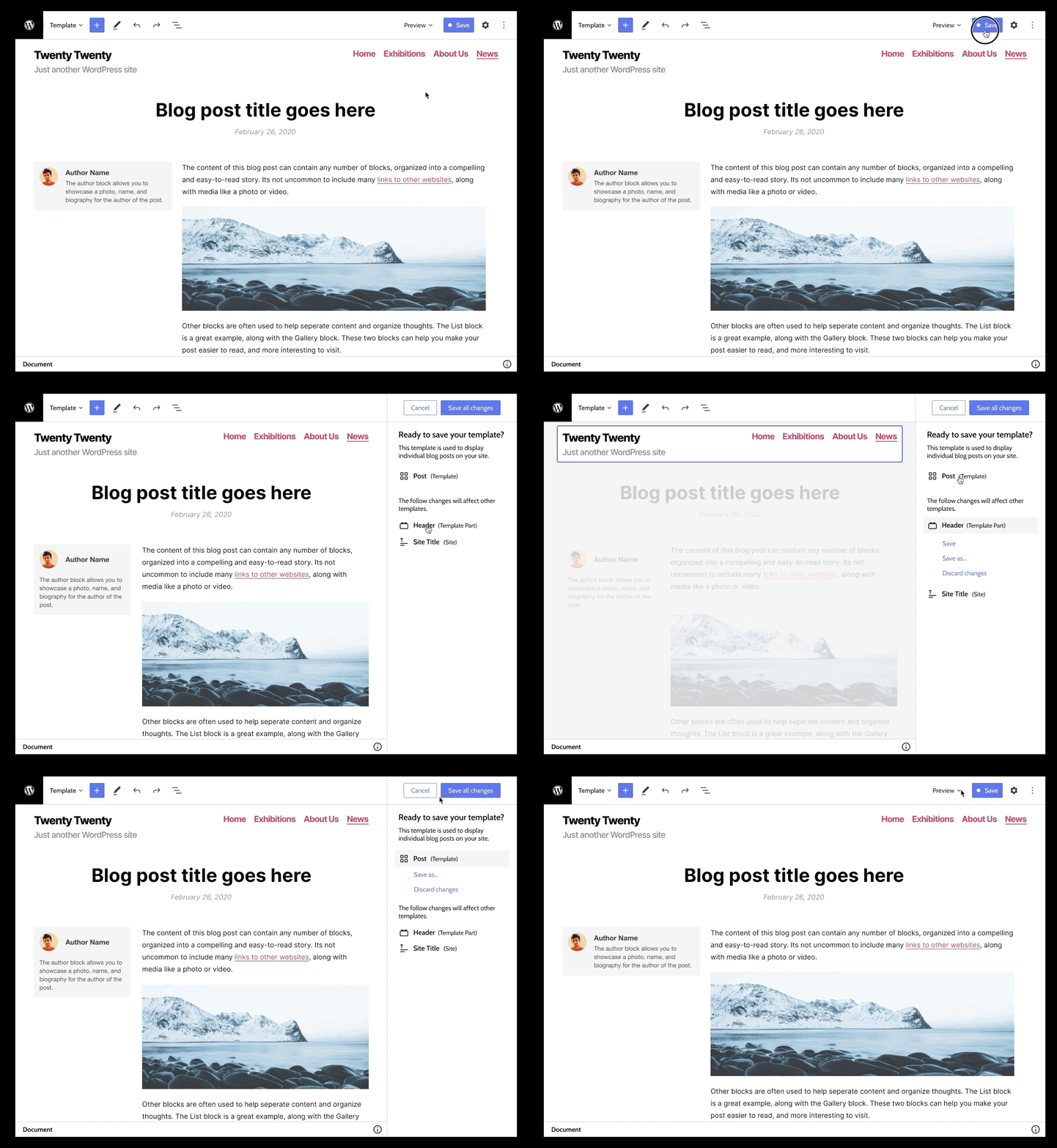
Screenshots


Notes
- Can highlight the content on desktop at full size. On mobile will likely need to resort to something similar to the template preview.
- Similar to the default save flow (is not pre-publish)
- Is a good path to save specific part changes, duplicate template parts, discard changes
 MichaelArestad
on 19 Mar 2020
MichaelArestad
on 19 Mar 2020
Hey @MichaelArestad!
Would you like feedback on the design mocks you posted above or the direction (screenshotted below) from your source Figma file > page: Prototype i3? The latter seems to introduce checkboxes...?

 joanrho
on 9 Apr 2020
joanrho
on 9 Apr 2020
@joanrho The latter. I posted the update to that here (to keep feedback in one place):
https://github.com/WordPress/gutenberg/issues/20421#issuecomment-611102784
It also doesn't introduce the checkbox component. Those already exist as mocked up in Gutenberg. (Though I think they could use a tiny bit more iteration)
MichaelArestad
on 9 Apr 2020
I really like
- The "Cancel" button is a great addition and makes it clear how to escape this flow.
- Keeping the "Preview" option visible and actionable is smart. I can see a flow where the user would like to double-check alternative screen previews before publishing.
- Hiding the various entities that need saving keeps the UI clean. But allowing power users the ability to access the list is perfect.
- Showing the "Save as..." as a link helps separate it from the "Save" and "Cancel" buttons up top.
Feedback
- The text changes once I click on "Review changes". Maybe it should remain and the Review changes can work like an accordion? Swapping out the text here could go unseen.
- The "save as" link is a bit long when including the template name. Maybe it should just read, "Save as..." ?
- What happens if I click out of the sidebar without clicking any of the buttons? Is it like clicking "Cancel"? I ask because all the other buttons on the page look like they are still active.
mapk
on 14 Apr 2020
What happens if I click out of the sidebar without clicking any of the buttons? Is it like clicking "Cancel"? I ask because all the other buttons on the page look like they are still active.
I would assume the same mechanics as prepublish, which, are that it doesn't cancel the flow. In fact, it lets the user continue editing. I am not against changing this behavior, but it's def in the realm of a separate issue.
MichaelArestad
on 14 Apr 2020
Closing this in favor of #20421
mapk
on 29 Apr 2020
Related issues
 jasmussen
·
3Comments
jasmussen
·
3Comments
 hedgefield
·
3Comments
hedgefield
·
3Comments
 franz-josef-kaiser
·
3Comments
franz-josef-kaiser
·
3Comments
 maddisondesigns
·
3Comments
jasmussen
·
3Comments
maddisondesigns
·
3Comments
jasmussen
·
3Comments