Gutenberg: Z-index issue in relation to open Gutenberg drop downs when opening a WP sidebar menu drop down.
Describe the bug
Open link feature in the navigation block.
Then open the WP sidebar menu.
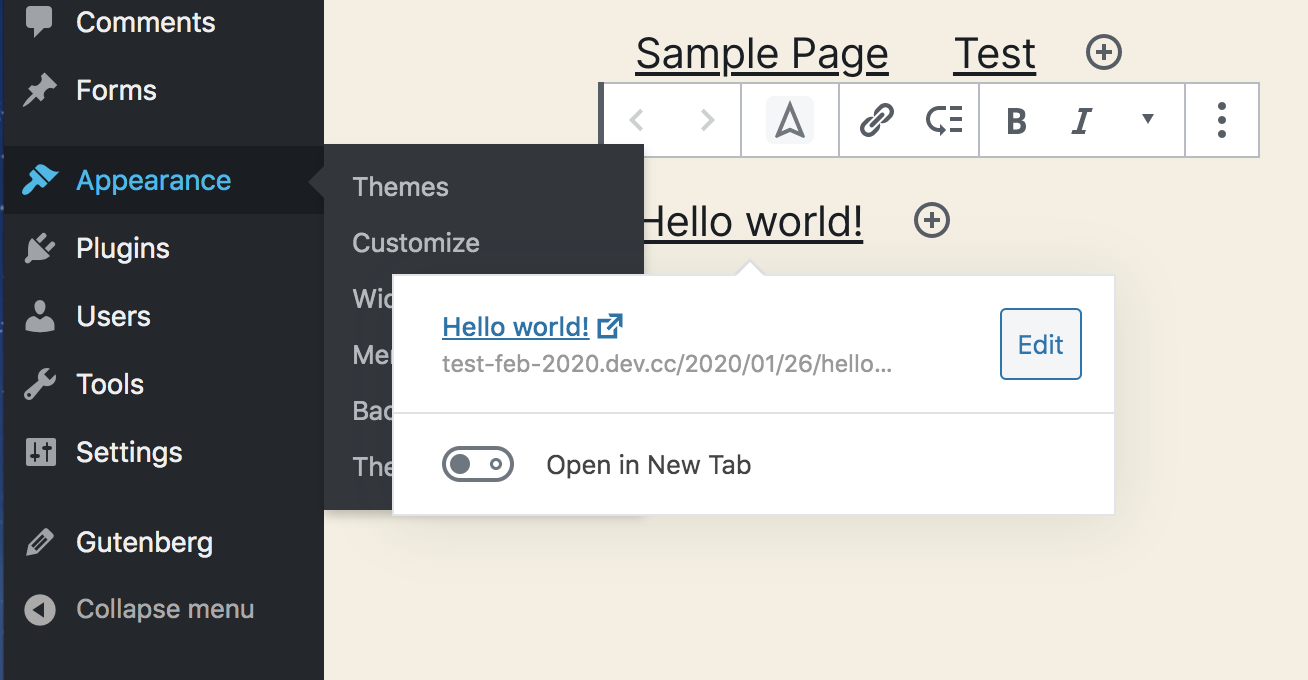
Local host using Desktop Server.
Chrome
Mac OSX 10.13.6
Theme: Twenty Twenty.
Plugins active: Gutenberg plugin.
 paaljoachim
All 6 comments
Hi @paaljoachim thank you for reporting this issue.
I verified and it is not the only case where it happens so I am not sure if it is not intended behavior. For example, the same happens with the block switcher, the inserter, the link format in a paragraph. It seems common behavior to all the other popovers.
 jorgefilipecosta
on 3 Feb 2020
jorgefilipecosta
on 3 Feb 2020
It would be interesting to find some data around where people tend to go after viewing a page in Gutenberg. Maybe even how many people make use of the Fullscreen mode.
What if we enforced the Fullscreen mode as the default when entering into the block editor?
 mapk
on 3 Feb 2020
mapk
on 3 Feb 2020
When clicking outside the boundaries of Gutenberg and it opens a submenu then anything Gutenberg related should also be behind the new that is opened. The newest that is opened should be on the top.
Fullscreen mode
A consistency we have that we are used to is having the left sidebar available when we enter any screen. Making it easier to still be connected with the sidebar menu. In a way it creates comfort. A habit.
If we were going to begin with a fullscreen mode then we need to have a modul show up that explains why we are in fullscreen and the ease of exiting the fullscreen mode. I am still very hesitant in beginning the Gutenberg experience in fullscreen. Perhaps another option would be to add into the beginning tutorial how easy it is to enter fullscreen.
paaljoachim
on 3 Feb 2020
Fullscreen mode is now default, but can be turned off which still makes this a problem.
I believe the wp-admin menu items should be at a higher z-index than the editor. This being said, do we need to create a Trac ticket for this to adjust the z-index there?
mapk
on 7 Mar 2020
Looks like we might be able to revise our z-indexing. Could we do this using CSS variables in the CSS file? This could provide a list of z-indexing values that elements can use.
mapk
on 30 Jun 2020
Looks like we might be able to revise our z-indexing. Could we do this using CSS variables in the CSS file? This could provide a list of z-indexing values that elements can use.
@mapk I think revising the z-indexing is a larger issue. I will say there isn't yet an elegant approach. The closest I've seen is using Sass maps to sort of "arrange" everything. For now, I recommend just bumping up the z-index.
 MichaelArestad
on 2 Jul 2020
MichaelArestad
on 2 Jul 2020
Related issues
 JohnPixle
·
3Comments
JohnPixle
·
3Comments
 franz-josef-kaiser
·
3Comments
franz-josef-kaiser
·
3Comments
 spocke
·
3Comments
spocke
·
3Comments
 maddisondesigns
·
3Comments
maddisondesigns
·
3Comments
 ellatrix
·
3Comments
ellatrix
·
3Comments
Most helpful comment
Looks like we might be able to revise our z-indexing. Could we do this using CSS variables in the CSS file? This could provide a list of z-indexing values that elements can use.