Gutenberg: Navigation: Misaligned left border between menu item and block controls
Describe the bug
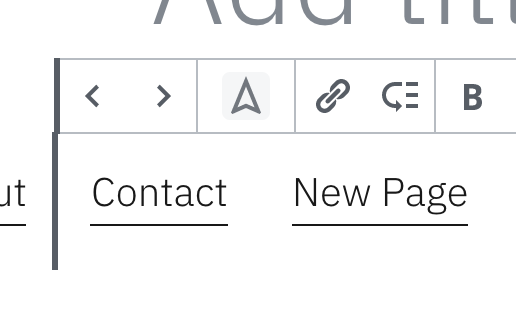
There's a 1px misalignment between the heavy left border on the menu item block controls and the menu item itself.
To reproduce
Steps to reproduce the behavior:
- Click on a menu item in the navigation block
- See how the left border between the block controls and the menu item are not aligned
Expected behavior
The border on the block controls and the menu item will be aligned.
Screenshots
Desktop
- OS: MacOS
- Browser: Chrome
- Version 79.0.3945.88
Additional context
Tested on Gutenberg v7.2.0
 jeryj
jeryj
>All comments
I can reproduce this on latest master. Changing left to 14px on [data-type="core/navigation-link"] .block-editor-block-toolbar in navigation-link/editor.scss seems to fix it.
 tellthemachines
on 9 Jan 2020
tellthemachines
on 9 Jan 2020
🎉1
👍1
Was this page helpful?
0 / 5 - 0 ratings
Related issues
 maddisondesigns
·
3Comments
maddisondesigns
·
3Comments
 mhenrylucero
·
3Comments
mhenrylucero
·
3Comments
 aduth
·
3Comments
aduth
·
3Comments
 BE-Webdesign
·
3Comments
BE-Webdesign
·
3Comments
 ellatrix
·
3Comments
ellatrix
·
3Comments
Most helpful comment
I can reproduce this on latest master. Changing
leftto14pxon[data-type="core/navigation-link"] .block-editor-block-toolbarinnavigation-link/editor.scssseems to fix it.