Gutenberg: Updating failed. Error message: The response is not a valid JSON response - Centos 7
Hello,
I can't publish anything i always got red message "Updating failed. Error message: The response is not a valid JSON response."
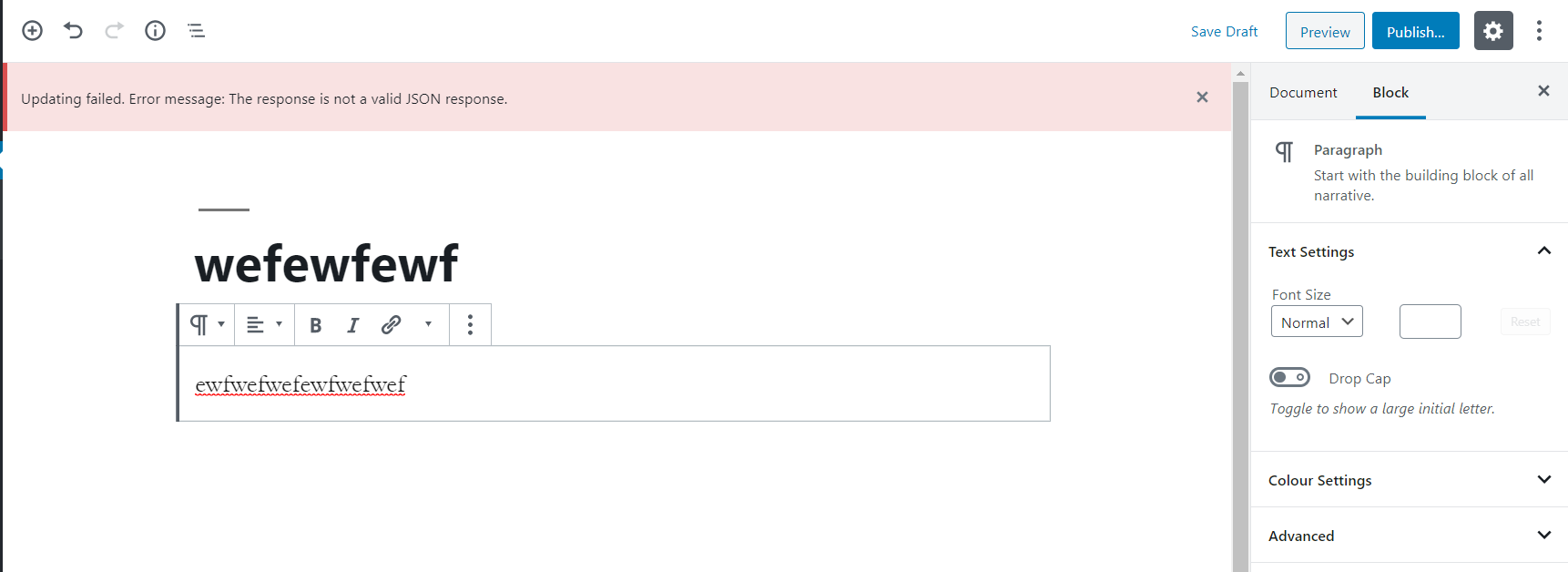
Site health is Good and this is all info
`
wp-core
version: 5.3
site_language: en_GB
user_language: en_GB
permalink: /%postname%/
https_status: false
user_registration: 0
default_comment_status: open
multisite: false
user_count: 1
dotorg_communication: true
wp-paths-sizes
wordpress_path: /var/www/html/wordpress
wordpress_size: 40.02 MB (41958942 bytes)
uploads_path: /var/www/html/wordpress/wp-content/uploads
uploads_size: 3.34 MB (3497746 bytes)
themes_path: /var/www/html/wordpress/wp-content/themes
themes_size: 1.08 MB (1136645 bytes)
plugins_path: /var/www/html/wordpress/wp-content/plugins
plugins_size: 603.72 KB (618205 bytes)
database_size: 2.13 MB (2228224 bytes)
total_size: 47.15 MB (49439762 bytes)
wp-active-theme
name: Twenty Nineteen (twentynineteen)
version: 1.4
author: WordPress Team
author_website: https://en-gb.wordpress.org/
parent_theme: none
theme_features: automatic-feed-links, title-tag, post-thumbnails, menus, html5, custom-logo, customize-selective-refresh-widgets, wp-block-styles, align-wide, editor-styles, editor-style, editor-font-sizes, editor-color-palette, responsive-embeds, widgets
theme_path: /var/www/html/wordpress/wp-content/themes/twentynineteen
wp-mu-plugins (1)
Health Check Troubleshooting Mode: author: (undefined), version: 1.7.0
wp-plugins-active (1)
Health Check & Troubleshooting: version: 1.4.2, author: The WordPress.org community
wp-plugins-inactive (3)
Akismet Anti-Spam: version: 4.1.3, author: Automattic
Hello Dolly: version: 1.7.2, author: Matt Mullenweg
SMTP Mailer: version: 1.0.8, author: naa986
wp-media
image_editor: WP_Image_Editor_Imagick
imagick_module_version: 1656
imagemagick_version: ImageMagick 6.7.8-9 2019-08-08 Q16 http://www.imagemagick.org
imagick_limits:
imagick::RESOURCETYPE_AREA: 12 GB
imagick::RESOURCETYPE_DISK: 1.844674407371E+19
imagick::RESOURCETYPE_FILE: 98304
imagick::RESOURCETYPE_MAP: 12 GB
imagick::RESOURCETYPE_MEMORY: 6 GB
imagick::RESOURCETYPE_THREAD: not available
gd_version: 2.2.5
ghostscript_version: not available
wp-server
server_architecture: Linux 2.6.32-042stab139.1 x86_64
httpd_software: Apache/2.4.6 (CentOS) PHP/7.3.12
php_version: 7.3.12 64bit
php_sapi: apache2handler
max_input_variables: 1000
time_limit: 30
memory_limit: 256M
max_input_time: 60
upload_max_size: 2M
php_post_max_size: 8M
curl_version: 7.29.0 NSS/3.36
suhosin: false
imagick_availability: true
server-headers:
date: Wed, 27 Nov 2019 15:00:35 GMT
server: Apache/2.4.6 (CentOS) PHP/7.3.12
x-powered-by: PHP/7.3.12
expires: Wed, 11 Jan 1984 05:00:00 GMT
cache-control: no-cache, must-revalidate, max-age=0
link: http://transitioning.xyz/wp-json/; rel="https://api.w.org/"
content-type: text/html; charset=UTF-8
htaccess_extra_rules: false
wp-database
extension: mysqli
server_version: 10.1.43-MariaDB
client_version: mysqlnd 5.0.12-dev - 20150407 - $Id: 7cc7cc96e675f6d72e5cf0f267f48e167c2abb23 $
wp-constants
WP_HOME: undefined
WP_SITEURL: undefined
WP_CONTENT_DIR: /var/www/html/wordpress/wp-content
WP_PLUGIN_DIR: /var/www/html/wordpress/wp-content/plugins
WP_MAX_MEMORY_LIMIT: 256M
WP_DEBUG: false
WP_DEBUG_DISPLAY: true
WP_DEBUG_LOG: false
SCRIPT_DEBUG: false
WP_CACHE: false
CONCATENATE_SCRIPTS: undefined
COMPRESS_SCRIPTS: undefined
COMPRESS_CSS: undefined
WP_LOCAL_DEV: undefined
wp-filesystem
wordpress: writable
wp-content: writable
uploads: writable
plugins: writable
themes: writable
mu-plugins: writable
`
Best regards
 yas9999
All 13 comments
in your apache's httpd.conf file, in
<Directory '/Library/WebServer/Documents'>
    Options FollowSymLinks Multiviews
    MultiviewsMatch Any
    AllowOverride all
    Require all granted
</Directory>
change AllowOverride None to AllowOverride all
 JiaqiGuo
on 14 Dec 2019
JiaqiGuo
on 14 Dec 2019
Make sure you are using the correct website address. Check your WordPress address, website address.
It can be caused by hosting without SSL support + Cloudflare Flexible SSL enabled.
You can just switch to the classic editor. Just install and enable the Cloudflare Flexible SSL, Classic Editor plugins.
 imarketlab
on 24 Dec 2019
imarketlab
on 24 Dec 2019
@imarketlab what do you mean with
Make sure you are using the correct website address. Check your WordPress address, website address.
Where are these settings?
 stidch
on 25 Jan 2020
stidch
on 25 Jan 2020
The settings are in the Wordpress Settings general tabs
Did anyone solve this yet? I'm still getting this problem on Wordpress using my 'Site5' hosting package..
help would be greatly appreciated
 Cliffox
on 1 Feb 2020
Cliffox
on 1 Feb 2020
It's a permalinks error.
do these steps:
- go to settings > permalinks and save them again
- if on nginx: make sure that conf file of website has proper rules for wordpress, restart nginx after editing if needed
reference: https://wordpress786.com/updating-failed-error-message-the-response-is-not-a-valid-json-response/
 nabtron
on 9 Feb 2020
nabtron
on 9 Feb 2020
Same problem here....
When the permalink is changed to 'plain' it works just fine, when you try to change it to anything else, the problem comes right back.
It IS NOT an .htaccess file issue as the file is there and correct. Apache2
What fixed it for me was enabling the Apache2 rewrite engine. FOr some reason it had been disabled.
 rjsears
on 14 Feb 2020
rjsears
on 14 Feb 2020
@rjsears it's still .htaccess issue, make sure that .htaccess rules are correct and also that mod_rewrite is enabled on the server.
nabtron
on 14 Feb 2020
What is your logic for this always being an htaccess issue? It only happens to me for a subset of articles, and just started happening this week.
 phillipjohnston
on 11 Mar 2020
phillipjohnston
on 11 Mar 2020
In fact, on one post which was failing to update (using the classic block), to fix it I:
- Deleted all the contents
- Updated, which worked
- Re-added all of the contents
- Updated, which worked
Now I don't get the error anymore.
phillipjohnston
on 11 Mar 2020
Actually, I was wrong. Re-adding any content to this particular post generates the failed "update" message.
phillipjohnston
on 11 Mar 2020
I can make it pass or fail depending on the content I put into the document. Unsure what the particular trigger is for the failure, however.
phillipjohnston
on 11 Mar 2020
Finally found the culprit in my case: ModSecurity on the server was flagging some of the terms I used (e.g., fopen() was included in a technical article).
I discovered the problem by installing the classic editor, which gave me a more helpful error: "you don't have permission to access /wp-admin/post.php".
So this was the real problem on my end for this being tied to specific articles.
phillipjohnston
on 11 Mar 2020
Same problem here....
When the permalink is changed to 'plain' it works just fine, when you try to change it to anything else, the problem comes right back.
It IS NOT an .htaccess file issue as the file is there and correct. Apache2
What fixed it for me was enabling the Apache2 rewrite engine. FOr some reason it had been disabled.
Thank you for this. The issue was fixed by enabling the mod_rewrite engine.
 sadorect
on 10 Apr 2020
sadorect
on 10 Apr 2020
Related issues
 cr101
·
3Comments
cr101
·
3Comments
 spocke
·
3Comments
spocke
·
3Comments
 pfefferle
·
3Comments
pfefferle
·
3Comments
 hedgefield
·
3Comments
hedgefield
·
3Comments
 wpalchemist
·
3Comments
wpalchemist
·
3Comments