Gutenberg: I can't input list blocks on my iPhone (when inputting Japanese)
Describe the bug
As the title says,I can't input list blocks on my iPhone when inputting Japanese.
To reproduce
- Add a list block on your smartphone
- Enter the first list in Japanese
- The character you entered will disappear.
- After a line break, move to the next paragraph block
- When Delete is pressed at the beginning of a paragraph block, the second item in the list is generated for some reason.
- Therefore, if you enter Japanese characters in two items in the list, the list item will become one.
- If there is already a first item, a new line will be generated if you start a new line, but if you enter Japanese there, it will be combined with the first item again.
Screenshots
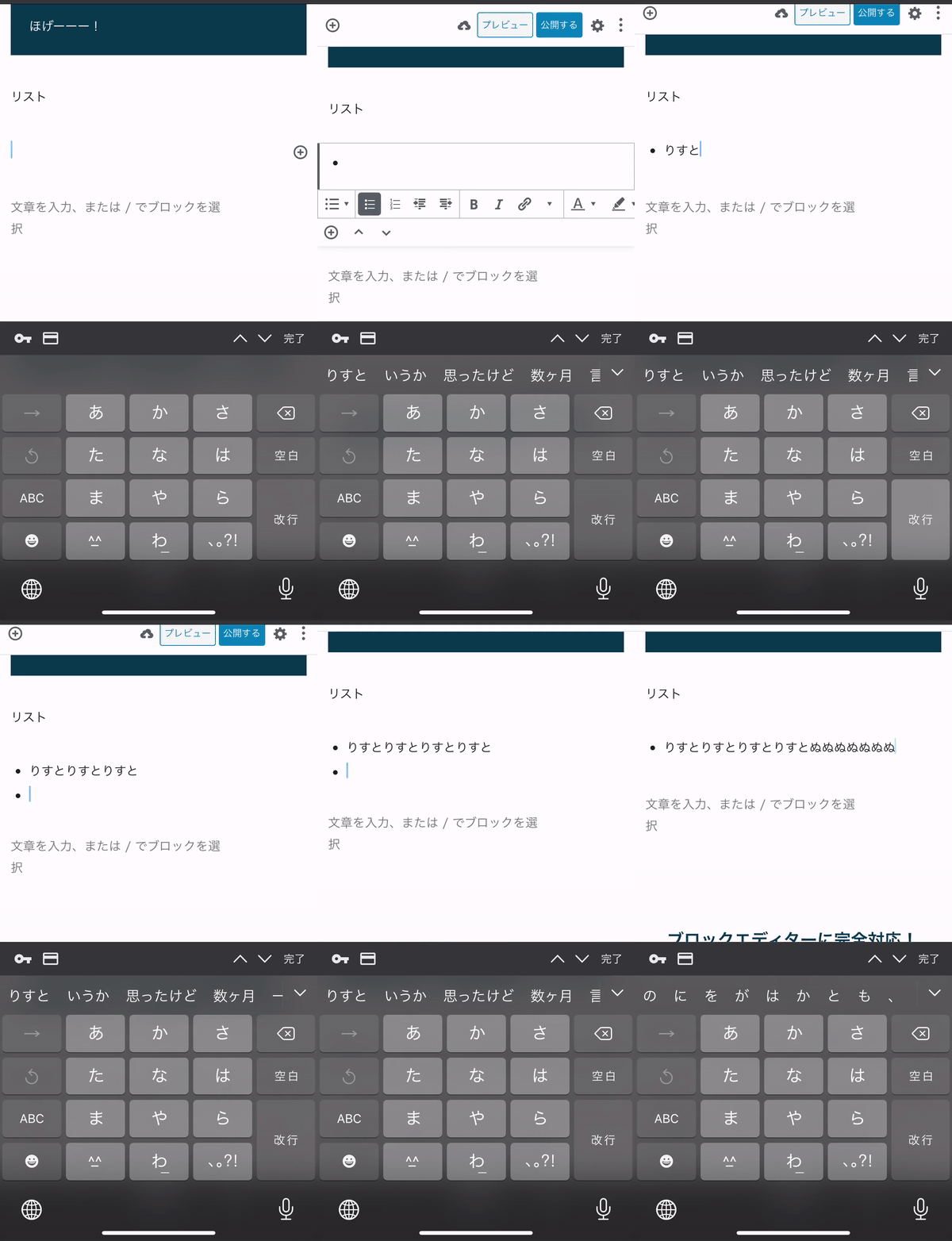
My Smartphone:
I'm using iPhone11.
- OS: iOS 13.2
- Browser : chrome
 ddryo
ddryo
All 12 comments
Hi @ellatrix, does this issue rings any bell?
 jorgefilipecosta
on 8 Feb 2020
jorgefilipecosta
on 8 Feb 2020
Thanks for the report! @jorgefilipecosta I haven't seen it before, and it's been a while since I touched to list block.
@torounit Have you seen this bug before, or maybe know someone that has?
 ellatrix
on 10 Feb 2020
ellatrix
on 10 Feb 2020
@ellatrix
It doesn't seem to happen on Chrome on Android now. The list remains two.
Not tested on iPhone yet. ( I'm not an iPhone user. 😢 )
 torounit
on 18 Feb 2020
torounit
on 18 Feb 2020
I can't reproduce the bug. My environment is below.
- WordPress 5.3.2
- iPhone7 (iOS13.3.1)
- Chrome and Safari
 naogify
on 19 Feb 2020
naogify
on 19 Feb 2020
I'm sorry, it seems to be a bug that only happens with my theme.
Twenty Twenty could not reproduce.
Investigate which code is the cause.
ddryo
on 20 Feb 2020
Thank you @ddryo, I'm closing the issue for now, if you have any further insights feel free to leave a comment.
jorgefilipecosta
on 1 Mar 2020
@jorgefilipecosta
Finally, we were able to determine the cause of this bug.
If the "position: relative" style hits the li tag of the list block, the above bug seems to occur.
ddryo
on 18 Mar 2020
Thank you for the additional insights, I reopened the issue.
jorgefilipecosta
on 20 Mar 2020
Thanks!
ddryo
on 21 Mar 2020
This bug is very serious.
@jorgefilipecosta
ddryo
on 2 Jun 2020
@jorgefilipecosta
I created a plugin to apply position: relative to the li tag of "list block" so that the bug can be reproduced.
The name of the plugin is "Reproduce #18708".
With this plugin used, if you enter Japanese into the list tag from the iPhone, the following behavior will occur.
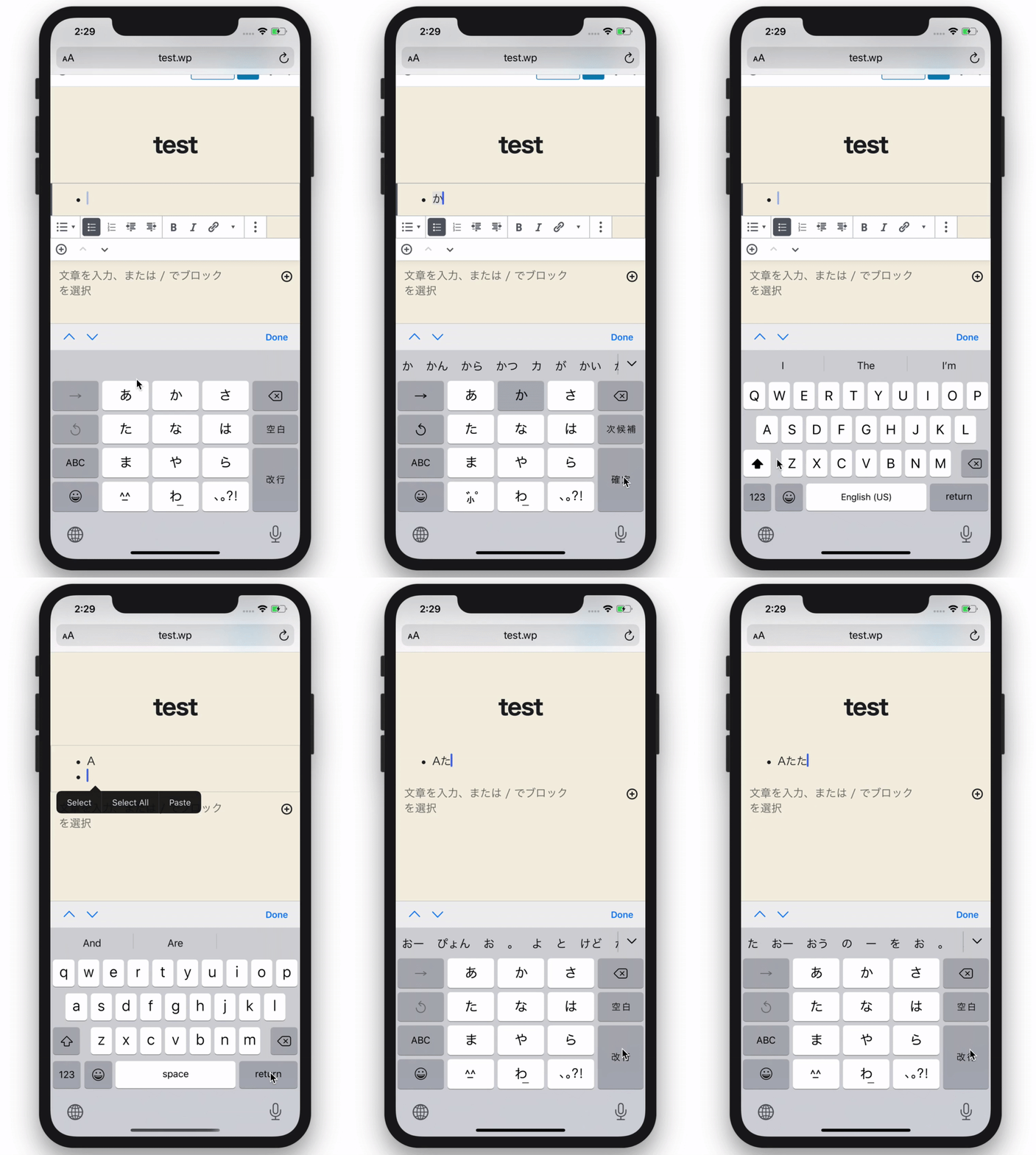
This bug is very critical in Japan.
Because position: relative is commonly used, such as when adding a block style and using a list with icons.
ddryo
on 2 Jun 2020
cc: @ellatrix, @mcsf in case you can help.
jorgefilipecosta
on 17 Jun 2020
Related issues
 nylen
·
3Comments
nylen
·
3Comments
 youknowriad
·
3Comments
youknowriad
·
3Comments
 hedgefield
·
3Comments
hedgefield
·
3Comments
 JohnPixle
·
3Comments
ellatrix
·
3Comments
JohnPixle
·
3Comments
ellatrix
·
3Comments