Gutenberg: Unable to crop images in Media Library
Describe the bug
I am unable to crop images in the Media Library. I am able to edit the image, but if I make any changes to crop the image, the "Save" button remains disabled, so I am unable to save my changes.
To reproduce
Steps to reproduce the behavior:
- Go to the Media Library in the admin.
- Select an image and click "Edit Image" underneath the image.
- Click the "Crop" button.
- Select the portion of the image that you want to keep after the crop.
- Attempt to save. Note that the "Save" button is disabled.
Other things I tried: Changing the aspect ratio, pressing enter, double-clicking inside the selected portion of the image.
I do not see any errors or warnings in the dev tools console.
Screen capture
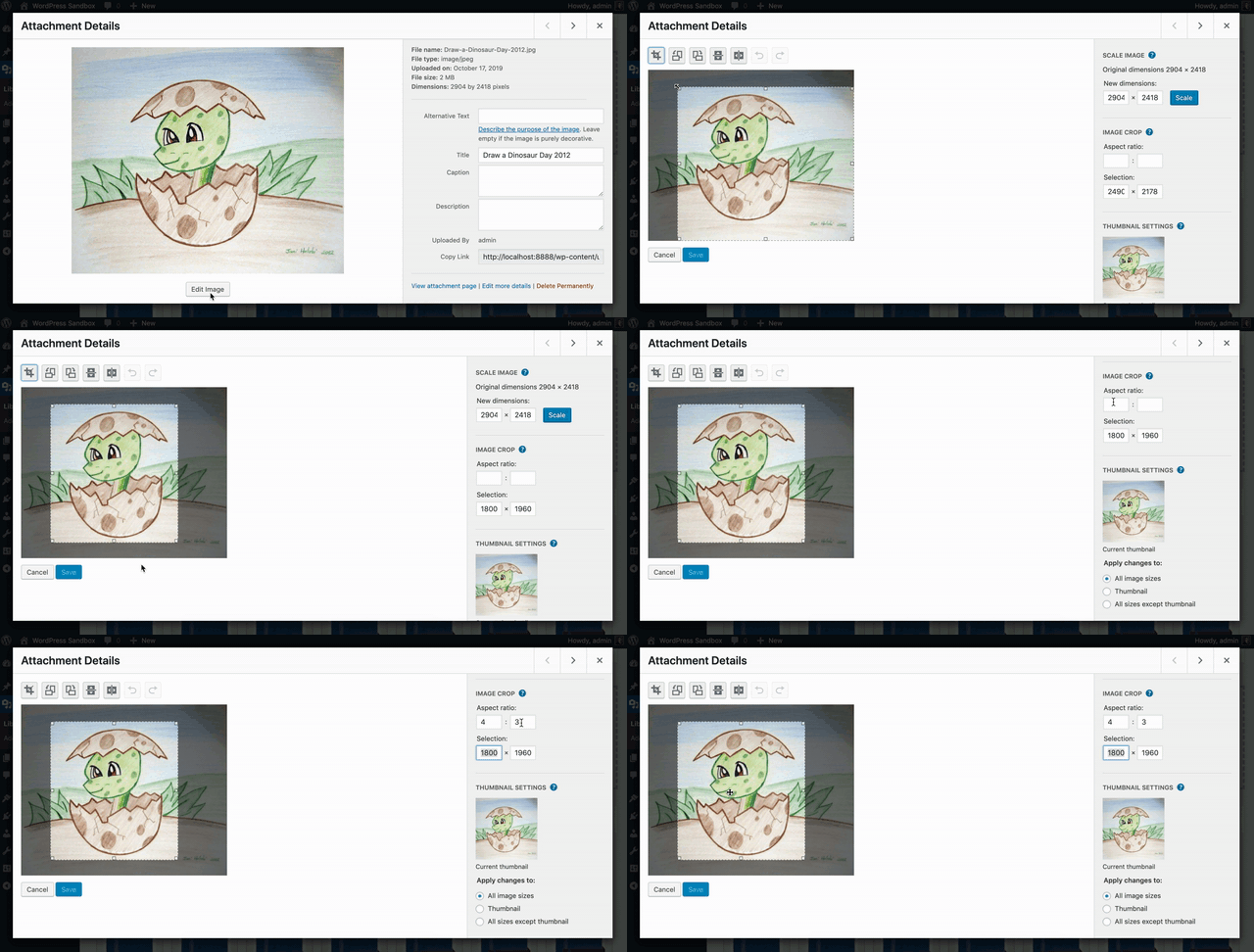
Expected behavior
I expected to be able to save my changes to the image.
Environment:
- OS: MacOS
- Browser: Chrome (latest)
- Wordpress core 5.2.4 (version of Gutenberg is whatever version is packaged with core v 5.2.4).
 thatdevgirl
All 3 comments
Hi there @thatdevgirl ! Thanks for making this issue. I just happened to have done work recently to bring this frame back to the modal, so this issue caught my eye. :)
I did some testing and was seeing the same behavior! It turns out, this is a ticket that we have open currently Core side.
I also found that it does work if you click the crop icon again after selecting your area. After clicking the crop icon, you should get the Save button able to be selected.
I'll admit, that's something I hadn't known about the crop tool so thanks for making this issue. I see we have it milestoned for a future release. Will keep my eye on it. Let me know if clicking the icon works and I'll close this one in favor of the trac ticket.
 anthonyburchell
on 18 Oct 2019
anthonyburchell
on 18 Oct 2019
Can we close this in favor of the core ticket since this is working as "expected" and not specific to Gutenberg?
 swissspidy
on 18 Oct 2019
swissspidy
on 18 Oct 2019
HI @anthonyburchell! Thank you for the tip! That does work for me - clicking the crop button again.
To be honest, I didn't even think to look for a core ticket because it is something my team noticed only with Gutenberg. (One of my colleagues noted that this is not an issue when using the core editor.) So, we figured it was a Gutenberg issue.
We can close this issue in favor of the core ticket.
thatdevgirl
on 18 Oct 2019
Related issues
 hedgefield
·
3Comments
hedgefield
·
3Comments
 davidsword
·
3Comments
davidsword
·
3Comments
 BE-Webdesign
·
3Comments
BE-Webdesign
·
3Comments
 JohnPixle
·
3Comments
JohnPixle
·
3Comments
 franz-josef-kaiser
·
3Comments
franz-josef-kaiser
·
3Comments
Most helpful comment
Hi there @thatdevgirl ! Thanks for making this issue. I just happened to have done work recently to bring this frame back to the modal, so this issue caught my eye. :)
I did some testing and was seeing the same behavior! It turns out, this is a ticket that we have open currently Core side.
I also found that it does work if you click the crop icon again after selecting your area. After clicking the crop icon, you should get the Save button able to be selected.
I'll admit, that's something I hadn't known about the crop tool so thanks for making this issue. I see we have it milestoned for a future release. Will keep my eye on it. Let me know if clicking the icon works and I'll close this one in favor of the trac ticket.