Gutenberg: Block style preview is too small to notice differences
Problem
If I create a custom block style for the paragraph block, and it changes the font color from black to grey, italicizes the text, changes the size by a few points, or other moderate visual changes, it's nearly impossible to tell that from the preview, because it's so tiny.

A similar problem may occur with other blocks, but so far Paragraph is the one I've noticed it with.
Proposed Solution
The preview could be zoomed-in, maybe?
 iandunn
All 4 comments
 GlennMartin1
on 27 Sep 2019
GlennMartin1
on 27 Sep 2019
As noted in the other issue from @karmatosed:
I thought there was an issue for this and if there is one please close this (I wasn't able to find it). The style thumbnails for the separators are incredibly subtle, so much I couldn't see them.
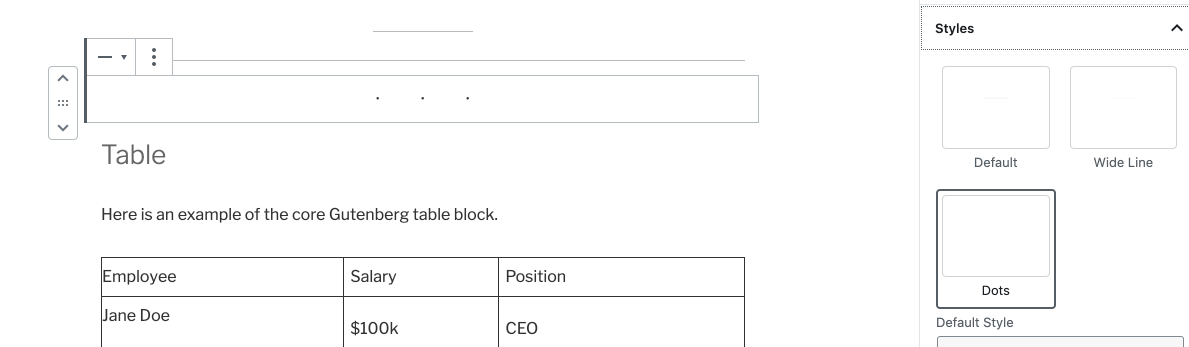
 mapk
on 8 Oct 2019
mapk
on 8 Oct 2019
We discussed this today in the Gutenberg Triage Meeting (Slack link) and the idea of having a way for blocks to opt-out of the scaling of style variation previews came up.
The current scaling system works well with larger content, but for other blocks such as this, it doesn’t work. In CoBlocks we've actually overridden the style variation scaling on certain blocks so that they would be more visible.
It'd be interesting to explore adding this capability (perhaps within supports of the block registration) to opt out of the scaling functionality.
 richtabor
on 8 Oct 2019
richtabor
on 8 Oct 2019
It looks like this can also be impacted by the theme. I have a custom block that looks normal in TwentyTwenty, but very small in TwentyFifteen.
iandunn
on 18 May 2020
Related issues
 maddisondesigns
·
3Comments
maddisondesigns
·
3Comments
 BE-Webdesign
·
3Comments
BE-Webdesign
·
3Comments
 franz-josef-kaiser
·
3Comments
franz-josef-kaiser
·
3Comments
 jasmussen
·
3Comments
jasmussen
·
3Comments
 youknowriad
·
3Comments
youknowriad
·
3Comments
Most helpful comment
We discussed this today in the Gutenberg Triage Meeting (Slack link) and the idea of having a way for blocks to opt-out of the scaling of style variation previews came up.
The current scaling system works well with larger content, but for other blocks such as this, it doesn’t work. In CoBlocks we've actually overridden the style variation scaling on certain blocks so that they would be more visible.
It'd be interesting to explore adding this capability (perhaps within
supportsof the block registration) to opt out of the scaling functionality.