Gutenberg: Gutenberg should prompt users to create ALT text for images
An easy #a11y win would be to make ALT text mandatory for non-decorative images, by, at the very least, putting up a warning flag if someone neglects to create alt text.
WHAT SHOULD HAPPEN
When the user adds an image, Gutenberg should prompt them to create an ALT text, and flag them with a warning if they neglect to do so.
WHAT DOES HAPPEN
Nothing.
RELATED ISSUES
Currently there is an Issue on helping the user avoid creating INAPPROPRIATE alt text:
https://github.com/WordPress/gutenberg/issues/5205
That’s fine as far as it goes, but it ignores the bigger problem that most users really will not bother creating alt text unless we programmatically urge them to do so.
Alt text is a bare minimum accessibility effort; it’s literally the least a content creator can do. Let’s help them make sure to do it!
Hat tip: Kjell Riegstad for sharing this issue with me and Mark Uraine for guidance on sharing this request.
 zeldman
All 8 comments
A possible related issue is: #12202
 karmatosed
on 5 Aug 2019
karmatosed
on 5 Aug 2019
Cc @afercia.
 ellatrix
on 6 Aug 2019
ellatrix
on 6 Aug 2019
This is something that would greatly help in producing accessible content and I'd totally second it.
I guess the technical challenge would be implementing a mechanism to determine whether an image is _decorative_ or not.
Single, linked, images
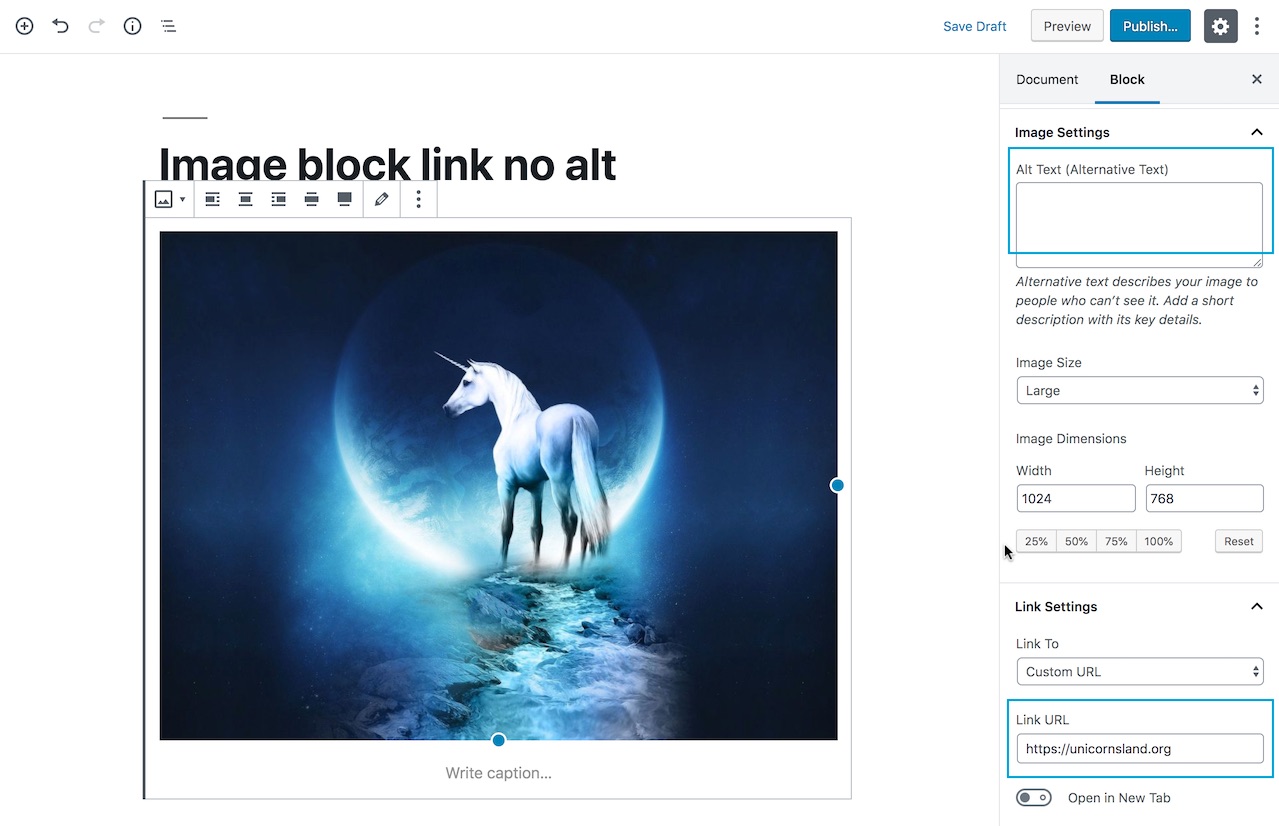
The simplest case is probably the one @joedolson mentioned on 5205: a linked image with no other content. The image block would make this relatively simple, as both the alt attribute and the image link are block settings:
Gutenberg image block on WordPress 5.2.2:
Worth noting the interface has changed in the Gutenberg plugin: the alt text description includes a link to the W3C alt decision tree tutorial. The UI to link the image has changed as well and it's now within the block toolbar:
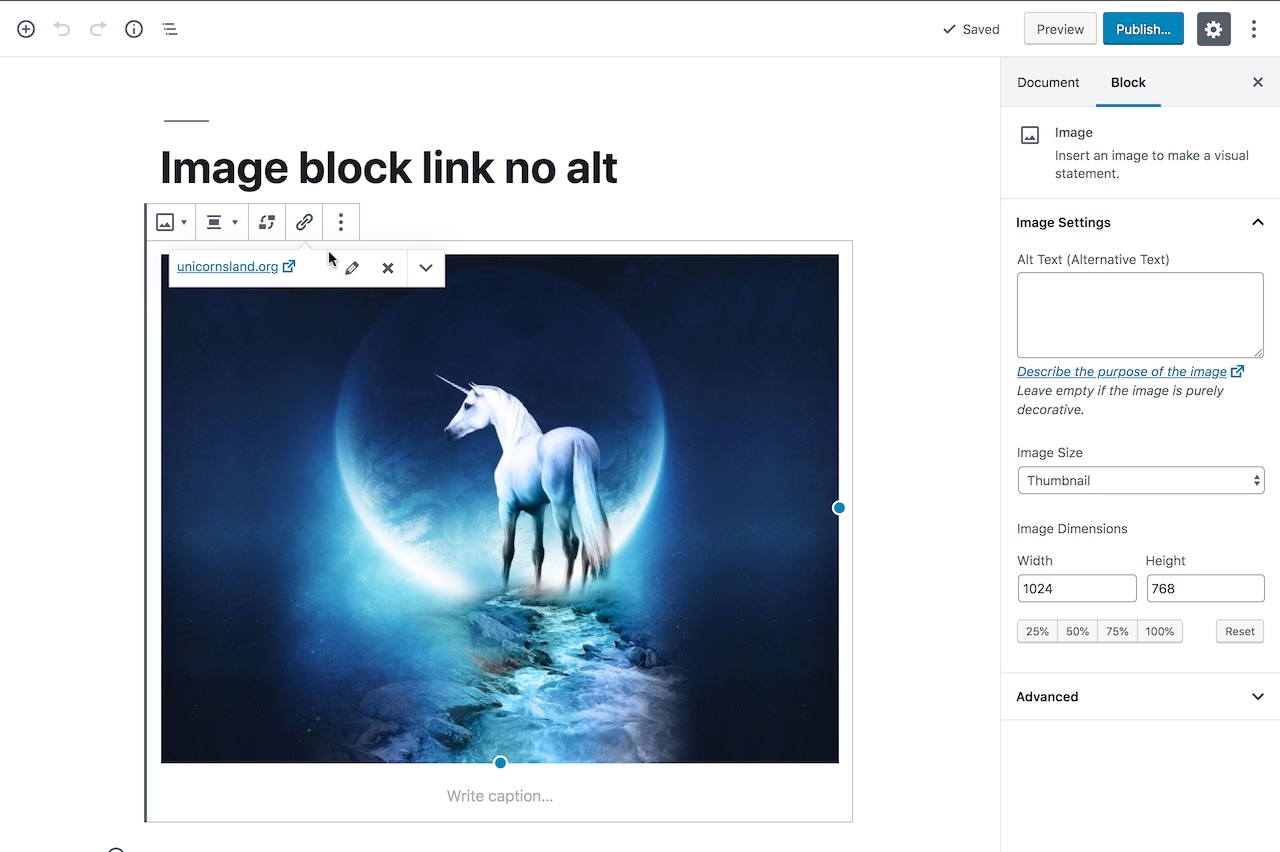
I'd dare say Gutenberg shouldn't even allow to save a linked image which has an empty alt attribute, as that actually produces the equivalent of an empty link:
<a href="https://somewhere"><img src="..." alt="" /></a>
Single, non-linked, images
I'm not sure how the relevance of non-linked images can be determined programmatically. When an image is purely decorative it should have an empty alt attribute alt="". Only when an image adds relevant information and "contributes meaning to the current page or context" it should be described following the guidance provided on https://www.w3.org/WAI/tutorials/images/decision-tree/. Depending on the complexity of the image, an alt attribute might be not appropriate and the description should be provided elsewhere on the page.
Regardless, Gutenberg should be smart enough to understand when an image is non-decorative, which implies some sort of image recognition and text analysis mechanisms.
Images in the Classic block and Custom HTML block
This is probably the most complicated case. For example, a link might contain an image _and_ some text. It the text already describes the link purpose, the image should use an empty alt attribute. In this case Gutenberg should check the actual content of the link first, and then use image recognition and text analysis.
Allowing free-form HTML exposes to all sort of cases. Not sure they can be all analyzed programmatically in a proper way.
Images in a gallery
They probably need to always have an alt attribute, whether they're linked or not. Images in a gallery determine the actual content of the gallery. Gallery images without an alt attribute defeat the purpose of a gallery.
Images from other blocks and custom blocks
For example: the "Media & text" block, and blocks provided by plugins (the "Cover" block uses a background image). Same as above for non-linked and linked images.
Images from embeds
For example: the Instagram block, the Flickr block, etc. I'm afraid there's not so much Gutenberg can do in these cases. The embed content is the one returned by the embed provider. For example, Instagram doesn't even use an empty alt attribute so screen readers fallback to the image filename:
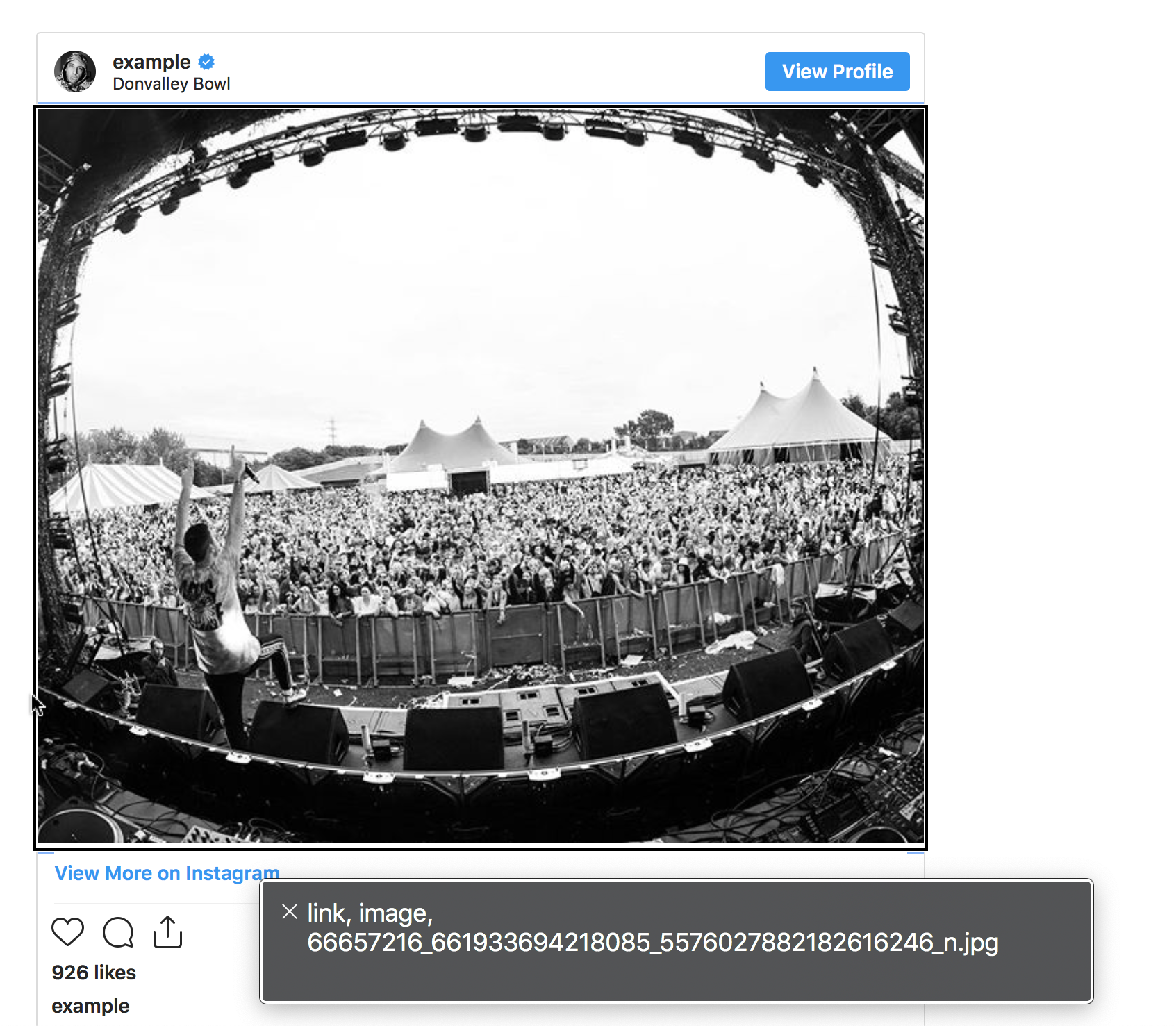
(Instagram doesn't even provide a title attribute on the iframe element)
 afercia
on 6 Aug 2019
afercia
on 6 Aug 2019
I think this is a great idea, it'll help educate users about writing accessible content, and make a significant impact for readers.
I'd dare say Gutenberg shouldn't even allow to save a linked image which has an empty alt attribute
I really like the idea of showing a warning, similar to what we do for color contrast. I'd be very, very cautious when considering making it mandatory, though; that feels very heavy-handed and likely to backfire, annoying users to the point where they resent it and are less likely to want to write accessible content.
Gutenberg should be smart enough to understand when an image is non-decorative, which implies some sort of image recognition and text analysis mechanisms.
I'd also be leery of trying to programmatically detect whether or not an image is decorative. That seems overly complex and prone to error, but allowing users to make the decision lets them retain control, and is an opportunity for them to learn about writing accessible content.
 iandunn
on 26 Sep 2019
iandunn
on 26 Sep 2019
The most definitive way to detect whether an image is not decorative is the presence of text in the image - but even that can backfire, if it's an image that happens to have a sign in the background that's legible but not actually relevant.
A linked image with no alt attribute, however, is 100% always an accessibility error, and should always be flagged as such.
The most legitimate case where I think it should be permissible to insert an image where there's an image that needs an appropriate alt attribute would be to allow sight impaired users to insert images with the expectation that somebody else will be able to later add appropriate alt attributes.
I'm in favor of adding strong and clear error flags, but feel that any situation that actively prevents actions has the potential to create user interaction barriers.
 joedolson
on 26 Sep 2019
joedolson
on 26 Sep 2019
“Blind users also lamented that the alt-text options on Instagram and Facebook are hard to find for sighted users if they don’t know to look for them as they upload a photo.”
Source: https://slate.com/technology/2019/11/facebook-blind-users-no-accessibility.html
I'm looking at Gutenberg in iOS Safari on an iPhone. To get to alt text for an image in the editor: three dot menu -> Show Block Settings -> scroll down to alt text in Image Settings. It's buried and ignorable. Further, the image being described does not show on screen with the alt text editing box, making describing the image difficult.
 ryanboren
on 26 Nov 2019
ryanboren
on 26 Nov 2019
Flagging alt text-less linked images and automatically detecting decorative images are worth investigating but they feel like separate issues. I think the core here is this:
Alt text is a bare minimum accessibility effort; it’s literally the least a content creator can do. Let’s help them make sure to do it!
Users remembering to add alt text is a huge problem I see day to day, even from people who know it's necessary. It's easy to miss, because alt text is not in the basic user flow for adding an image. It's relegated to the sidebar, which is described this way in the block editor handbook:
The Settings Sidebar should only be used for advanced, tertiary controls
The Settings Sidebar is not visible by default on a small / mobile screen, and may also be collapsed in a desktop view. Therefore, it should not be relied on for anything that is necessary for the basic operation of the block. Pick good defaults, make important actions available in the block toolbar, and think of the Settings Sidebar as something that most users should not need to open.
Alt text is not a tertiary function. Adding or omitting it should be a core part of using the image block. My suggested solution:
When an image inserted, the default state becomes a prompt for alt text floating over a tinted version of the image, reminiscent of the cover block. The user can dismiss the prompt if the image is decorative or leave it alone as a reminder to come back later. A toggle to show/hide it should also be made available in the image block's toolbar. Here's a quick _extremely rough_ mockup made in the inspector:
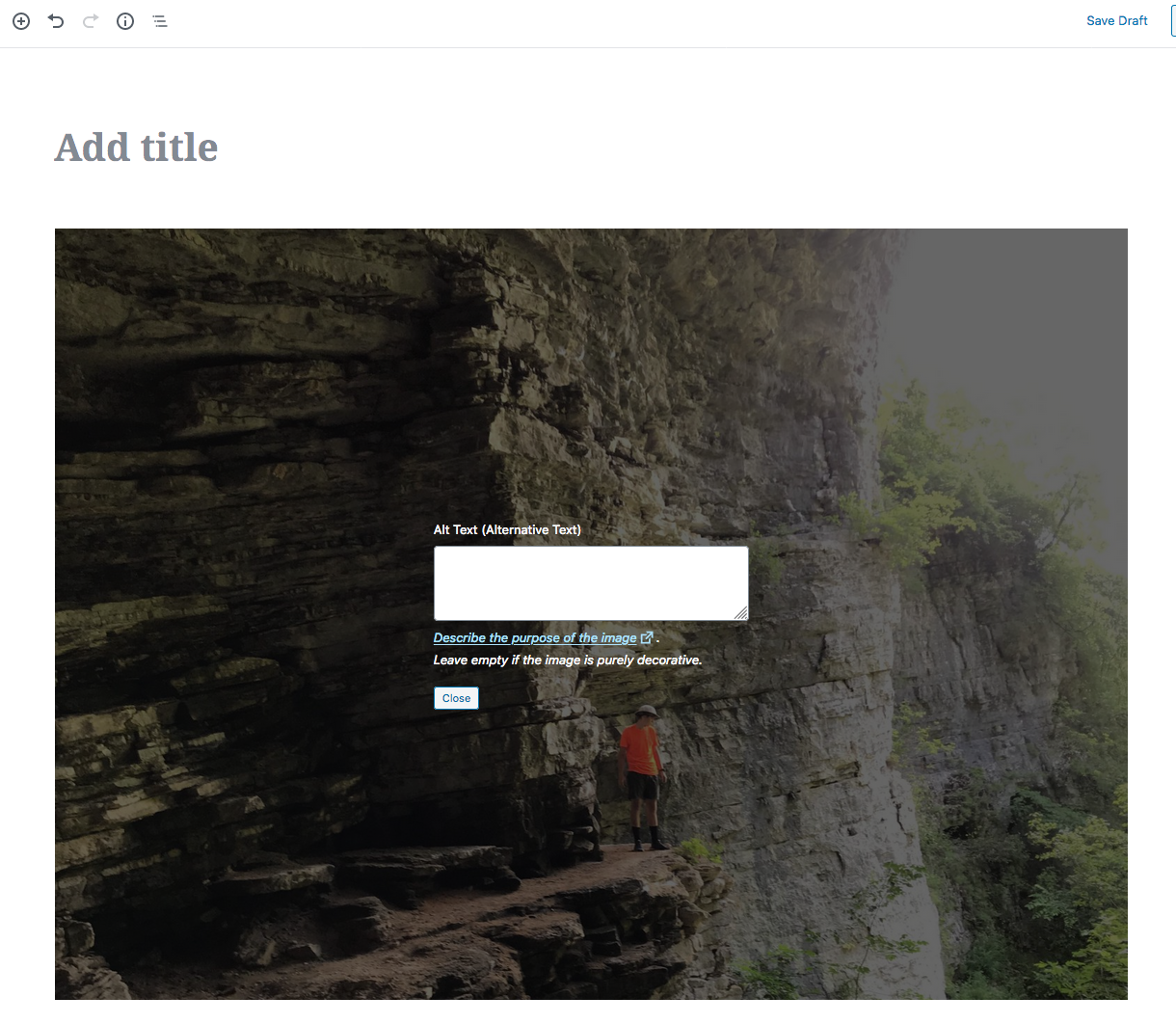
No warning or blocking. Just a simple prompt, right in line with the rest of the content.
 cbirdsong
on 5 Feb 2020
cbirdsong
on 5 Feb 2020
I think that having an alt text field as the default overlay when editing any inserted image without an alt attribute is a nice idea. Easy to find, image is immediate, etc.
joedolson
on 7 Feb 2020
Related issues
 youknowriad
·
3Comments
youknowriad
·
3Comments
 aaronjorbin
·
3Comments
aaronjorbin
·
3Comments
 jasmussen
·
3Comments
ellatrix
·
3Comments
jasmussen
·
3Comments
ellatrix
·
3Comments
 JohnPixle
·
3Comments
JohnPixle
·
3Comments
Most helpful comment
Flagging alt text-less linked images and automatically detecting decorative images are worth investigating but they feel like separate issues. I think the core here is this:
Users remembering to add alt text is a huge problem I see day to day, even from people who know it's necessary. It's easy to miss, because alt text is not in the basic user flow for adding an image. It's relegated to the sidebar, which is described this way in the block editor handbook:
Alt text is not a tertiary function. Adding or omitting it should be a core part of using the image block. My suggested solution:
When an image inserted, the default state becomes a prompt for alt text floating over a tinted version of the image, reminiscent of the cover block. The user can dismiss the prompt if the image is decorative or leave it alone as a reminder to come back later. A toggle to show/hide it should also be made available in the image block's toolbar. Here's a quick _extremely rough_ mockup made in the inspector:
No warning or blocking. Just a simple prompt, right in line with the rest of the content.