Gutenberg: Content loss after v5.9.0 update.
The problem seems to be limited to dynamic container blocks. I won't bother you with code of my own plugin since this is affecting even the most popular plugins currently available. I will use qubely's plugin to demonstrate the issue.
Steps to reproduce the behavior:
- Install the Qubely Blocks plugin.
- Create a new post.
- Switch to the code editor (so you can see the code updating).
- Paste this block markup (or create a row with some content).
- Click outside the code editor or save the post.
- Notice how the block markup changed in the code editor.
If you switch to the visual editor at this point, you should get something like this:
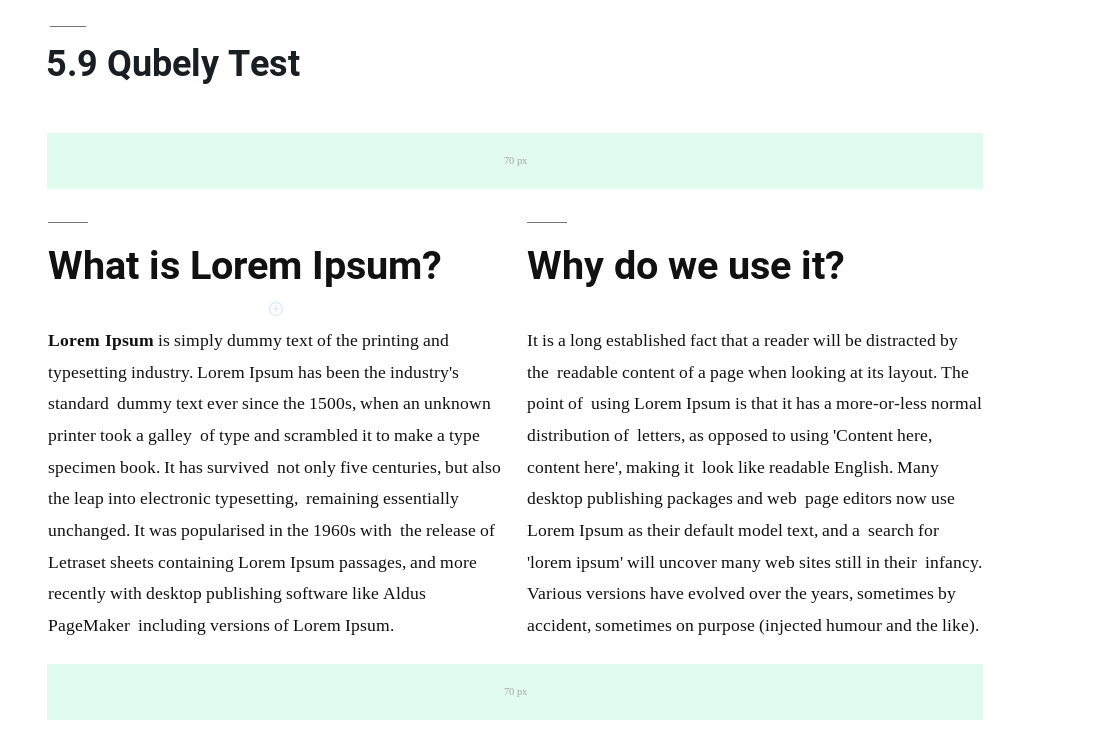
which is the correct visual representation of the block. However, If you now save the post and hit the "View Post" button the nested content will not be there. Switching back to the editor now, you should get an empty qubely row like that:
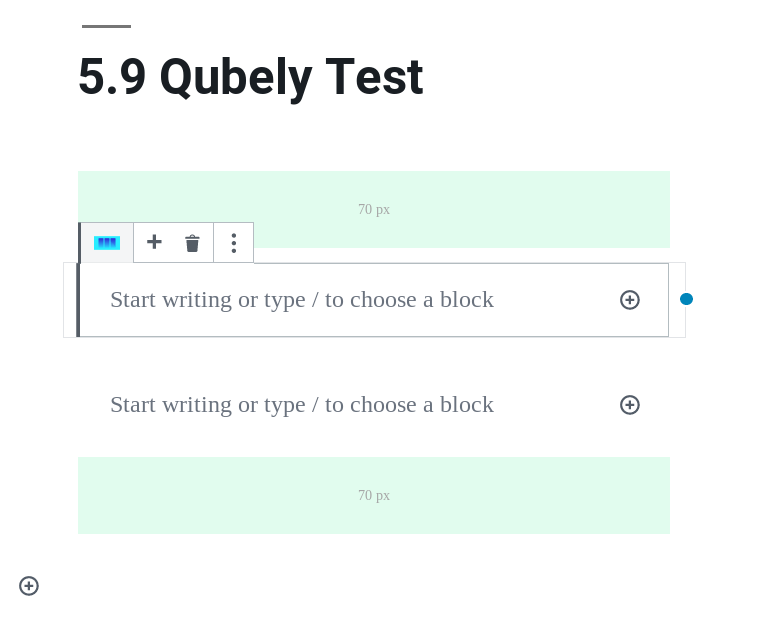
and the code editor should look like this:
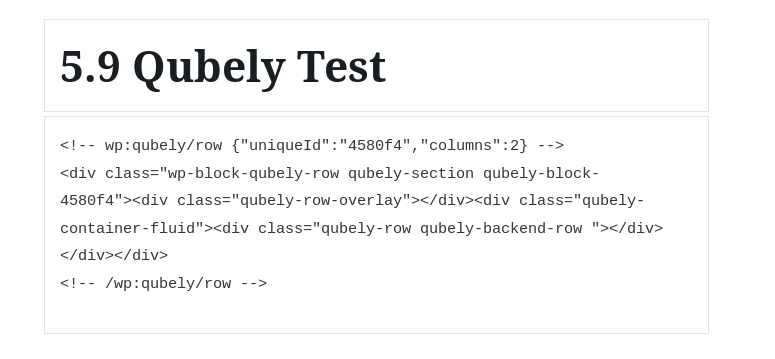
So essentially the column's
This does not affect static blocks like the core-columns block.
Theme: Twentynineteen
Plugins active: Gutenberg 5.9.0, Qubely Blocks
 amyriounis
All 14 comments
Am I understanding correctly that this only happens with Quebely blocks? Have you reported that to them as well?
 swissspidy
on 14 Jun 2019
swissspidy
on 14 Jun 2019
I ran into similar issues with blocks that used InnerBlocks. My assumption is that the background compatibility with @wordpress/editor is somehow broken. After updating everything that uses @wordpress/editor to @wordpress/block-editor like advised in https://make.wordpress.org/core/2019/04/09/the-block-editor-javascript-module-in-5-2/, my issues were resolved.
I guess #16175 is related to this as well.
 gchtr
on 14 Jun 2019
gchtr
on 14 Jun 2019
Can you try 5.9.1 and see if it fixes the issue?
 youknowriad
on 14 Jun 2019
youknowriad
on 14 Jun 2019
Okay, I misunderstood that. My InnerBlocks are not affected by 5.9.1. There so many errors that I just updated to block-editor, which solved all issues.
But what _is_ broken in 5.9.1 is saving simple blocks. Here’s a test block that fails for me:
import { registerBlockType } from '@wordpress/blocks';
import { RichText } from '@wordpress/editor';

registerBlockType('test/heading', {
  title: 'Heading 1',
  icon: 'heart',
  category: 'common',

  attributes: {
    content: {
      type: 'string',
      default: '',
      selector: 'h1',
      source: 'html'
    }
  },

  edit: function({ attributes, setAttributes }) {
    const { content } = attributes;

    return (
      <RichText
        className="heading-1"
        formattingControls={[]}
        wrapperClassName="wp-block-heading"
        tagName="h1"
        value={content}
        onChange={value => setAttributes({ content: value })}
        placeholder="Your heading…"
      />
    );
  },

  save({ attributes }) {
    const { content } = attributes;

    return (
      <RichText.Content tagName="h1" className="heading-1" value={content} />
    );
  }
});
After saving content in that block and reloading the page, the content is empty again. The post content looks like this:
<!-- wp:test/heading /-->
Now consider the following content:
<!-- wp:test/heading -->
<h1 class="wp-block-test-heading heading-1">My heading</h1>
<!-- /wp:test/heading -->
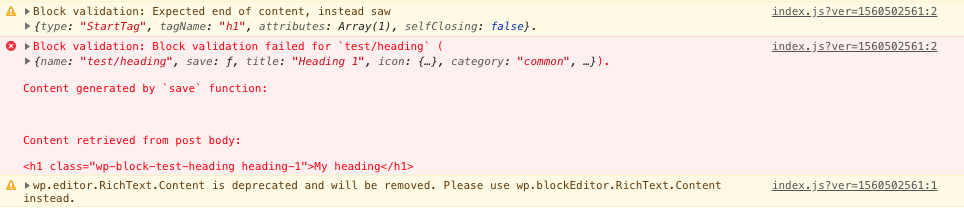
When I load RichText from editor instead of block-editor, then I get the following message:
gchtr
on 14 Jun 2019
Am I understanding correctly that this only happens with Quebely blocks? Have you reported that to them as well?
@swissspidy This affects other popular plugins as well, like Atomic Blocks, Ultimate Addons For Gutenberg and probably a lot more. I just used Qubely Blocks for the demonstration.
Can you try
5.9.1and see if it fixes the issue?
@youknowriad 5.9.1 does not fix this issue, although updating references from wp.editor to wp.blockEditor as @gchtr suggested (thanks @gchtr :smiley:), does.
@gchtr In your last example, I believe you forgot to pass the attributes variable to registerBlockType's options. Although, even after doing that, if you are using wp.editor you will see that the content is not there in the frontend while the backend is okay. The only solution is to update to wp.blockEditor and ofc pass the attributes variable when the block is being registered.
All in all, if breaking compatibility with wp.editor was intended, I think this issue can be closed.
amyriounis
on 14 Jun 2019
@amyriounis Damn... you’re right, I forgot the attributes. I updated my code example and included the attributes. But I’m still getting the same error when I use wp.editor.
gchtr
on 14 Jun 2019
@gchtr I think the error displays correctly as there is a difference between the output of the save function and the post content. I believe the main problem is why save is not behaving as expected when using wp.editor. I'm guessing somewhere down the line some code regarding save and wp.editor got out of sync while migrating to wp.blockEditor but I guess we'll find out.
amyriounis
on 14 Jun 2019
breaking compatibility was not intended. We'll have to investigate deeper.
youknowriad
on 14 Jun 2019
This PR should fix the issue https://github.com/WordPress/gutenberg/pull/16180 I'd appreciate some testing. We might do a 5.9.2 release.
youknowriad
on 14 Jun 2019
@youknowriad checked (using my own plugin and Qubely's) and everything seems to be working as expected. Thanks! :)
@gchtr checked your case (using wp.editor) and that works as well, but you can always double check.
amyriounis
on 14 Jun 2019
Thanks for the testing @amyriounis
youknowriad
on 14 Jun 2019
@youknowriad I also just checked and your PR solves the issue for me 👍
gchtr
on 14 Jun 2019
5.9.2 is release, can you check how it looks?
youknowriad
on 14 Jun 2019
@youknowriad everything seems fine on my end :+1:
amyriounis
on 14 Jun 2019
Related issues
 moorscode
·
3Comments
moorscode
·
3Comments
 JohnPixle
·
3Comments
JohnPixle
·
3Comments
 mhenrylucero
·
3Comments
mhenrylucero
·
3Comments
 maddisondesigns
·
3Comments
maddisondesigns
·
3Comments
 jasmussen
·
3Comments
jasmussen
·
3Comments
Most helpful comment
I ran into similar issues with blocks that used InnerBlocks. My assumption is that the background compatibility with
@wordpress/editoris somehow broken. After updating everything that uses@wordpress/editorto@wordpress/block-editorlike advised in https://make.wordpress.org/core/2019/04/09/the-block-editor-javascript-module-in-5-2/, my issues were resolved.I guess #16175 is related to this as well.