Gutenberg: Links can be added to the Button Block's text using the shortcut
Describe the bug
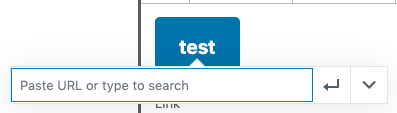
The button block has its own UI for adding links. However, a user can also highlight the text in the button when editing a button block and use Cmd+K or Ctrl+K to add link formatting to button text.
This duplication is confusing.
To reproduce
Steps to reproduce the behavior:
- Create a new post
- Add a button block
- Type some text in the button
- Highlight the text in the button
- Use the Cmd+K (Mac) or Ctrl+K (Windows/Linux) keyboard shortcut
- Observe that link formatting can be applied to the button's text.
Expected behavior
The link format should be disabled on the button block as it has its own interface for adding links.
Screenshots
Additional context
Discovered while testing #10128
 talldan
All 4 comments
This line:
excludes the "link" rich text format from the toolbar (and hotkeys?), but it doesn't seem to be doing anything.
cc @ellatrix
 epiqueras
on 9 Jul 2019
epiqueras
on 9 Jul 2019
I’ve noticed this as well - it seems like the behaviour around which controls are visible does not impact all keyboard shortcuts.
 chrisvanpatten
on 10 Jul 2019
chrisvanpatten
on 10 Jul 2019
(Also worth noting that the formats in the drop down are visible even though they aren’t explicitly enabled in formattingControls.)
chrisvanpatten
on 10 Jul 2019
Should be fixed by #14542.
 ellatrix
on 10 Jul 2019
ellatrix
on 10 Jul 2019
Related issues
 pfefferle
·
3Comments
pfefferle
·
3Comments
 nylen
·
3Comments
nylen
·
3Comments
 moorscode
·
3Comments
moorscode
·
3Comments
 hedgefield
·
3Comments
hedgefield
·
3Comments
 maddisondesigns
·
3Comments
maddisondesigns
·
3Comments
Most helpful comment
Should be fixed by #14542.