Gutenberg: Add timezone to Publish date/time for scheduled posts
Describe the bug
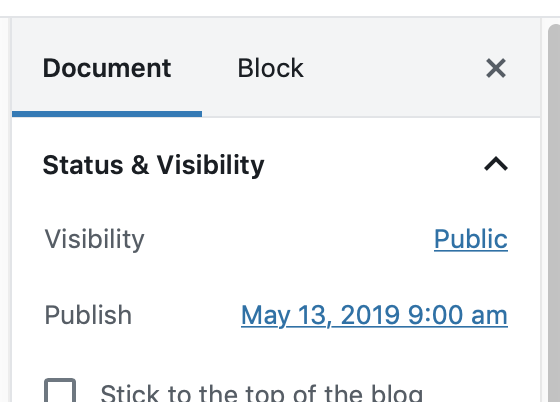
For multi users blog (in multiple time zones) it is not clear what time zone a scheduled post is being set to. It appears the time shown for the Publish date is the time zone for the blog and not the user.
Showing the time zone used in the displayed date will help clarify for all users of the site.
 mkaz
mkaz
All 8 comments
Here I thought this would be an easy one, just adding. an extra character to the display string.
The date displayed comes from the PostScheduleLabel component using settings.formats.datetimeAbbreviation
The format is set in two places, one in @wordpress/date component which is actually ignored, and the setting used is from an inline script hard-coded in wp-includes/script-loader.php
So the various options I see:
(1) Update wp-includes/script-loader.php in core adding the T parameter at the end of datetimeAbbreviated format. From what I can tell the setting was added for Gutenberg and only used in this location.
(2) Create a new format called datetimeAbbreviatedTZ which is the same format with a T added. Add format to wp-includes/script-loader.php in core and then update component to use new format. I'm not sure this is great, because the previous format would stay in the code and would not be used anywhere.
(3) Two other formats specified in script-loader.php use the get_option which fetches the format setting set on the wp-admin General settings page. We could add an additional option to that page for the datetimeAbbreviated format, though this would yet another user setting.
(4) The string format is hard-coded everywhere, might as well hard-code it at the point of usage, so update the format in PostScheduleLabel instead of calling out to a setting that can't be changed.
(5) Don't change in core or Editor and leave for a plugin to change, would require something like the following code:
wp_add_inline_script(
    'wp-date',
    implode(
        "\n",
        array(
            'var localDateSettings = wp.date.__experimentalGetSettings();',
            'localDateSettings.formats.datetimeAbbreviated = "M j, Y g:i a T";',
            'wp.date.setSettings(localDateSettings);',
        )
    ),
    'after'
);
Open to thoughts?
mkaz
on 16 May 2019
The changes in #15757 allows a user to change their time format settings, set to g:i a T will display the time zone. It's not the default for users, but can be changed.
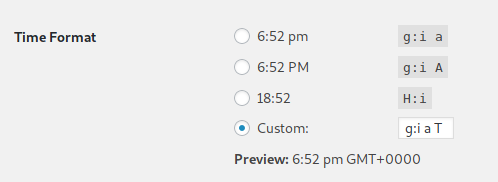
For the command-line inclined, you can do this using wp-cli command as follows
wp option update time_format 'g:i a T'
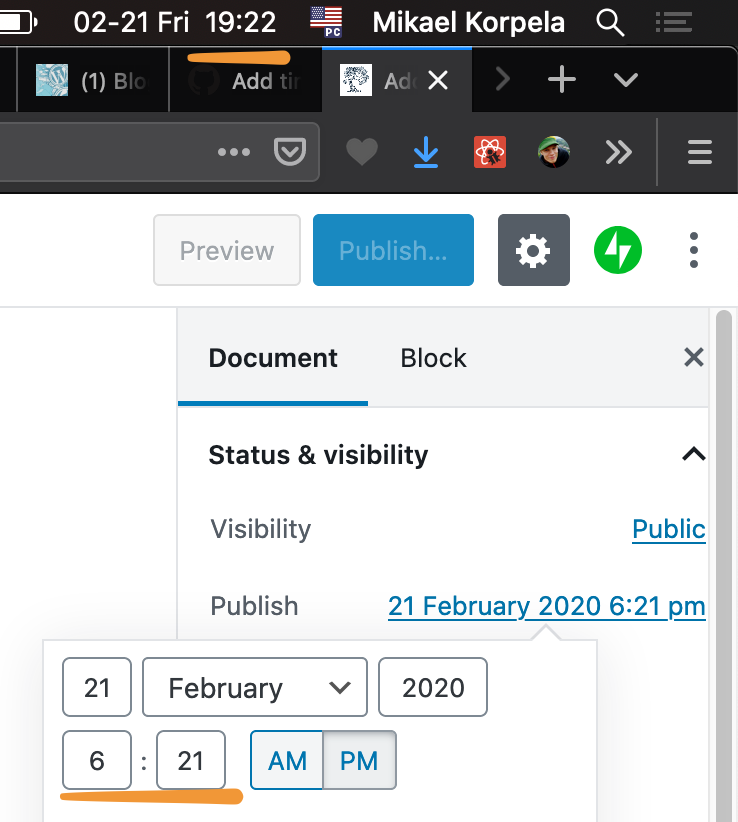
Could timezone still be shown even if not configured, if browser time differs from server time?
I think many of us stare at the computer clock and think that's the same as "internet page time":
 simison
on 21 Feb 2020
simison
on 21 Feb 2020
I'll re-open since I think this can still potentially be confusing in some multi-timezone editing situations and users shouldn't need to add timezone to site's date+time just to show it here. Admin interface and (frontend) presentation can differ in this case.
To summarize some thoughts from @folletto and @amamujee;
- Those inputs should always show _site_ timezone, not _user_ timezone.
- The user will set the site timezone to the local one either matching theirs, or matching their favored audience. Editors outside that would still benefit from using the site time zone as a reference.
- Timezone could be shown only if there’s a mismatch between user’s and site’s timezones to reduce potential clutter.
simison
on 3 Mar 2020
I wanted to share previous designs I explored on this same issue: https://github.com/Automattic/wp-calypso/issues/42116. We were limited on what we could display in terms of the timezone labels, but those should be made clearer, including the options we display in /settings. For example, offsets should have example cities for them to be helpful.
 jancavan
on 26 May 2020
jancavan
on 26 May 2020
I think your last mockup on the thread would be a nice improvement:

@mapk Do you think this would be a good enough v1?
 obenland
on 26 May 2020
obenland
on 26 May 2020
Looks good. 👍
 mapk
on 27 May 2020
mapk
on 27 May 2020
@mapk Great, thanks. As a related change, I created this issue for further visual improvements to the calendar: https://github.com/WordPress/gutenberg/issues/22387
jancavan
on 27 May 2020
Related issues
 jasmussen
·
3Comments
jasmussen
·
3Comments
 youknowriad
·
3Comments
youknowriad
·
3Comments
 aduth
·
3Comments
aduth
·
3Comments
 nylen
·
3Comments
nylen
·
3Comments
 wpalchemist
·
3Comments
wpalchemist
·
3Comments
Most helpful comment
I think your last mockup on the thread would be a nice improvement:
@mapk Do you think this would be a good enough v1?