Gutenberg: TextControl doesn't work as expected with number attributes
Describe the bug
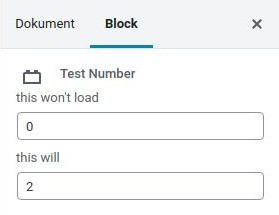
Using TextControl to manipulate attributes that have the type number doesn't work. When saving and reloading, the input still has the default value instead of the saved one.
To reproduce
import React from 'react'

const { registerBlockType } = wp.blocks
const { Fragment } = wp.element
const { InspectorControls } = wp.editor
const { TextControl } = wp.components

registerBlockType('acme/testnumber', {
  title: 'Test Number',
  category: 'common',
  attributes: {
    firstValue: {
      type: 'number',
      default: 0,
    },
    secondValue: {
      type: 'string',
      default: '0',
    },
  },
  edit: ({ attributes, setAttributes }) => {
    const { firstValue, secondValue } = attributes

    return (
      <Fragment>
        <InspectorControls>
          <TextControl
            label="this won't load"
            value={firstValue}
            onChange={(firstValue) => setAttributes({ firstValue })}
            type="number"
          />
          <TextControl
            label="this will"
            value={secondValue}
            onChange={(secondValue) => setAttributes({ secondValue })}
            type="number"
          />
        </InspectorControls>
        <div>
          <h2>some text so this block can be selected</h2>
        </div>
      </Fragment>
    )
  },
  save: () => (
    <div>
      <h2>some frontend text</h2>
    </div>
  ),
})
Expected behavior
The value should be saved and loaded just like string attributes.
Screenshots
Setting specific values:

Reloading still shows default value for the number attribute:
Additional context
WP version 5.1.1
 kingkero
All 3 comments
Have you tried using parseInt() to ensure the input value is cast to a number?
 swissspidy
on 2 May 2019
swissspidy
on 2 May 2019
Have you tried using parseInt() to ensure the input value is cast to a number?
I feel stupid now. Casting to int/number works. It just feels strange, since some components like RangeControl do this out of the box.
kingkero
on 8 May 2019
Since this is a popular result on Google, here's an example using the parseInt():
_(Maybe it will be useful to someone)_
attributes: {
    test: {
        type: 'number',
    },
},
const { test } = attributes;


md5-a7f8d31217819978f810ddfd851aeb11


<TextControl
    label="Additional Number"
    type="number"
    value={test}
    onChange={(value) => { setAttributes({ test: parseInt(value) }); }}
    min={0}
/>
 kanlukasz
on 20 Oct 2020
kanlukasz
on 20 Oct 2020
Related issues
 hedgefield
·
3Comments
hedgefield
·
3Comments
 cr101
·
3Comments
cr101
·
3Comments
 aaronjorbin
·
3Comments
aaronjorbin
·
3Comments
 moorscode
·
3Comments
moorscode
·
3Comments
 maddisondesigns
·
3Comments
maddisondesigns
·
3Comments
Most helpful comment
I feel stupid now. Casting to int/number works. It just feels strange, since some components like
RangeControldo this out of the box.