Gutenberg: Gutenberg option to show Custom Fields not saving
Describe the bug
I wish I had more information than I do, sorry. I'm trying to show the Custom Fields area on the Post screen. When I open the Gutenberg Options panel and choose the checkbox for Custom Fields the page reloads, the Custom Fields are not shown, and the checkbox remains unchecked.
I have access to more than one WordPress-powered web site and this is only happening on one of them. So I'm guessing a plugin conflict?
A clear and concise description of what the bug is.
To reproduce
Steps to reproduce the behavior:
- Go to Add New Post
- Click on Gutenberg "three dots menu"
- Choose Options
- Attempt to show Custom Fields by selecting checkbox
- Page refreshes, does not show or save
Expected behavior
I would expect to see the Custom Field area.
Screenshots
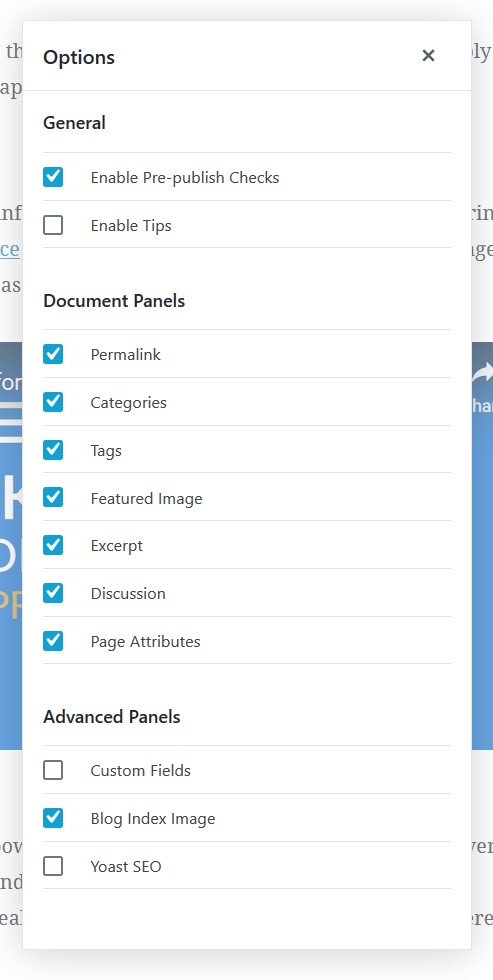
Desktop (please complete the following information):
- OS: Windows 10 version 1903
- Browser: Firefox
- Version: 66.0.3
Additional context
- WordPress 5.1.1
- Gutenberg 5.5.0, plugin activated
 cdevroe
All 4 comments
Hi @cdevroe thanks for taking the time to report this issue. As you mentioned in our slack convo you did test using a "vanilla" WP install and were unable to reproduce so this does point to a plugin and/or theme conflict. Unfortunately there's not much we can do on our end to help resolve this until we know which is conflicting.
Some good next steps for troubleshooting would be to:
- activate your plugins/theme one by one until you discover what's reproducing this.
- open up your browser dev tools console and see if there are any errors appearing - if there are you can post them in here but ideally you'd share your findings with the plugin/theme author and they should be able to derive whether this is something specific to their plugin that they need to fix or if their implementation is exposing a bug in GB.
I'm going to close this for now because there's nothing actionable for us to work with. Feel free to re-open if/when you uncover more information.
 nerrad
on 24 Apr 2019
nerrad
on 24 Apr 2019
I'm having the same issue, I deactivated all plugins, I don't get any error in the console and still can't get the custom fields meta box to display.
 ymsstudios
on 7 Oct 2019
ymsstudios
on 7 Oct 2019
Sounds like this was the issue: https://github.com/WordPress/gutenberg/issues/16333#issuecomment-506448303
But the custom fields option should not show up in the options panel if this is the issue.
ymsstudios
on 7 Oct 2019
The issue is a plugin conflict. The following plugins AFAIK break this functionality in WP Core:
- ACF/ACF Pro
- Older versions of Yoast
If you need to use those plugins, you can always install Custom Fields for Gutenburg Block Editor which bypasses the problem.
 wpsmith
on 14 May 2020
wpsmith
on 14 May 2020
Related issues
 aaronjorbin
·
3Comments
aaronjorbin
·
3Comments
 JohnPixle
·
3Comments
JohnPixle
·
3Comments
 moorscode
·
3Comments
moorscode
·
3Comments
 aduth
·
3Comments
aduth
·
3Comments
 BE-Webdesign
·
3Comments
BE-Webdesign
·
3Comments
Most helpful comment
The issue is a plugin conflict. The following plugins AFAIK break this functionality in WP Core:
If you need to use those plugins, you can always install Custom Fields for Gutenburg Block Editor which bypasses the problem.