Gutenberg: Image alignment left and adding a spacer
Describe the bug
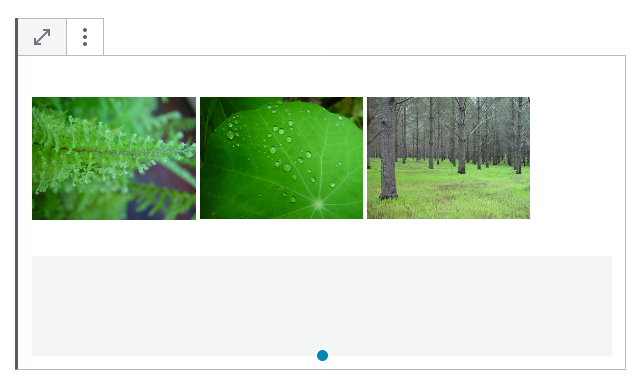
Add a few image blocks and align them to the left so that the caption shows up correctly below them. Then add a spacer block. Mine looked like this:

The conclusion I reach is that I have to add CSS code to get the spacer to show up below the 3 image blocks that are all aligned to the left.
How can we control when the wrap is active or not? For the last image it would be good to turn off the wrap so that I can add the spacer below the 3 images. (I can not use a gallery as each image needs to have a custom link.)
This issue seems to be very similar:
https://github.com/WordPress/gutenberg/issues/13784
 paaljoachim
All 3 comments
It seems the issue is caused because the images are floated and so the spacer just takes there space.
Given that images are behaving as they should (floating), I guess the only fix for this problem would be adding some CSS that clears the previous floats on the spacer block. Given the nature of the spacer block that change would probably make sense, in fact, using spacer blocks would become a simple way for users to apply a float clear operation. Any thoughts on this @youknowriad, @mapk?
 jorgefilipecosta
on 28 May 2019
jorgefilipecosta
on 28 May 2019
By adding a clear: both; on the spacer block, we could get it to look like this.
It's still a little odd looking, but provides the outcome I think you're expecting.
 mapk
on 29 May 2019
mapk
on 29 May 2019
Yeah that will help a lot!
paaljoachim
on 29 May 2019
Related issues
 mhenrylucero
·
3Comments
mhenrylucero
·
3Comments
 aaronjorbin
·
3Comments
aaronjorbin
·
3Comments
 wpalchemist
·
3Comments
wpalchemist
·
3Comments
 franz-josef-kaiser
·
3Comments
franz-josef-kaiser
·
3Comments
 jasmussen
·
3Comments
jasmussen
·
3Comments