Gutenberg: White Screen when posting or editing
When trying to edit or add new content on WordPress, the entire screen "loads" as white. No sidebar or admin bar. 100% white screen. Otherwise, the site works as expected.

I've tried the following:
- Updating wordpress version
- Updating plugins
- Disabling all plugins
- Switching to original (twenty nineteen) theme
- Switching browser type (chrome / safari) - I am on a MacBook Air (macOS Majave)
- Ran security/server health scan (wordfence security plug in) which came back normal
None of this has worked. The error that shows up under dev console is:
JQMIGRATE: Migrate is installed, version 1.4.1
wp-tinymce.js:3 Uncaught SyntaxError: Invalid or unexpected token
blocks.min.js:2 Uncaught SyntaxError: Invalid or unexpected token
post-new.php:1642 Uncaught TypeError: Cannot read property 'setCategories' of undefined
at post-new.php:1642
editor.min.js?ver=9.0.11:55 Uncaught TypeError: Cannot read property 'withBlockContentContext' of undefined
at Module.
at n (editor.min.js?ver=9.0.11:1)
at editor.min.js?ver=9.0.11:1
at editor.min.js?ver=9.0.11:1
block-library.min.js?ver=2.2.16:12 Uncaught TypeError: Object(...) is not a function
at Module.306 (block-library.min.js?ver=2.2.16:12)
at n (block-library.min.js?ver=2.2.16:1)
at wp.blockLibrary.0 (block-library.min.js?ver=2.2.16:1)
at block-library.min.js?ver=2.2.16:1
mce-view.min.js:1 Uncaught SyntaxError: Invalid or unexpected token
post-new.php:1815 Uncaught ReferenceError: tinymce is not defined
at post-new.php:1815
edit-post.min.js?ver=3.1.11:12 Uncaught TypeError: Cannot read property 'registerCoreBlocks' of undefined
at Module.$n (edit-post.min.js?ver=3.1.11:12)
at HTMLDocument.
 stephaniebee
All 26 comments
@stephaniebee it sounds like we might be seeing untranspiled JavaScript loading in the browser - this is just a guess because of the "Invalid or unexpected token" errors.
Alternatively, we could be seeing some host/server wrapping of those JS files that adds something to the top that isn't JavaScript, maybe like a bad header? This would be much less likely but those syntax errors are coming at the top of those files, which either could be suspicious or simply the result of magnification turning them into just a few lines.
Would you be willing to share a bit more of how this happened? Are you attempting to run the plugin in a development environment? Did your web host install WordPress for you?
Also I'm curious about seeing JQMIGRATE if indeed all plugins are uninstalled.
Sorry I couldn't be more helpful given the information here!
 dmsnell
on 10 Mar 2019
dmsnell
on 10 Mar 2019
I installed it myself. It was working fine since 2015. I haven’t done anything, just randomly stopped working :(
stephaniebee
on 10 Mar 2019
I activated the plugins again after it made no difference in the event the error was plugin related and the error report gave more clues to the problem.
stephaniebee
on 11 Mar 2019
Also I'm curious about seeing JQMIGRATE if indeed all plugins are uninstalled.
@dmsnell Fyi, jquery-migrate appears to be loaded by default WordPress installs since almost ever via load-scripts.php ...
 bupotalovo
on 11 Mar 2019
bupotalovo
on 11 Mar 2019
Thanks for reporting this! There are a few different reasons for why this could be happening.
If you can open the developer tools and look at the console to see what errors are showing up there, that will help shed some like on what might be going wrong in your case and then we can go from there. If you're not sure how to get a screenshot of the errors in the console, please reply back and we can get you some more detailed instructions.
 noisysocks
on 13 Mar 2019
noisysocks
on 13 Mar 2019
Hi noisysocks, if you see my original post I’ve already copy and pasted the error in the dev console.
If you need it in screenshot form also, I can do that.
stephaniebee
on 13 Mar 2019
I have the exact same issue and I'm getting a blank page editor.

 khaladj
on 14 Mar 2019
khaladj
on 14 Mar 2019
I just ran a the WordPress update (5.1.1) on another one of my sites, and the same thing happened. I can't edit or create new posts. White Screen of death.
Otherwise the site works perfectly.
stephaniebee
on 15 Mar 2019

stephaniebee
on 15 Mar 2019
Hello,
I'm having the exact same issue with the same version of WordPress (5.1.1). I went through the same troubleshooting steps as well, with the same results. @stephaniebee have you narrowed this issue down to the Wordpress version? If so, have you determined that a revert solves the issue?
@noisysocks she did give you the DevTools response earlier. Please review them and update the status of the ticket. If you have any suggestions please let us know.
 jeppy7
on 21 Mar 2019
jeppy7
on 21 Mar 2019
Yes, since it happened to another site right after the upgrade, I’m going to say it’s highly likely a wordpress version issue. I was hoping for a response here, but there hasn’t really been one. I’ll downgrade one of the sites tomorrow and if it fixes the issue I will report back (either way)
stephaniebee
on 21 Mar 2019
@jeppy7 Alright, so downgrading did NOT work, but I did fix the issue by installing the "classic editor" plugin
https://wordpress.org/plugins/classic-editor/
Try it out and let me know if it works for you. I have it working with WP version 5.1.1
stephaniebee
on 21 Mar 2019
Correction, it KIND OF works. I can at least add and edit my pages, but it's super slow and glitchy. In visual editor the text appears white... which is annoying. Text editor is okay, though functions are weird. I can work around it until (hopefully) another answer comes.
stephaniebee
on 21 Mar 2019
@stephaniebee thank you for the update. I’m going to try the Classic Editor plugin on my lunch. I’ll jump on here after and let you know what the result is. Thanks again!
jeppy7
on 21 Mar 2019
@stephaniebee adding the Classic editor plugin an enabling it allows me to Add New Posts. I didn’t have time to review other functionality, but my client will be happy to know that they can add new posts now. I will keep checking in this thread for a solution as well. Also, if I discover a better solution I will share it on here.
jeppy7
on 21 Mar 2019
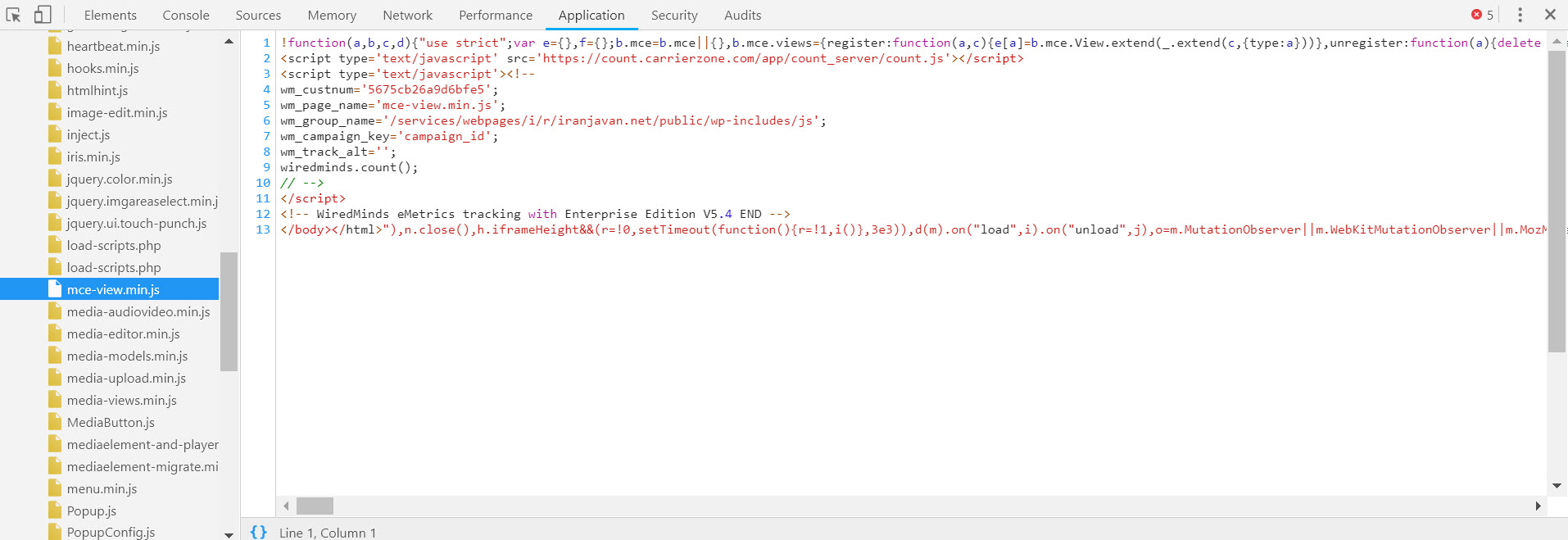
From the developer tools console, could you try clicking on those links mce-view.min.js and wp-tinymce.js toward the right side? I wonder if those files may be missing (which could be indicated if clicking those links presents a "Not found" page). If that were the case, it may be cleared up by re-installing WordPress via Dashboard -> Updates.
 aduth
on 25 Mar 2019
aduth
on 25 Mar 2019
@aduth the js files are there, I installed Classic editor no luck and also reinstalling the updates did not work for me as well, We need some help from Wordpress team to release an update with a fix for it.
khaladj
on 25 Mar 2019
@aduth


khaladj
on 25 Mar 2019
The "WiredMinds" and "CarrierZone" snippets there are _not_ part of what's included with the WordPress files:
- https://github.com/WordPress/WordPress/blob/master/wp-includes/js/tinymce/wp-tinymce.js
- https://github.com/WordPress/WordPress/blob/master/wp-includes/js/mce-view.min.js
It is very likely this is the reason for the error you are seeing.
This may be part of some custom tracking solution enabled by another plugin or your host. If you do not recognize it, I would suggest reaching out to your hosting provider support, as in the worst case it could be a man-in-the-middle attack.
aduth
on 25 Mar 2019
@aduth I've already tried re-installing, downgrading and then upgrading again. None of those helped in resolving my issue.
stephaniebee
on 25 Mar 2019
The "WiredMinds" and "CarrierZone" snippets there are _not_ part of what's included with the WordPress files:
- https://github.com/WordPress/WordPress/blob/master/wp-includes/js/tinymce/wp-tinymce.js
- https://github.com/WordPress/WordPress/blob/master/wp-includes/js/mce-view.min.js
It is very likely this is the reason for the error you are seeing.
This may be part of some custom tracking solution enabled by another plugin or your host. If you do not recognize it, I would suggest reaching out to your hosting provider support, as in the worst case it could be a man-in-the-middle attack.
You're right my host added this tracking code, but it was there before, After upgrading to 5.1.1 the editor is not working.
Something seems to have happened after updating the WordPress website to 5.1.1.
Thank you!
khaladj
on 25 Mar 2019
@khaladj
Based on the information, here's my educated guess on what's happening:
Your host is injecting the tracking script by looking for the presence of the piece of text </body>, which normally would indicate the end of an HTML document. This snippet of text _does exist_ in both wp-tinymce.js and tinymce.min.js, but these are JavaScript files, not HTML documents, and the injection of the tracking snippet causes the files to include invalid JavaScript syntax (the error from the screenshots). Prior to WordPress 5.1, the TinyMCE JavaScript file was bundled with WordPress in a compressed format, so the string was likely not discovered by the transformation being a binary file (see Trac#45645). As of WordPress 5.1, it is no longer compressed, and thus would be subject to the transformation your host is applying.
To be clear, if this is the case, it would be an issue with your host. If this is how they choose to inject the tracking snippet, they should at least apply the transformation only to HTML documents (MIME type text/html), not JavaScript files (MIME type application/javascript). The error occurs because the injection of the tracking snippet causes the file to become malformed, invalid JavaScript. I'd recommend that you provide this information to your host so that they can resolve the issue, as it could very well impact more files than just those included with WordPress (other plugins, etc).
cc @azaozz
@stephaniebee Can you please share the contents of /wp-includes/js/tinymce/wp-tinymce.js and /wp-includes/js/mce-view.min.js ? I strongly suspect it may be an identical issue to what is shown with https://github.com/WordPress/gutenberg/issues/14362#issuecomment-476254192 .
aduth
on 26 Mar 2019
Hi sorry, my email never notified me that there was a response. I can get that to you asap.
thx
stephaniebee
on 18 Apr 2019
@aduth
You are absolutely right, I had a long conversation with my host and finally by removing that injected tracking codes everything back to normal.
I would thank you so much for catching the issue and gave the solution.
khaladj
on 18 Apr 2019
Unless other information can be presented to the contrary, I'm expecting this to be resolved as explained in https://github.com/WordPress/gutenberg/issues/14362#issuecomment-476422195 . The two files from the original comment (blocks.min.js, wp-tinymce.js) both contain references to </body> in a string which as explained in my previous comment could be used by hosts or other tracking software as indicators on where to manipulate an HTML document, which when wrongly applied to JavaScript files would cause malformed output.
aduth
on 22 Apr 2019
Just FYI, the corresponding core trac ticket for the same "tracking pixel insertion in JS files" issue: https://core.trac.wordpress.org/ticket/46442.
 azaozz
on 22 Apr 2019
azaozz
on 22 Apr 2019
Related issues
 ellatrix
·
3Comments
ellatrix
·
3Comments
 jasmussen
·
3Comments
jasmussen
·
3Comments
 davidsword
·
3Comments
davidsword
·
3Comments
 maddisondesigns
·
3Comments
maddisondesigns
·
3Comments
maddisondesigns
·
3Comments
maddisondesigns
·
3Comments