Gutenberg: Italicized text adding non-breaking spaces after publishing
Describe the bug
When writing a post in Gutenberg, if you italicize text, any spaces between the <em> tags are replaced with , which causes issues with formatting.
To Reproduce
Steps to reproduce the behavior:
- Create a new post/page in Gutenberg
- Italicize text using CTRL/⌘+I
- Publish the post/page
- Refresh the page to re-load the editor
- View the block's HTML
Expected behavior
Italicized text would preserve spacing in <em> tags
Actual behavior
Spaces in text between the <em> tags are replaced with
Screenshots
Desktop (please complete the following information):
- OS: macOS (10.14.2)/Windows 10 (v.1809)
- Browser: Safari, Chrome (macOS & Windows 10)
- Version: Safari - 12.0.2, Chrome - 71.0.3578.98 (macOS & Windows 10)
Additional context
WordPress 5.0.2, hosted on Pressable
 edequalsawesome
All 19 comments
I can reproduce similar behaviour when switching between italicised and non-italicised text.
 pento
on 15 Jan 2019
pento
on 15 Jan 2019
This is not new and not only when using the <em> tag. The browsers have always inserted U+00A0 (nbsp) chars when the user types several spaces. At first only in contenteditable, then started to see that in textareas and even in text fields.
Lately Chrome/WebKit seem to be getting more aggressive with these nbsp chars. As far as I see they insert one as soon as the user presses the spacebar at the end of each word, and then replace it with a normal space U+0020 later on, when the user continues to type. However if the HTML tag is closed (and in some other seemingly random cases) that replacement doesn't seem to happen.
There is an old core trac ticket attempting to deal with this: https://core.trac.wordpress.org/ticket/26842. Unfortunately it was never implemented as it has the potential to break wpautop and introduce new hard to find/anticipate edge cases there. Perhaps we can revisit again considering Gutenberg doesn't (shouldn't) use wpautop any more.
An acceptable fix for the "overly-aggressive" U+00A0 invasion in Chrome would probably be to just replace them all with U+0020 on editor cleanup. That may eventually break somebody's "double-spacing-after-a-full-stop" style, but this would be the "lesser evil" :)
 azaozz
on 15 Jan 2019
azaozz
on 15 Jan 2019
This happens with any format. Looking into it a bit now.
 ellatrix
on 15 Jan 2019
ellatrix
on 15 Jan 2019
Interestingly, the input event is not triggered when you press the spacebar in a format.
ellatrix
on 15 Jan 2019
@iseulde As this is a "pure text" formatting, do you think something like this would be good?
content = content.replace( /\u00A0(?![ \u00A0])/g, ' ' );
It should replace single U+00A0 with U+0020 at the start, end or between any other chars, but will keep multiple sequences of U+00A0 and U+0020 that are used to "preserve" user input for multiple spaces.
azaozz
on 15 Jan 2019
@azaozz I fixed non breaking space issue some time ago, I didn't expect an issue like this.
Digging into it further, it seem to be TinyMCE's doing. If I prevent TinyMCE initialisation, no non breaking spaces are inserted.
ellatrix
on 15 Jan 2019
Hmm, no TinyMCE init also means no contenteditable? Think these are added in contenteditable, let me check again :)
Could also be some remnants from the "press arrow key to move out of links/inline tags" thing?
azaozz
on 15 Jan 2019
@azaozz There is still contenteditable, but I've made it so that the browser does not add any non breaking spaces when pressing space, by use of white-space: pre-wrap;.
ellatrix
on 15 Jan 2019
Hmm, wouldn't white-space: pre-wrap; make it all look preformatted? In any case, check this fiddle: https://jsfiddle.net/0eqt4f7y/1/. In Chrome I only see charCode 160 (nbsp) as spaces while typing, in Firefox only charCode 32 (normal spaces)...
(As that is contenteditable you can also do Cmd+B for bold, Cmd+I for italic, etc.).
azaozz
on 15 Jan 2019
@iseulde Just wanted to check, are you happy to work on a fix for this? If so, I'll unassign myself.
 talldan
on 17 Jan 2019
talldan
on 17 Jan 2019
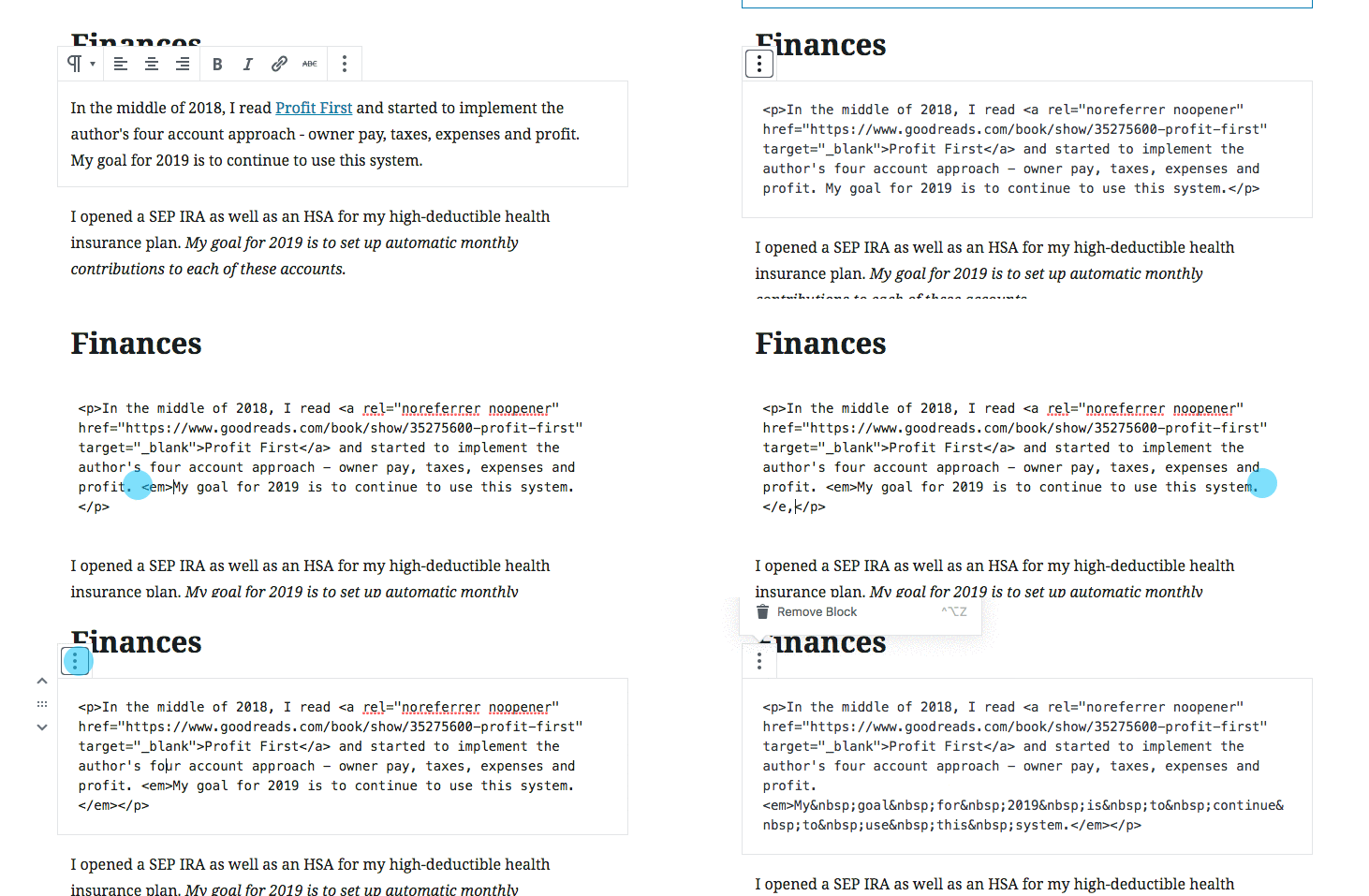
I'm having issues with this as well. I've tried using the keyboard shortcut for italics vs. using the italics button vs. putting in the em tags in the HTML manually.
 renemorozowich
on 17 Jan 2019
renemorozowich
on 17 Jan 2019
@azaozz If you add white-space: pre-wrap; to the div, the result when typing would look very different. It doesn't add any styling, it just changes how white space is rendered.
ellatrix
on 21 Jan 2019
FYI there's the following note in the release note of TinyMCE 4.9.0 (newer than the 4.8.0 shipped currently in core):
Reduced insertion of unnecessary nonbreaking spaces in the editor. #TINY-1879
(I had a hard time tracking this back to a specific code change; I guess the reference is some internal issue tracker?)
https://github.com/tinymce/tinymce/blob/master/changelog.txt
Manually pulling in the latest version, the issue still appears to be present though. 🤷♂️
 aduth
on 22 Jan 2019
aduth
on 22 Jan 2019
Manually pulling in the latest version, the issue still appears to be present though. 🤷♂️
Actually, on further testing, at least pressing Space at the end of an inline boundary in TinyMCE 4.9.2 does not insert the nbsp, whereas in 4.8.0 it would.
Related:
- https://github.com/tinymce/tinymce/commit/bad77bacb5113512c773be65d40c2b587cbd1c9d#diff-c51bc0bcc0d2d5008544b2cf3d001207
- https://github.com/tinymce/tinymce/commit/829942db6d935d5ff3b977f07c94b4c2fcbad979#diff-c51bc0bcc0d2d5008544b2cf3d001207
- https://github.com/tinymce/tinymce/commit/0167d682b9fc9b471a731c3cc8fcb5b620a91158#diff-c51bc0bcc0d2d5008544b2cf3d001207
aduth
on 22 Jan 2019
Ok, let's try updating TinyMCE in core then.
ellatrix
on 23 Jan 2019
let's try updating TinyMCE in core then.
We could try, but... Don't think this will fix it, or at least not fully.
Here's an updated fiddle: https://jsfiddle.net/j5sLq4kf/. It clearly shows that Chrome inserts a nbsp as you type a space after any other char, then replaces that nbsp with a normal space when you continue to type.
Firefox always keeps a normal space at the end, but converts previous spaces into nbsp when typing several.
Also, the behaviour is a bit unpredictable when pasting in contenteditable.
Seems the best option is to add white-space: pre-wrap; and make sure no \n makes its way in there.
azaozz
on 23 Jan 2019
Hi folks!
I was able to replicate that using the <strong> tags:

The steps I followed:
- Created a draft with some text and used the "Bold" button.
- Closed the draft and then opened it again
- Changed to the code editor
I used a Jurassic Ninja site to replicate that. And I wasn't able to replicate it when having the "Classic Editor" plugin enabled. Meaning this is only happening with Gutenberg.
_WordPress 5.0.3 running Twenty Nineteen theme. Chrome Version 71.0.3578.98 (Official Build) (64-bit). macOS Mojave 10.14.2_
 AtrumGeost
on 28 Jan 2019
AtrumGeost
on 28 Jan 2019
For reference: https://core.trac.wordpress.org/ticket/46094 should fix this issue.
ellatrix
on 29 Jan 2019
Fixed by https://core.trac.wordpress.org/ticket/46094. Will be in WordPress 5.1 beta 3.
ellatrix
on 29 Jan 2019
Related issues
 spocke
·
3Comments
spocke
·
3Comments
 davidsword
·
3Comments
davidsword
·
3Comments
 mhenrylucero
·
3Comments
mhenrylucero
·
3Comments
 moorscode
·
3Comments
moorscode
·
3Comments
 franz-josef-kaiser
·
3Comments
franz-josef-kaiser
·
3Comments
Most helpful comment
For reference: https://core.trac.wordpress.org/ticket/46094 should fix this issue.