Hello!
Since the WordPress 5 RC I have some weird behavior with the RichText component:
When first initialized, the markup is set two times (see the 2 h2 on the pic)
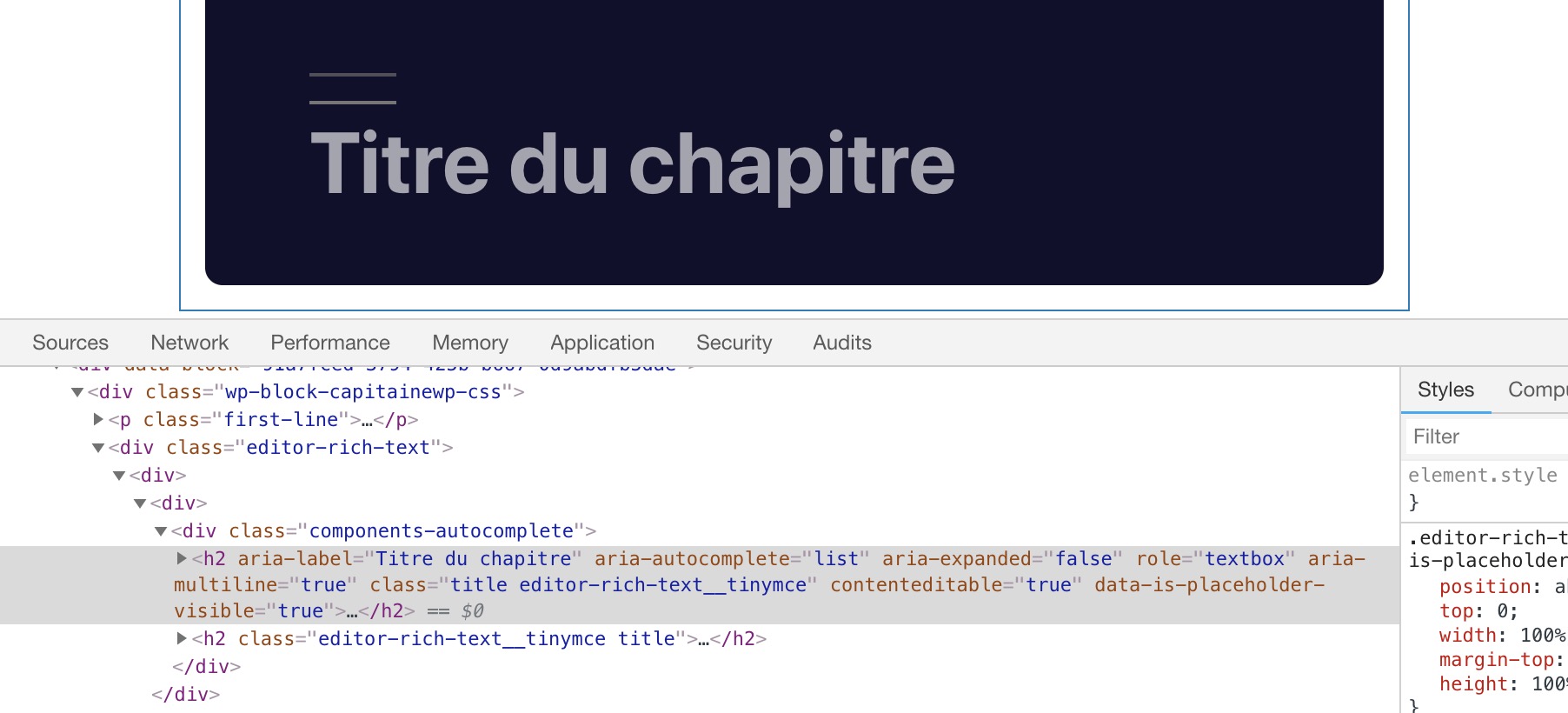
We can see the double upper line. I can see it on every Richtext on my blocks.
When I edit the content, the second markup disappear.
Bug? Feature?
Is it only me ?
I'll give it further investigations, but has the release date approach, I prefer open this issue now
 maximebj
All 10 comments
This is only for your own custom blocks or is it happening for you with the core/heading block? Are you using the Twenty Nineteen theme? If yes, does the problem go away if you change to Twenty Seventeen?
I tested the core heading block with WordPress 5.0-RC1-43946 (Twenty Nineteen theme) just now and did not see a double line above headings.
 designsimply
on 29 Nov 2018
designsimply
on 29 Nov 2018
I have the thing with your block @maximebj , but when I begin to type the second H2 disappear.
 Benoti
on 29 Nov 2018
Benoti
on 29 Nov 2018
I'm not sure it's theme related as it's about the markup on the editor
The issue is the duplication of the richtext inner marker, not directly the
CSS.
I'll test with another theme , just to be sure
maximebj
on 29 Nov 2018
The issue is the duplication of the richtext inner marker, not directly the CSS.
Aha. Okay. I cannot see the problem in testing, but it sounds like it may only be happening with a custom block. Is there a way for me to install your blocks so I can help test?
designsimply
on 5 Dec 2018
I can't reproduce it everywhere so I'll assume than I've made a mistake somewhere. I'll reopen this issue if I find something!
maximebj
on 6 Dec 2018
Hi Guys,
I have exactly the same issue....
 frissekom
on 29 Jan 2019
frissekom
on 29 Jan 2019
@frissekom can you please confirm some details? Which version of WordPress you are running and have you activated the Gutenberg plugin? What theme are you using? If this is happening only for a custom block, are you able to provide a code example with instructions for how to test? In your case, does the second h2 disappear when you start typing the same way the earlier comment at https://github.com/WordPress/gutenberg/issues/12424#issuecomment-442890989 noted?
designsimply
on 30 Jan 2019
It has something to do with conditional fields. I want to show or hide fields based on the FormControl. When I enable this it shows 2 fields on the edit section. When I do not use this the problem does not exist. Maybe you have the solution?
Below you will find my code.
    /**
     * Block dependencies
     */
    import icons from './icons';
    import './editor.scss';

    /**
     * Internal block libraries
     */
    const { __ } = wp.i18n;
    const {
        registerBlockType,
    } = wp.blocks;

    const {
      InspectorControls,
      RichText,
      MediaUpload,
    } = wp.editor;

    const {
        Tooltip,
        PanelBody,
        PanelRow,
        FormToggle,
        Button,
        Component,
    } = wp.components;

    /**
     * Register example block
     */
    export default registerBlockType('frissekom/banner', {
            title: __( 'Banner Block', 'frissekom' ),
            description: __( 'Voeg een banner toe aan de website (met of zonder tekst)', 'frissekom'),
            category: 'common',
            icon: {
                background: 'rgba(254, 243, 224, 0.52)',
                src: icons.upload,
            },
            keywords: [
                __( 'Image', 'frissekom' ),
                __( 'MediaUpload', 'frissekom' ),
                __( 'Message', 'frissekom' ),
            ],
            attributes: {
                title: {
                    type: 'array',
                    source: 'children',
                    selector: 'h2',
                },
                content: {
                    type: 'array',
                    source: 'children',
                    selector: 'p',
                },
                backgroundImage: {
                    type: 'string',
                    default: '', // no image by default!
                },
                contentControl: {
                    type: 'boolean',
                    default: false,
                },
            },

            edit: props => {

              const { attributes: { title, content, backgroundImage, contentControl, Component },
                  className, setAttributes } = props;

              const toggleContentControl = () => setAttributes( { contentControl: ! contentControl } );

              function onTitleChange(changes) {
                setAttributes({
                    title: changes
                });
              }

              function onContentChange(changes) {
                setAttributes({
                    content: changes
                });
              }

              function onImageSelect(imageObject) {
                setAttributes({
                    backgroundImage: imageObject.sizes.full.url
                })
              }

              return ([
                <InspectorControls>

                  <PanelBody
                      title={ __( 'Tekst opties', 'frissekom' ) }
                  >
                      <PanelRow>
                          <label
                              htmlFor="has-text-form-toggle"
                          >
                              { __( 'Bevat deze banner tekst?', 'frissekom' ) }
                          </label>
                          <FormToggle
                              id="has-text-form-toggle"
                              label={ __( 'Bevat tekst...', 'frissekom' ) }
                              checked={ contentControl }
                              onChange={ toggleContentControl }
                          />
                      </PanelRow>
                  </PanelBody>

                  <PanelBody
                      title={ __( 'Selecteer een achtergrond afbeelding', 'frissekom' ) }
                  >
                    <PanelRow>
                        <MediaUpload
                            onSelect={onImageSelect}
                            type="image"
                            value={backgroundImage} // make sure you destructured backgroundImage from props.attributes!
                            render={ ( { open } ) => (
                                <Button
                                    className={ "button button-large" }
                                    onClick={ open }
                                >
                                    { icons.upload }
                                    { __( ' Upload Image', 'frissekom' ) }
                                </Button>
                            ) }
                        />
                        <img src={backgroundImage} />
                    </PanelRow>
                </PanelBody>

                </InspectorControls>,
                <div
                    className={className}
                    style={{
                        backgroundImage: `url(${backgroundImage})`,
                        backgroundSize: 'cover',
                        backgroundPosition: 'center'
                    }}>
                    <div className="overlay"></div> {/* Adding an overlay element */}

                    { contentControl == true &&
                      <div>
                        <RichText
                            tagName="h2"
                            className="title" // adding a class we can target
                            value={title}
                            onChange={onTitleChange}
                            placeholder="Voer de titel in"
                        />
                        <RichText
                            tagName="p"
                            className="content" // adding a class we can target
                            value={content}
                            onChange={onContentChange}
                            placeholder="Voer de text in..."
                        />
                    </div>
                    }

                </div>
              ]);
            },
            save: props => {
              const { attributes, className } = props;
              const { title, content, contentControl, backgroundImage } = props.attributes;

              return (
                  <div
                  className={className}
                  style={{
                        backgroundImage: `url(${backgroundImage})`,
                        backgroundSize: 'cover',
                        backgroundPosition: 'center'
                    }}>
                      <div className="overlay"></div>
                      {/* the class also needs to be added to the h2 for RichText */}
                      { contentControl == true && (
                      <h2 class="title">{title}</h2>
                      )}
                      { contentControl == true && (
                      <p class="content">{content}</p>
                      )}
                  </div>
              );
            },
        },
    );
@frissekom The RichText component has undergone quite a bit of change in recent versions of the plugin. Could you verify that the issue is still present?
From the original comment, the "duplicate" markup is likely the placeholder value, which is intentionally separate from the contenteditable field itself. In other words, it is intended that there may be two separate elements, at least when empty. Normally it should not be seen as a visibly separate field, except if there were some conflicting styles introduced.
 aduth
on 22 Apr 2019
aduth
on 22 Apr 2019
I'm closing at the moment as there's nothing that seems actionable. Please reopen If I'm missing anything here.
 youknowriad
on 10 May 2019
youknowriad
on 10 May 2019
Related issues
youknowriad
·
3Comments
 hedgefield
·
3Comments
aduth
·
3Comments
hedgefield
·
3Comments
aduth
·
3Comments
 nylen
·
3Comments
nylen
·
3Comments
 franz-josef-kaiser
·
3Comments
franz-josef-kaiser
·
3Comments
Most helpful comment
It has something to do with conditional fields. I want to show or hide fields based on the FormControl. When I enable this it shows 2 fields on the edit section. When I do not use this the problem does not exist. Maybe you have the solution?
Below you will find my code.