Gutenberg: Copied wide-aligned blocks keep the alignment even in themes that don't support it
How to recreate
Copy the sample Gutenberg post content from https://wordpress.org/gutenberg/ (by switching to "Code Editor" view). And paste it into a test post on a website using a _theme that does not support wide/full alignment_ of blocks.
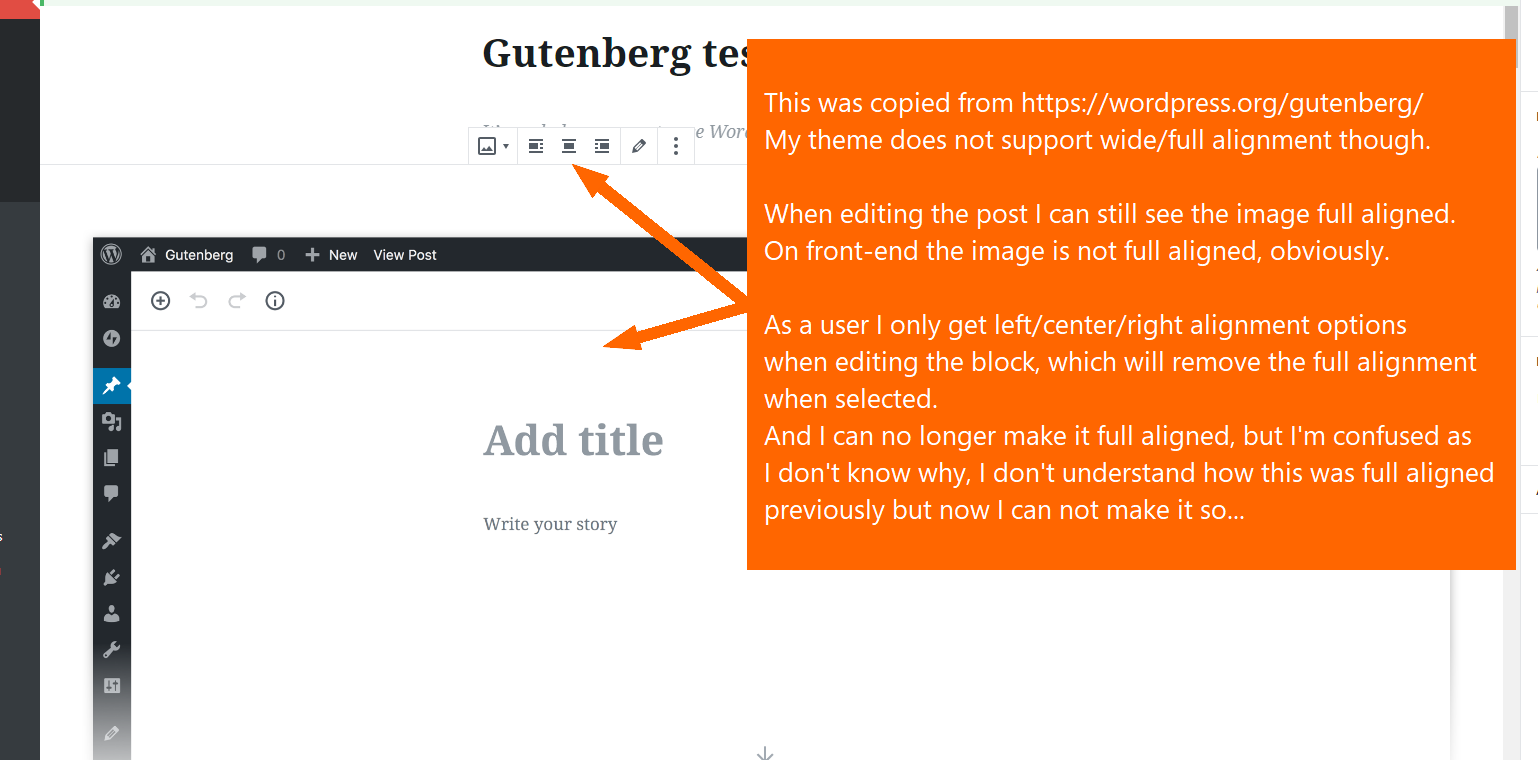
Everything works as expected on a website front-end, however, when editing the post user keeps seeing the cover image full aligned. But there are no wide/full alignment buttons when editing the block.
When the block alignment is changed to left/right/center, the block is displayed correctly in admin too, matching the width of the other content elements/blocks.
The issue
This might bring a confusion to a user copying content from one source to another. User might want to recreate the full alignment, but failing doing so, and failing understanding how it actually works.
Expected behavior
When copying wide/full aligned block from a website that supports such alignment into a website that does not, the block should not be wide/full aligned when editing the post.
Screenshots
Additional context
- Gutenberg v4.5.1
 webmandesign
All 5 comments
I tried the following steps and couldn't see copied alignfull images appear as full-width in the editor. I tested with the Twenty Fifteen theme and used Firefox on macOS for my test.
- Go to https://wordpress.org/gutenberg/
- Go to More > Code Editor and copy the code.
- Activate a theme that does not have support
fullorwideimages (e.g. Twenty Fifteen). - Paste the content from step 2 into a new post.
Result: the image at the top which is alignfull at https://wordpress.org/gutenberg/ did not have the alignfull designation after pasting.

Seen at https://tan-otter.jurassic.ninja/wp-admin/post.php?post=123&action=edit running WordPress 4.9.8 and Gutenberg 4.5.1 using Firefox 63.0.3 on macOS 10.13.6.
Do you see anything different in my testing steps compared to yours?
What OS and browser version did you use for testing?
What theme did you use for testing?
 designsimply
on 27 Nov 2018
designsimply
on 27 Nov 2018
Oh, I see. You've basically pasted the copied content directly into Gutenberg's Visual Editor mode. I didn't realize this was actually possible.
Here is what I did instead (and that's where you get the image fullwidth):
- Go to https://wordpress.org/gutenberg/
- In "Show more tools & options" (3 vertical dots in upper right corner) choose Code Editor
- Copy the post content code
- Create a new post on a test website using Gutenberg, set post title
- In "Show more tools & options" switch over to Code Editor
- Paste the copied content code into the _"Start writing with text or HTML"_ field
- In "Show more tools & options" switch back to Visual Editor
_For information, I've used super-plain testing theme (download zip if further tests needed)._
webmandesign
on 27 Nov 2018
@manake also pointed out in #12948 that disabling align-wide doesn't refresh the block and I think we can consolidate that report here as well:
Steps to reproduce the behavior:
- In functions.php add
add_theme_support( 'align-wide' );- Create a new post with a full wide image and save it.
- In functions.php remove
add_theme_support( 'align-wide' );- Open the post editing screen and see that the image is still full wide.
designsimply
on 17 Dec 2018
I added the Needs Decision label to ask specifically what should happen when align-wide content is opened in a theme that does not have align-wide support.
designsimply
on 17 Dec 2018
Can I remove data-align="full" by myself as a workaround before there is an official solution?
How would I do that?
Maybe there exists some wp.refreshGutenberg() that would do it that I could call on $(document).ready()?
 manake
on 17 Dec 2018
manake
on 17 Dec 2018
Related issues
 DeveloperWil
·
102Comments
DeveloperWil
·
102Comments
 azaozz
·
91Comments
azaozz
·
91Comments
 mapk
·
92Comments
mapk
·
92Comments
 melchoyce
·
95Comments
melchoyce
·
95Comments
 afercia
·
73Comments
afercia
·
73Comments