Gutenberg: The classic editor block breaks HTML in shortcodes content
Describe the bug
Shortcodes with HTML in their content get that HTML content encoded as soon as you end up typing them.
To Reproduce
Steps to reproduce the behavior:
- Go to a new post edited with Gutenberg and add a classic editor block.
- Copy the example for the shortcode with content
[caption]<a href="http://example.com/">My Caption</a>[/caption]in the official documentation: https://codex.wordpress.org/Shortcode_API#Enclosing_vs_self-closing_shortcodes - Save the post and see it in the frontend.
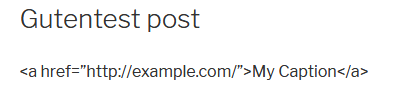
- See tha the link contained in the caption shortcode was HTML encoded.
In fact, the content of the shortcode is HTML encoded as soon as you paste it inside the Gutenberg classic editor block. This does not happen on a post edite with the classic editor using the TinyMCE Visual tab.
Expected behavior
The HTML inside the shortcode content should be respected.
Screenshots
Classic block editor with the example just pasted:

HTML source of the portion of the classic editor block with the example just pasted:
<p>[caption]<a href="http://example.com/">My Caption</a>[/caption]</p>
Frontend:
Desktop (please complete the following information):
- OS: Windows
- Browser firefox
- Version 63
Additional context
- Gutenberg plugin 4.4.0
- WordPress 5.1-alpha-43678
 decodekult
All 11 comments
@designsimply Can you please take a look at this and see if you can repro?
 catehstn
on 19 Nov 2018
catehstn
on 19 Nov 2018
_Confirmed_
Windows 10 64bit, Chrome browser, (all recent), WP (5.0-beta5-43908) without Gutenberg Plugin, Theme Twenty Nineteen

 La-Geek
on 19 Nov 2018
La-Geek
on 19 Nov 2018
Thanks @La-Geek! ❤️
I also tested and confirmed with the plugin standalone (WP4.9.8 & WordPress 4.9.8 and Gutenberg master 1e5f88595). (screenshot)
 designsimply
on 19 Nov 2018
designsimply
on 19 Nov 2018
Hm, does that work the same in the Classic Editor? Pasting raw HTML in the "Visual" editor always encodes the <, >, &, etc. Or perhaps you have a TinyMCE plugin that sees the shortcode and prevents/reverts the encoding (that fails in Gutenberg's Classic Block)?
 azaozz
on 20 Nov 2018
azaozz
on 20 Nov 2018
No, in the classic editor any HTML content you paste inside a shortcode content is kept, no encoding happens. The example in the official documentation lnked in the opening comment works fine in the Visual tab of the classic editor.
decodekult
on 20 Nov 2018
Hmm, that doesn't work here :)
Any raw HTML pasted in the Visual editor gets entity-encoded, wrapped in a shortcode or not. Thinking this may be caused by a plugin that doesn't work well (or at all) in the Classic Block. Could you please check what WP plugins you have enabled?
azaozz
on 20 Nov 2018
I tested the block classic (like described above). No additional plugin or theme installed/activated.
Windows 10 64bit, Chrome browser, (all recent), WP (5.0-beta5-43908) without Gutenberg Plugin, Theme Twenty Nineteen
La-Geek
on 20 Nov 2018
This is how the Visual editor works: any raw HTML gets entity-encoded. Here the same happens in both the (old) editor in the Visual tab, and in the Classic Block in Gutenberg.
If you need to add raw HTML to a post, it needs to be pasted (or typed) in the Text/Code tab. Then it works as expected. Both the old editor and Gutenberg work the same way.
azaozz
on 20 Nov 2018
Closing as works as intended.
 youknowriad
on 20 Nov 2018
youknowriad
on 20 Nov 2018
Yeah, for me it was late in the night while testing, missed the point of RAW HTML. You are right 👍
La-Geek
on 20 Nov 2018
I tested in the the classic editor and the link inside the caption shortcode was kept, I double checked it before opening the ticket. However, I did a fresh instal, and also I deactivated all my plugins on my main dev local site, and I can confirm that in the classic editor Visual tab I can no longer keep the HTML inside a shortcode.
However, this is by no means a minor thing or a reason to dismiss the potential danger of this issue.
Users do have HTML inside their shortcodes content. They could add it in the HTML tab in the past. It is even part of the official documentation for enclosing shortcodes:
Since $content is included in the return value without any escaping or encoding, the user can include raw HTML
and
This may or may not be intended behaviour - if the shortcode should not permit raw HTML in its output, it should use an escaping or filtering function to deal with it before returning the result.
so it clearly states that it is the shortcode who should be escaping its content, not the editor where you put it.
Given the nature of the editor change, all posts created before Gutenberg will see their content transformed into a classic editor block, in the Visual tab. In other words, Gutenberg does not respect the user setting about not using the Visual editor tab, nor whatever the user had saved when editing an individual post, because the classic editot block is always open in the visual mode. Hence opening the Gutenberg editor for the first time upon a post containing HTML as a shortcode content, and saving it, will effectively mean content degradation and corruption.
In addition, the HTML editor of the classic editor block lacks the resources that the HTML tab of the classic editor provides, mainly Quicktags buttons. It is a less than optimal experience,totally unser unfriendly way of editing existing content, in addition to being buried in the block options.
This has the potential to become a huge issue if not addressed. I am OK with splitting this into two separated tickets for:
- The classic editor block editor should be rendered in the HTML mode when the user setting states to not use the Visual editor, or when the current post was saved with the HTML editor tab enabled.
- The classic editor block should provide proper editing tools like the HTML tab of the classic editor, including Quicktags.
decodekult
on 20 Nov 2018
Related issues
 BE-Webdesign
·
3Comments
BE-Webdesign
·
3Comments
 JohnPixle
·
3Comments
youknowriad
·
3Comments
JohnPixle
·
3Comments
youknowriad
·
3Comments
 spocke
·
3Comments
spocke
·
3Comments
 davidsword
·
3Comments
davidsword
·
3Comments
Most helpful comment
Closing as works as intended.