Gutenberg: Update not always saving changes (tracked down to a server-side PHP configuration error)
Describe the bug
Once pages get beyond a certain size, pressing the Update button in the editor does not save any of the changes made to the page.
To Reproduce
Steps to reproduce the behavior:
- Create a page consisting of more than just a few blocks, say 25 or so
- Publish the page.
- Click on 'Edit'
- Make any change
- Click on the 'Update' button
Expected behavior
I expect that changes I make in the editor are actually stored when I ask for them to be.
Screenshots
If applicable, add screenshots to help explain your problem.
Desktop (please complete the following information):
- OS: Windows 10
- Browser: Avast Secure Browser, Firefox
- Version: 69.1.867.101 (Avast), 63.0.3 (Firefox)
Smartphone (please complete the following information):
- Device: [e.g. iPhone6]
- OS: [e.g. iOS8.1]
- Browser [e.g. stock browser, safari]
- Version [e.g. 22]
Additional context
- Gutenberg 4.4.0
 ecorbett2
All 14 comments
I was able to reproduce this bug (strange one indeed).
Windows 10 64bit, Chrome browser, (all recent), WP (5.0-beta5-43907), Theme Twenty Nineteen
_Confirmed_.
But I could reproduce it "only" once, the second and third test failed.
 La-Geek
on 17 Nov 2018
La-Geek
on 17 Nov 2018
Testing note: check to see if this happens with the plugin only or just with WP5.0-beta.
This sounds like a tricky one to trigger in testing. If anyone happens to be able to trigger it again, please try to grab a screenshot or a copy of any errors from the Console and Network panels in your web developer tools. Thank you!
 designsimply
on 18 Nov 2018
designsimply
on 18 Nov 2018
Testing note: check to see if this happens with the plugin only or just with WP5.0-beta.
It happened in Gutenberg 4.4 and in WP (5.0-beta5-43907) as you can see in both posts above.
La-Geek
on 18 Nov 2018
Yes, just wanting to note to double check that in testing. Thanks!
I have noticed that some people test with both WP5.0-beta and the plugin installed at the same time and notes to confirm exactly the context for an issue like this one may be helpful in debugging and so I want to note it.
designsimply
on 18 Nov 2018
Ah okay, for me, this was without a Gutenberg installation.
La-Geek
on 18 Nov 2018
I can confirm that this is happening with Wordpress 4.9.8 and version 4.4.0 of the Gutenberg plugin. I've never installed the 5.0 beta.
ecorbett2
on 18 Nov 2018
I can confirm the problem with two different WP 4.9.8 installations and Gutenberg 4.4.0
A downgrade to Gutenberg 4.3.0 did not help with both installations.
The problem happens by accident because I was able to save the same content at a different time.
All other plugins were deactivated and Twenty Seventeen was used. Maybe it's the bigger content (5000+ chars)? Small changes are usually problem-free.
PHP 7.2.10, MySQL 5.6.41-log, Hoster strato.de
 clumsypierre
on 19 Nov 2018
clumsypierre
on 19 Nov 2018
@designsimply can you try and repro with some longer content please?
 catehstn
on 19 Nov 2018
catehstn
on 19 Nov 2018
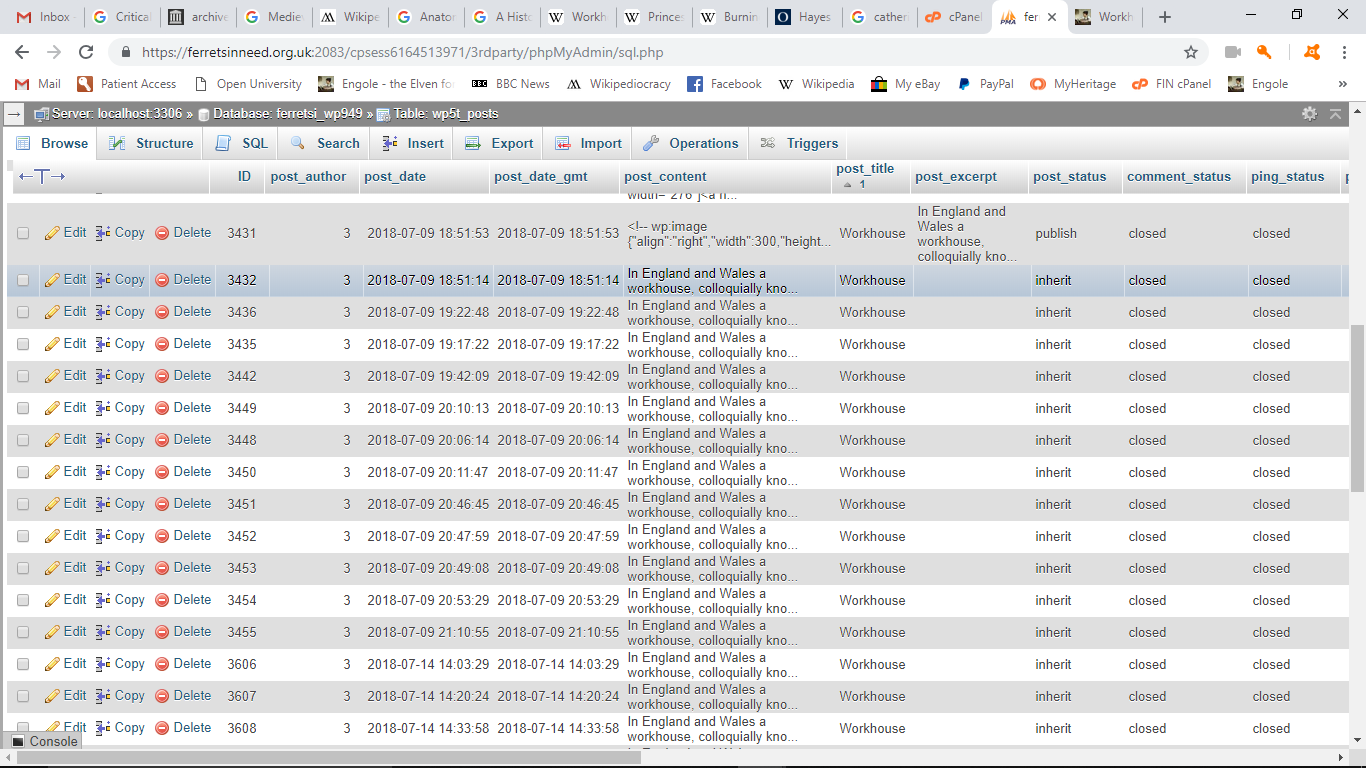
This problem seems to be related to the presence in the database of multiple rows in the wp5t_posts table for a single page. In the attached screenshot there are more than twenty rows for the Workhouse page for instance, which is one of the pages where this problem is manifesting itself consistently.
ecorbett2
on 19 Nov 2018
A page we've created that's on the cusp of being uneditable contains 2048 words, 5 headings, 22 paragraphs, and 36 blocks. This page can be edited so long as the edit doesn't increase the word count, but if it does, the edit is ignored.
That represents 15.3 KB of raw text. Is it just a coincidence that 2048 equals 2 x (2^10)?
ecorbett2
on 21 Nov 2018
This problem has finally been tracked down to a server-side PHP configuration error, nothing to do with Gutenberg, so this can now be considered closed.
ecorbett2
on 23 Nov 2018
@ecorbett2 thanks so much for posting an update! May I ask what the server-side PHP configuration error was so if I see someone else report a similar problem I can try to help them get it sorted with the same solution you used?
designsimply
on 23 Nov 2018
All I know about what the PHP problem was is contained in this email I received from my ISP's support department:
"Seems the issue was actually a PHP Temp directory issue, not a WordPress temp directory issue.
What led us to realising it was a PHP issue and not a WordPress problem is that the admin section keeps logging out if you let it sit there doing nothing.
No other WP install does that, ever.
So, fixed and tested, all now fine."
ecorbett2
on 23 Nov 2018
Interesting. Thanks for the update!
designsimply
on 24 Nov 2018
Related issues
 SchneiderSam
·
88Comments
SchneiderSam
·
88Comments
 jasmussen
·
74Comments
jasmussen
·
74Comments
 ahmadawais
·
101Comments
ahmadawais
·
101Comments
 maddisondesigns
·
79Comments
maddisondesigns
·
79Comments
 mapk
·
92Comments
mapk
·
92Comments