Gutenberg: Restoring Page from autosave loads most recently published Custom Post Type
Describe the bug
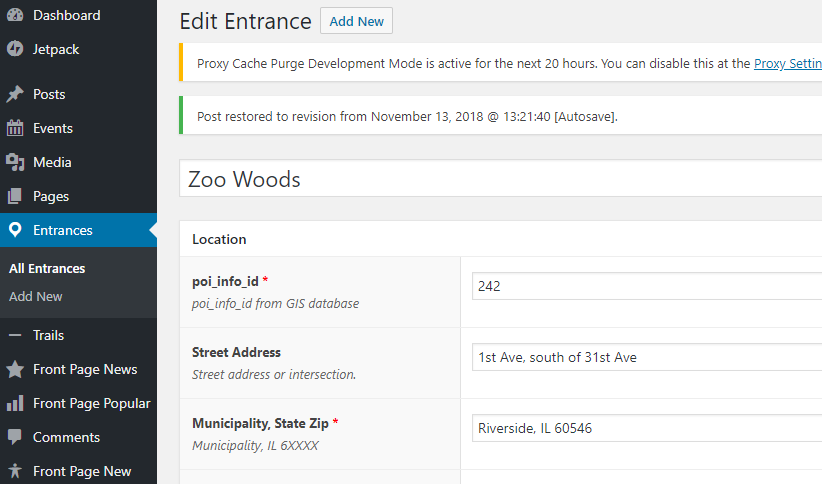
When restoring an autosave of a Page, the most recently published Custom Post Type is loaded instead.
This does not occur with Posts or when I remove the Custom Post Types. The autosave is still restored.
To Reproduce
Steps to reproduce the behavior:
- Edit a page
- Wait for autosave
- Close page editor
- Reopen page editor
- Click "view the autosave"
- Click "restore this autosave"
Expected behavior
The Page reloads with the autosave restored.
Screenshots
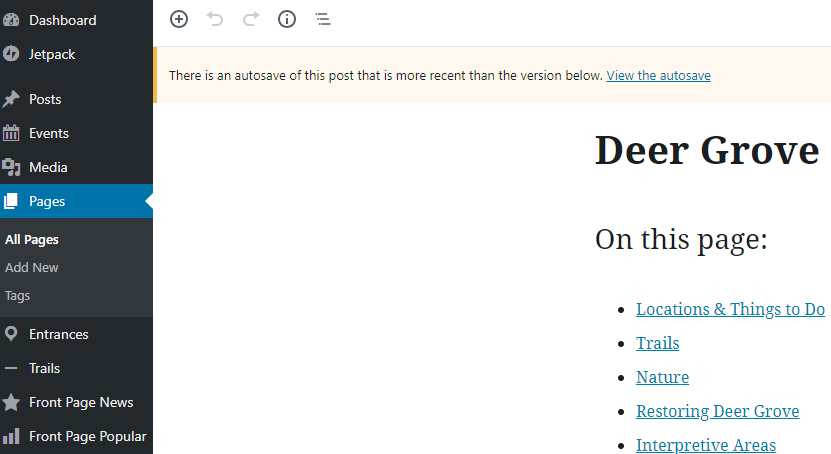
Page with autosave:
Restore the autosave:
Loads a Custom Post Type:
Custom Post Type code
$labels = array(
        'name'                  => _x( 'Entrances', 'Post Type General Name', 'fpdcc' ),
        'singular_name'         => _x( 'Entrance', 'Post Type Singular Name', 'fpdcc' ),
        'menu_name'             => __( 'Entrances', 'fpdcc' ),
        'name_admin_bar'        => __( 'Entrances', 'fpdcc' ),
        'archives'              => __( 'Entrance Archives', 'fpdcc' ),
        'attributes'            => __( 'Entrance Attributes', 'fpdcc' ),
        'parent_item_colon'     => __( 'Parent Entrance:', 'fpdcc' ),
        'all_items'             => __( 'All Entrances', 'fpdcc' ),
        'add_new_item'          => __( 'Add New Entrance', 'fpdcc' ),
        'add_new'               => __( 'Add New', 'fpdcc' ),
        'new_item'              => __( 'New Entrance', 'fpdcc' ),
        'edit_item'             => __( 'Edit Entrance', 'fpdcc' ),
        'update_item'           => __( 'Update Entrance', 'fpdcc' ),
        'view_item'             => __( 'View Entrance', 'fpdcc' ),
        'view_items'            => __( 'View Entrances', 'fpdcc' ),
        'search_items'          => __( 'Search Entrances', 'fpdcc' ),
        'not_found'             => __( 'Not found', 'fpdcc' ),
        'not_found_in_trash'    => __( 'Not found in Trash', 'fpdcc' ),
        'featured_image'        => __( 'Featured Image', 'fpdcc' ),
        'set_featured_image'    => __( 'Set featured image', 'fpdcc' ),
        'remove_featured_image' => __( 'Remove featured image', 'fpdcc' ),
        'use_featured_image'    => __( 'Use as featured image', 'fpdcc' ),
        'insert_into_item'      => __( 'Insert into Entrance', 'fpdcc' ),
        'uploaded_to_this_item' => __( 'Uploaded to this Entrance', 'fpdcc' ),
        'items_list'            => __( 'Entrances list', 'fpdcc' ),
        'items_list_navigation' => __( 'Entrances list navigation', 'fpdcc' ),
        'filter_items_list'     => __( 'Filter Entrances list', 'fpdcc' ),
    );
    $args = array(
        'label'                 => __( 'Entrance', 'fpdcc' ),
        'description'           => __( 'Official entrances', 'fpdcc' ),
        'labels'                => $labels,
        'supports'              => array( 'title', 'custom-fields' ),
        'hierarchical'          => false,
        'public'                => true,
        'show_in_rest'          => true,
        'show_ui'               => true,
        'show_in_menu'          => true,
        'menu_position'         => 21,
        'menu_icon'             => 'dashicons-location',
        'show_in_admin_bar'     => true,
        'show_in_nav_menus'     => false,
        'can_export'            => true,
        'has_archive'           => false,
        'exclude_from_search'   => true,
        'publicly_queryable'    => false,
        'rewrite'               => false,
        'capability_type'       => 'page',
    );
register_post_type( 'fpdcc_entrances', $args );
Desktop (please complete the following information):
- OS: Windows 10
- Chrome 69.0.3497.100
Additional context
- Wordpress 4.9.8
- Gutenberg 4.3.0
 versatilehuman
All 7 comments
I wasn't sure if this is a help request based on your custom code or if you are reporting an issue for all Custom Post Types (CPTs) so I have first tried to replicate the issue using a CPT I have used before by installing the Confit theme and the Jetpack plugin because they have a "Testimonials" CPT. After adding and saving a testimonial, I was unable to replicate the problem using steps from your post to restore an autosave for a page—everything worked normally in my test. (1m9s) Do my testing steps look okay? Do I need to find out how to setup exactly the same CPT that you are using in order to see the problem happen?
Tested with WordPress 4.9.8, Gutenberg 4.3, Jetpack 6.7, and the Confit 1.3.3 theme using Firefox 63.0.1 on macOS 10.13.6.
 designsimply
on 13 Nov 2018
designsimply
on 13 Nov 2018
Testing steps look good. I was providing the custom code thinking that maybe one of the specific CPT attributes was triggering the issue.
I've tested more since posting and it's happening for certain pages, but not all. I can't figure out any pattern so far, but I'll keep looking.
versatilehuman
on 13 Nov 2018
Ok, it looks like it's only occurring on Pages that call the CPT via shortcode.
I failed to mention that the CPT uses the Advanced Custom Fields (ACF) plugin. When I deactivate ACF, any admin Pages that have a block with the shortcode that calls the CPT only partially load:
<!DOCTYPE html>
--
| <!--[if IE 8]>
| <html xmlns="http://www.w3.org/1999/xhtml" class="ie8 wp-toolbar" lang="en-US">
| <![endif]-->
| <!--[if !(IE 8) ]><!-->
| <html xmlns="http://www.w3.org/1999/xhtml" class="wp-toolbar" lang="en-US">
| <!--<![endif]-->
| <head>
| <meta http-equiv="Content-Type" content="text/html; charset=UTF-8" />
| <title>Edit Page ‹ WordPress</title>
| <script type="text/javascript">
| addLoadEvent = function(func){if(typeof jQuery!="undefined")jQuery(document).ready(func);else if(typeof wpOnload!='function'){wpOnload=func;}else{var oldonload=wpOnload;wpOnload=function(){oldonload();func();}}};
| var ajaxurl = '/wp-admin/admin-ajax.php',
| pagenow = 'page',
| typenow = 'page',
| adminpage = 'post-php',
| thousandsSeparator = ',',
| decimalPoint = '.',
| isRtl = 0;
| </script>
| <meta name="viewport" content="width=device-width,initial-scale=1.0">
Not sure if there is an issue with shortcode code:
function entrance_short_link_query($atts, $content = null){
$attributes = shortcode_atts(
        array(
            'id' => null,
            'link' => null
            ), $atts );

        $args = array(
            'post_type'     => 'fpdcc_entrances',
            'posts_per_page'       => '1'
            );
        $entrance_id =  $attributes['id'];
        $link =  $attributes['link'];
        $posts = new WP_Query($args);
    if ($posts->have_posts($entrance_id))
        while ($posts->have_posts($entrance_id)):
            $posts->the_post();
            $out = '<div class="entrance_short">';
            if ($link == 'no') :
            $out .= '<strong>'.get_the_title($entrance_id).'</strong>';
            else:
            $out .= '<strong><a href="'.get_field('poi_page_link', $entrance_id).'">'.get_the_title($entrance_id) .'</a></strong>';
            endif;
            if( get_field('part_of', $entrance_id) ):
            $poi_page_link_id = get_field('poi_page_link', $entrance_id, false);
            $out .='<div class="part_of">(part of ' . get_the_title($poi_page_link_id) . ')</div>';
            endif;
            if( get_field('street_address', $entrance_id) ):
            $out .= '<div class="street_address">'. get_field('street_address', $entrance_id) .'</div> ';
            endif;
            $out .= '<div class="city_zip">'. get_field('city_zip', $entrance_id) .' ';
            if( get_field('web_map_link', $entrance_id) ):
            $out .= '<span>(<a href="'.get_field('web_map_link', $entrance_id).'">view web map<span class="screen-reader-text"> of ' . get_the_title($entrance_id) . '</span></a>)</span>';
            endif;
            $out .= '</div>';
            if( get_field('phone', $entrance_id) ):
            $out .= '<div class="phone">'. get_field('phone', $entrance_id) .'</div>';
            endif;
            $out .= '<p>' . do_shortcode($content) . '</p>';
            $out .='</div><!--.entrance_short-->';
    endwhile;
    else
    return; // no posts found

  wp_reset_postdata();
  return html_entity_decode($out);
}
add_shortcode('entrance_short', 'entrance_short_link_query');
Hi There! Did you manage to solve the issue? It doesn't seem Gutenberg related at first sight. Does it work properly in the classic editor? It might be related to the Rest API if not.
 youknowriad
on 22 Apr 2019
youknowriad
on 22 Apr 2019
No, it still occurs though the behavior changes over time. Recently it loads the last published CPT created by a 3rd party plugin. I thought I tested it in the classic editor at the time but I don't see anything in my notes. Tested just now and it does occur with classic editor plugin activated.
Any leads on places to look for answers appreciated. Thanks!
versatilehuman
on 22 Apr 2019
Replicated this on a fresh jurassic ninja install:
- create site
- install + activate : Yoast SEO (or another plugin that adds fields to posts) + Display-Posts-Shortcode plugins
- Create post - any title + any text
- Create page - any title + Shortcode block (or classic block) with : [display-posts id="POST_ID" include_content="true" wrapper="div" ignore_sticky_posts="true"] + Publish page
- Change anything on the page and Update the page
- Check the Revisions and go back to the previous one (any with the shortcode there)
Result: The user is taken to the post instead of the page, when the revision is restored.
Expected: the user should go back to the page they restored.
This happens if the last post created/edited contains any "custom field". If Yoast is deactivated and a new post is created, this behavior doesn't happen (I believe).
Deactivating the display posts plugin also prevents this from happening on my test site. On the user's reported site the behavior still happened (90% sure) with the display posts plugin disabled though.
user report: 1959009-zd
WordPress 5.2 + Browser tested: Firefox
 mlaetitia
on 10 May 2019
mlaetitia
on 10 May 2019
Thanks for the details steps @mlaetitia This will be very helpful to investigate.
youknowriad
on 10 May 2019
Related issues
 melchoyce
·
95Comments
melchoyce
·
95Comments
 afercia
·
73Comments
afercia
·
73Comments
 mapk
·
80Comments
mapk
·
92Comments
afercia
·
78Comments
mapk
·
80Comments
mapk
·
92Comments
afercia
·
78Comments
Most helpful comment
Replicated this on a fresh jurassic ninja install:
Result: The user is taken to the post instead of the page, when the revision is restored.
Expected: the user should go back to the page they restored.
This happens if the last post created/edited contains any "custom field". If Yoast is deactivated and a new post is created, this behavior doesn't happen (I believe).
Deactivating the display posts plugin also prevents this from happening on my test site. On the user's reported site the behavior still happened (90% sure) with the display posts plugin disabled though.
user report: 1959009-zd
WordPress 5.2 + Browser tested: Firefox