Gutenberg: Incorrect permalinks being generated when saving
Describe the bug
I created a new page called "Gutenberg Blocks", copied in some sample blocks from another site, and when I saved, I ended up with a permalink that didn't have my page name, but instead was called __trashed.
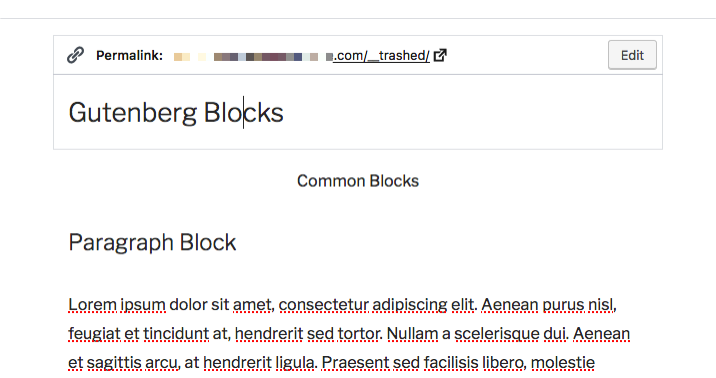
To Reproduce
Steps to reproduce the behavior:
- Create new Page
- Add Title
- Switch to Code Editor
- Copy in some generic sample blocks
- Switch to Visual Editor
- Save page
Expected behavior
Permalinks should contain Page/Post title, as expected
Desktop (please complete the following information):
- OS: macOS Sierra 10.12.6
- Browser: Firefox Quantum 63.0 (64-bit)
- Version: WP 5.0 Beta 1
 maddisondesigns
All 10 comments
I'm not able to replicate this at the moment, though I'm pretty sure I remember running into something like this a week or two ago.
Do you have any more information that could help in replicating this?
 earnjam
on 30 Oct 2018
earnjam
on 30 Oct 2018
I don't have lot of information, sorry. As mentioned above, all I did was created a new page, switched to the Code Editor, copied in some standards blocks from a test page on another site, and then tried to publish and preview.
maddisondesigns
on 31 Oct 2018
I experienced something similar yesterday. It wasn't __trashed, but I updated the title, emptied the permalink, and when it autocompleted it used the previous version of the title instead of the new one. I'll try to capture the flow if I can reproduce it consistently.
 kriskarkoski
on 16 Nov 2018
kriskarkoski
on 16 Nov 2018
We received a report of this issue in the support queue for the WordPress iOS app.
The user notes that their post was mistakenly sent to trash while they were editing in a web browser, using Gutenberg. They edited the post entirely within their web browser.
__trashed-2 appeared in place of the post's correct permalink after they restored it.
I've tried various flows (alternating with trashing/restoring in the browser and the app) but haven't been able to reproduce this issue myself. I'm going to try to get more specific steps from the user but wanted to make a note of the report here.
 SiobhyB
on 28 Nov 2018
SiobhyB
on 28 Nov 2018
I know that I definitely didn't send my post to the trash (and/or subsequently restore it). All I did was created a new page, copied in some content and then saved the page.
maddisondesigns
on 29 Nov 2018
Adding Needs Testing to see if we can get more eyes on this.
@maddisondesigns have you noticed this problem is persistent even after updating to later betas or the RC or was it a super rare case in your experience?
 designsimply
on 30 Nov 2018
designsimply
on 30 Nov 2018
@designsimply It's been fairly rare. It's not something I've been able to reproduce consistently, unfortunately.
maddisondesigns
on 1 Dec 2018
The user I was speaking to came back with some more info:
I was typing text and inserting photos. I lost internet service (in a village in Colombia) and the screen froze. I shut down all windows and restarted the computer. The internet came back on.
When I checked for my previous work it was not in drafts. I found it in trash and restored it.Perhaps a red herring, but it seems like this could be related to connectivity and auto-saving? I spent some more time attempting to replicate this, switching between online/offline, but still wasn't able to.
SiobhyB
on 3 Dec 2018
I tested with WordPress 5.0.1 and Gutenberg 4.7.0 master @ ddac4f3cf today and found that I can see __trashed in the permalink for any draft restored from the trash (published posts do not seem to have the same problem).
Steps to reproduce:
- Go to Settings > Permalink, choose an option that includes
%postname%, and save changes. - Go to Posts > Add New.
- Add a title and some content.
- Click "Save Draft."
- Click Settings > Document > "Move to trash".
- Go to Posts > Trashed and click "Restore" below the post.
- Check the permalink for the post.
Result: __trashed is appended to the slug for drafts restored from the trash. (42s)
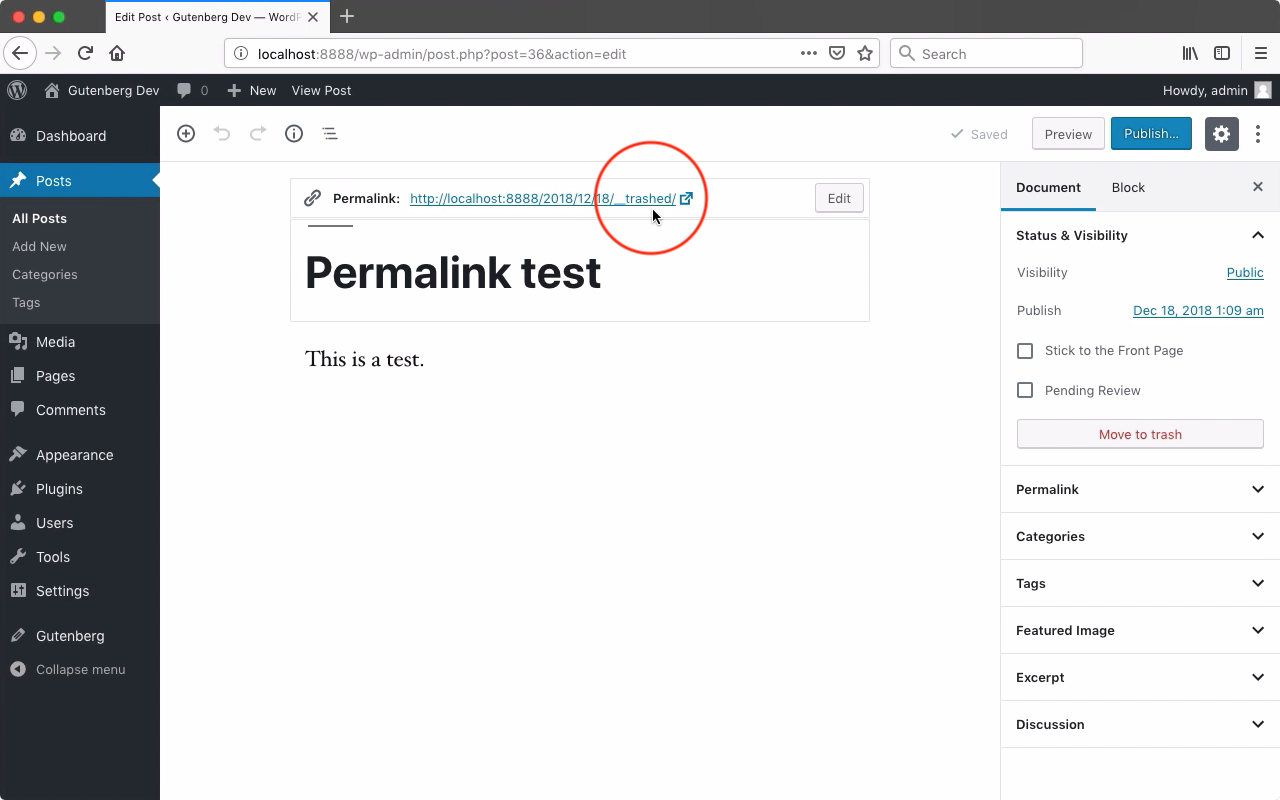
Tested with WordPress 5.0.1 and Gutenberg 4.7.0 master @ ddac4f3cf using Firefox 63.0.3 on macOS 10.13.6.
I also found that it happens even if you trash and restore the post from outside Gutenberg (29s), and I would like to close this issue in favor of https://core.trac.wordpress.org/ticket/40588
@maddisondesigns even though you mentioned you think you definitely didn't send your post to the trash then restore it but also that the problem appears fairly rarely for you, the issue isn't really actionable unless we get more reports or find better steps for replicating the problem. Since we do have something actionable in https://core.trac.wordpress.org/ticket/40588 I would like to close this issue in favor of that one and re-visit your case once the restored drafts problem has been fixed in core. I will also keep an eye out for additional reports that do not involve __trashed appearing in the slug for posts which have not been restored from the trash.
designsimply
on 18 Dec 2018
Could this be related to this? (saving nav menu caused it in this case): https://wordpress.org/support/topic/wordpress-permalinkslug-changed-page-to-page_trashed/
 coreyworrell
on 23 May 2020
coreyworrell
on 23 May 2020
Related issues
maddisondesigns
·
3Comments
 youknowriad
·
3Comments
youknowriad
·
3Comments
 BE-Webdesign
·
3Comments
BE-Webdesign
·
3Comments
 nylen
·
3Comments
nylen
·
3Comments
 moorscode
·
3Comments
moorscode
·
3Comments