Gutenberg: Disabling custom font size not working
Describe the bug
I added add_theme_support( 'disable-custom-font-sizes' ); to my theme , but the custom font sizes field still appears in my theme.
Screenshots

Desktop (please complete the following information):
- Browser Chrome
- Version 69
Additional context
- 4.0
 salamalala
All 7 comments
Hey @salamalala,
this is a feature of Gutenberg 4.1. see #10620, which is not released yet.
You can download the Release Candidate or wait a few days for the release
 Soean
on 23 Oct 2018
Soean
on 23 Oct 2018
Ok thanks @Soean. Because it's in the handbook (https://wordpress.org/gutenberg/handbook/extensibility/theme-support/#disabling-custom-font-sizes) I assumed it would be already in the current version.
salamalala
on 24 Oct 2018
Im running 4.3.0 and neither add_theme_support( 'disable-custom-font-sizes' ) or add_theme_support( 'disable-custom-colors' ); seem to work for me
 lukehm
on 13 Nov 2018
lukehm
on 13 Nov 2018
@lukehm would you be able to try with 4.4 and, if the problem is still happening for you, create a new issue and include some steps for testing? I can help test but need more explicit testing steps for technical cases where custom code is required. Walk me through it with steps and I'm keen to help test!
 designsimply
on 19 Nov 2018
designsimply
on 19 Nov 2018
@designsimply Steps to reproduce, using a clean WP installation:
- Activate Gutenberg.
- Add these two lines to functions.php in twentyseventeen:
add_theme_support( 'disable-custom-font-sizes' ); add_theme_support( 'disable-custom-colors' ); - Edit the Gutenberg example post. Click on some text.
Font Size, Background Color, and Text Color are still there.
 swinggraphics
on 19 Nov 2018
swinggraphics
on 19 Nov 2018
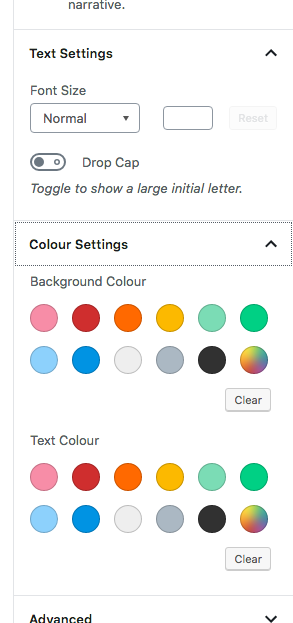
Ive done that still seeing all items
lukehm
on 29 Nov 2018
As of wordpress 5.0, disabling colors works but there is still a list of colors : we need to add_theme_support( 'editor-color-palette' ); before disabling it. Weird ?
The disabling of custom font-sizes works too but there is no way to hide the entire "text settings" block" :'(
All this functions are fired in the "after_theme_setup" action.
 nderambure
on 12 Dec 2018
nderambure
on 12 Dec 2018
Related issues
 jasmussen
·
3Comments
jasmussen
·
3Comments
 davidsword
·
3Comments
davidsword
·
3Comments
 pfefferle
·
3Comments
jasmussen
·
3Comments
pfefferle
·
3Comments
jasmussen
·
3Comments
 moorscode
·
3Comments
moorscode
·
3Comments
Most helpful comment
As of wordpress 5.0, disabling colors works but there is still a list of colors : we need to
add_theme_support( 'editor-color-palette' );before disabling it. Weird ?The disabling of custom font-sizes works too but there is no way to hide the entire "text settings" block" :'(
All this functions are fired in the "after_theme_setup" action.