Gutenberg: Editor width is overridden by the default width at bottom in source code of editor.
Describe the bug
My custom stylesheet for the Gutenberg editor works and loads, but noticed that my editor width is being overridden with the default width of 610px. Looking at the source code, the default style loads at the bottom of the page, therefore, my custom width is ignored unless I add !important to my own width.
To Reproduce
Steps to reproduce the behavior:
Adding this to a theme's editor css file for gutenberg:
body.gutenberg-editor-page .editor-post-title__block,
body.gutenberg-editor-page .editor-default-block-appender,
body.gutenberg-editor-page .editor-block-list__block {
    max-width: 825px;
}
Expected behavior
The editor should be resized from the default 610px to 825px.
Screenshots
See the attached image below in Additional info.
Desktop (please complete the following information):
- OS: Windows 10
- Browser Chrome
- Version 69.0.3497.92
Smartphone (please complete the following information):
N/A
Additional context
- Gutenberg version 3.8.0.
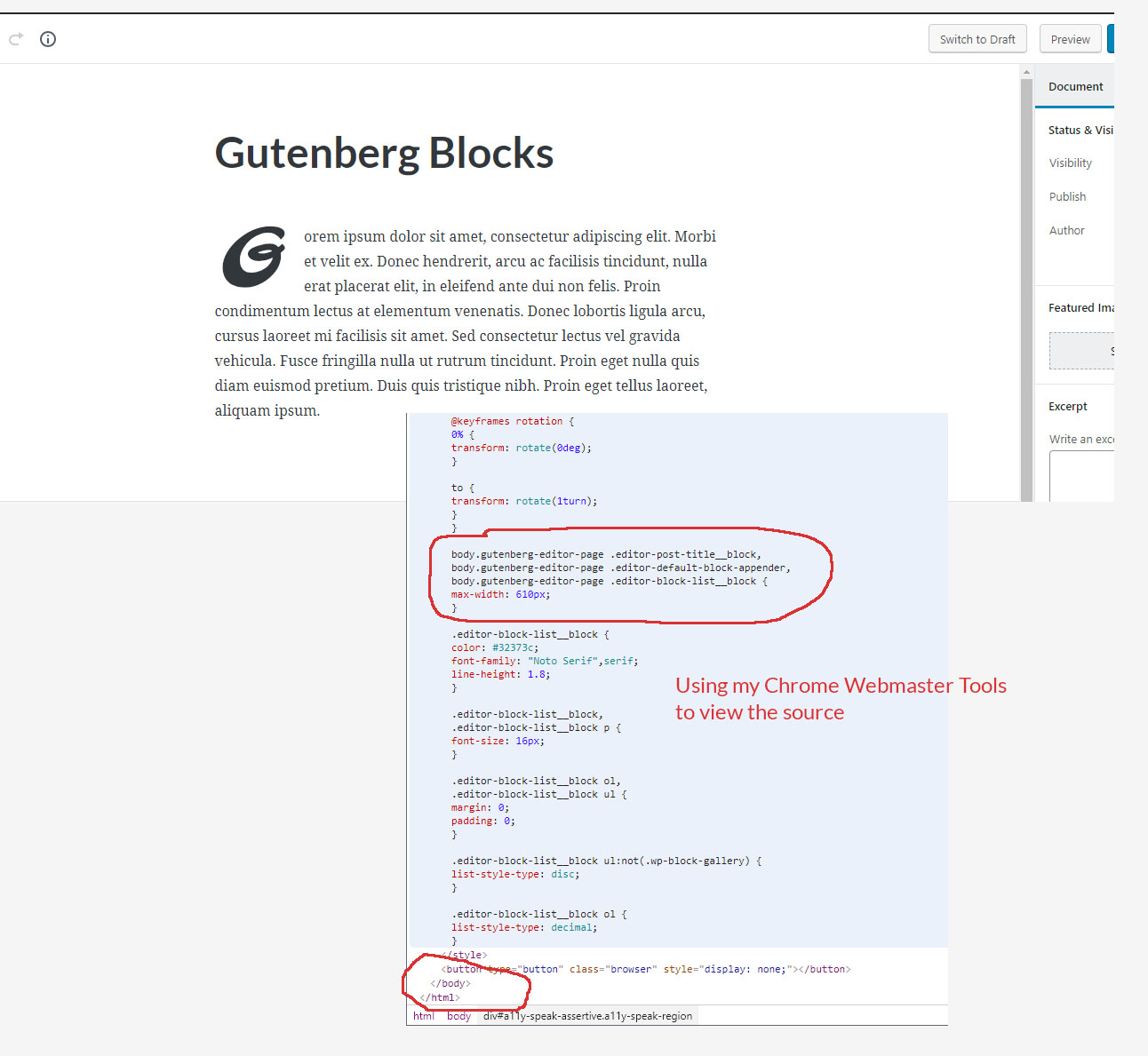
UPDATE: Actualy, the inline styles from the default source are causing issues because it's loading at the bottom of the source code. Even my fonts are being overridden. The solution here is to not have this inline stylesheet load at the end of the source.
 Mocha365
All 9 comments
Tested and confirmed that adding a stylesheet then adding CSS to style-editor.css does not override the width of the editor without adding !important.
 designsimply
on 17 Sep 2018
designsimply
on 17 Sep 2018
Try using the new editor styles instead see https://wordpress.org/gutenberg/handbook/extensibility/theme-support/#editor-styles
 youknowriad
on 17 Sep 2018
youknowriad
on 17 Sep 2018
~Adding the Needs Technical Feedback tag in case there is a better way to add a custom editor width compared to what we're testing here.~ ← whoops! spoke too soon :)
@youknowriad forgive me for the basic question, what do I do next after adding add_theme_support( 'editor-styles' );? I tried adding things like h2 { color: red; } and html { width: 800px; } to files like style-editor.css or editor-styles.css and it didn't work but I am probably doing it wrong!
designsimply
on 17 Sep 2018
Figured it out (with some help!), to update the content width for the editor in a given theme:
- Add the following to the theme's
functions.phpfile:
add_theme_support( 'editor-styles' );
add_editor_style( 'editor-style.css' );
- Add this to
editor-style.cssin the theme folder:
.wp-block { width: 852px; }
As far as I can tell, and even though this works, doing .wp-block (width: 825px;) is incorrect as the documentation states that to to change the editor width, you add this:
/* Main column width */
body.gutenberg-editor-page .editor-post-title__block,
body.gutenberg-editor-page .editor-default-block-appender,
body.gutenberg-editor-page .editor-block-list__block {
    max-width: 720px;
}

/* Width of "wide" blocks */
body.gutenberg-editor-page .editor-block-list__block[data-align="wide"] {
    max-width: 1080px;
}

/* Width of "full-wide" blocks */
body.gutenberg-editor-page .editor-block-list__block[data-align="full"] {
    max-width: none;
}
Based on my testing so far, the editor stylesheet gets loaded in the editor with .editor-block-list__block prepended to each selector. So this group:
body.gutenberg-editor-page .editor-post-title__block,
body.gutenberg-editor-page .editor-default-block-appender,
body.gutenberg-editor-page .editor-block-list__block
Is loaded in my editor stylesheet as:
.editor-block-list__block.gutenberg-editor-page .editor-post-title__block,
.editor-block-list__block.gutenberg-editor-page .editor-default-block-appender,
.editor-block-list__block.gutenberg-editor-page .editor-block-list__block
Basically the body is being stripped and replaced with .editor-block-list_block to each line. Therefore, this does not work and is being overridden with the default Gutenberg inline stylesheet, which should be:
body.gutenberg-editor-page .editor-post-title__block,
body.gutenberg-editor-page .editor-default-block-appender,
body.gutenberg-editor-page .editor-block-list__block
....which is what shows in the default inline at the bottom of the source code.
Mocha365
on 18 Sep 2018
The documentation probably needs to be updated!
designsimply
on 20 Sep 2018
Assigning a fixed width here doesn't really work very well. I think you still need to tackle the wrappers noted in the current documentation, as mentioned by @Mocha365. Those will enable a nice fluid width editor area at different sizes (wide and full width).
But to make those wrappers work now you need to use !important unfortunately as they are being overwritten (whereas they didn't use to be).
 onetrev
on 3 Oct 2018
onetrev
on 3 Oct 2018
@Mocha365 @onetrev I'm circling back to note that the documentation for how to set editor width is getting an update in #10956. 😍
Check it out: https://github.com/WordPress/gutenberg/pull/10956#issuecomment-432310648
designsimply
on 25 Oct 2018
Is it possible to set multiple widths depending on the page/post template being used? I have post/pages with sidebar and without, so the width differs. I would like the editor to be as close to the live version as possible. But so far it seems like you can only set the width using exactly wp-block, if you try to add a selector in front of it, it simply doesn't work, for example:
.wp-block { width:750px; }
.page-template-fullwidth .wp-block { width:1080px; }
 sebrosen
on 2 Nov 2018
sebrosen
on 2 Nov 2018
Related issues
 ellatrix
·
3Comments
ellatrix
·
3Comments
 moorscode
·
3Comments
moorscode
·
3Comments
 pfefferle
·
3Comments
pfefferle
·
3Comments
 cr101
·
3Comments
cr101
·
3Comments
 hedgefield
·
3Comments
hedgefield
·
3Comments
Most helpful comment
Figured it out (with some help!), to update the content width for the editor in a given theme:
functions.phpfile:editor-style.cssin the theme folder: