I’d like the ability to customize my options for headings, as H5 and H6 are my primary go-tos and neither seems present in Gutenberg. Thank you!
 AtwoodEditor
All 2 comments
You can set a heading to the h5 or h6 options in the block inspector:
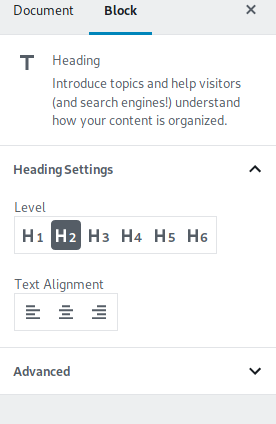
However, it sounds like you are using the headings wrong. Headings have semantic meaning. An h2 represents a heading for a section/chapter of the main article/post/page (which uses an h1). An h3 is a heading for a sub-section (like a section of a chapter). An h4 is a heading of a sub-sub-section, and so on. If you want to have small looking headings that are really just 2nd-level headings, then you should use CSS. Your theme may support changing the h2 size in the Theme Customizer, and if not you could use the Additional CSS box in the Customizer.
https://codex.wordpress.org/CSS#Custom_CSS_in_WordPress
Proper usage of headings is good for people using accessibility tools such as screen readers, as well as for search engine optimization (SEO).
Additional info:
https://developer.mozilla.org/en-US/docs/Web/HTML/Element/Heading_Elements
https://www.w3.org/TR/html53/sections.html#the-h1-h2-h3-h4-h5-and-h6-elements
 ZebulanStanphill
on 2 Sep 2018
ZebulanStanphill
on 2 Sep 2018
thanks for answering this so thoroughly @ZebulanStanphill!
 0aveRyan
on 4 Sep 2018
0aveRyan
on 4 Sep 2018
Related issues
 youknowriad
·
3Comments
youknowriad
·
3Comments
 wpalchemist
·
3Comments
wpalchemist
·
3Comments
 hedgefield
·
3Comments
hedgefield
·
3Comments
 moorscode
·
3Comments
moorscode
·
3Comments
 spocke
·
3Comments
spocke
·
3Comments
Most helpful comment
You can set a heading to the

h5orh6options in the block inspector:However, it sounds like you are using the headings wrong. Headings have semantic meaning. An h2 represents a heading for a section/chapter of the main article/post/page (which uses an h1). An h3 is a heading for a sub-section (like a section of a chapter). An h4 is a heading of a sub-sub-section, and so on. If you want to have small looking headings that are really just 2nd-level headings, then you should use CSS. Your theme may support changing the h2 size in the Theme Customizer, and if not you could use the Additional CSS box in the Customizer.
https://codex.wordpress.org/CSS#Custom_CSS_in_WordPress
Proper usage of headings is good for people using accessibility tools such as screen readers, as well as for search engine optimization (SEO).
Additional info:
https://developer.mozilla.org/en-US/docs/Web/HTML/Element/Heading_Elements
https://www.w3.org/TR/html53/sections.html#the-h1-h2-h3-h4-h5-and-h6-elements