Gutenberg: Gutenberg will not upload images
Describe the bug
When I am using the Gutenberg page editor and try to upload an image, it will not load. I get an error message.
To Reproduce
Here's a screencast video of the problem:
Unable to display content. Adobe Flash is required.
https://www.screencast.com/t/B32tdZSN
Expected behavior
I would expect wordpress to upload the file and show me my other files that have already been uploaded to my Media Library (they are not visible when I open the library, but I can see them on my web pages)
Screenshots
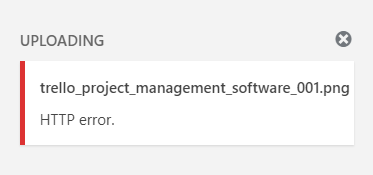

Desktop (please complete the following information):
- OS: Windows
- Browser: Chrome
- Version: Version 68.0.3440.106 (Official Build) (64-bit)
 MindfulTrader-Jeff
All 10 comments
Arch Linux 4.18.1
Firefox 61.0.2
Gutenberg 3.6.2
Wordpress 5.0-alpha-43572
Cannot reproduce with https://static1.squarespace.com/static/54823afbe4b023af78555735/t/54e3dfe3e4b04edd584762b4/1424220131955/Darbee4k-stream_hd100.png
 onliniak
on 19 Aug 2018
onliniak
on 19 Aug 2018
I tested uploading a .png file into a post using WordPress 4.9.8 and Gutenberg 3.6.2 and it worked in my test.
How was your trello_project_management_software_001.png file created? Is it definitely a .png time or could it have been renamed?
Are you able to try testing with the example file from the comment above?
 designsimply
on 20 Aug 2018
designsimply
on 20 Aug 2018
Sheri,
It must have had something to do with the file creation. I created it on
Clipular, from a screen shot.
Your image uploaded perfectly well.
Jeffrey
MindfulTrader-Jeff
on 20 Aug 2018
🤔 strange! Does the problem happen with every screenshot you take with Clipular or was trello_project_management_software_001.png the only file with the problem?
Aside: I tested taking a screenshot using the demo option at https://www.clipular.com/welcome and then clicking the "Get Started" button and right-clicking on the image to save it—when I uploaded that test image to a Gutenberg post, it worked without error in my test. I used WordPress 4.9.8 and Gutenberg 3.6.2 and Chrome 68.0.3440.106 on macOS 10.13.6 for testing.
designsimply
on 21 Aug 2018
The day that I was having problems, it was with all images. Today
everything worked fine. I don't know what the difference was. I did
everything the same.
MindfulTrader-Jeff
on 21 Aug 2018
I have added a lot of addition information about this bug here: https://github.com/WordPress/gutenberg/issues/9142#issuecomment-416342295
 zethzeth
on 27 Aug 2018
zethzeth
on 27 Aug 2018
Seems related to this patch made in 4.9.8: https://core.trac.wordpress.org/ticket/43751
I've reported the bug here: https://core.trac.wordpress.org/ticket/44864
 JakePT
on 30 Aug 2018
JakePT
on 30 Aug 2018
Looks like this issue was patched in core but we're waiting on a release. Since there's nothing else for us to do here I'm closing the issue, though it won't be fixed until the next version of WordPress ships.
 tofumatt
on 15 Sep 2018
tofumatt
on 15 Sep 2018
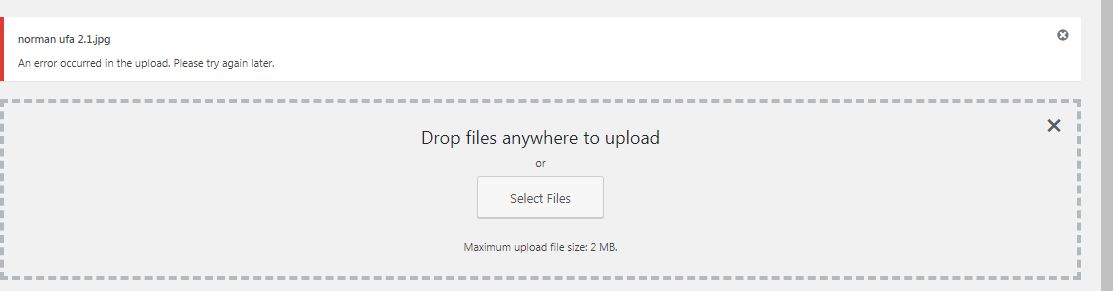
Having the same issue here. Unable to upload imag both jpg and png in Wordpress 5.0 with Gutenberg editor.
 abeludoh
on 9 Dec 2018
abeludoh
on 9 Dec 2018
Please try to upload from mozila (firefox)browser
 malaniraz
on 28 Feb 2019
malaniraz
on 28 Feb 2019
Related issues
 wpalchemist
·
3Comments
wpalchemist
·
3Comments
 pfefferle
·
3Comments
pfefferle
·
3Comments
 aduth
·
3Comments
aduth
·
3Comments
 mhenrylucero
·
3Comments
mhenrylucero
·
3Comments
 davidsword
·
3Comments
davidsword
·
3Comments
Most helpful comment
Seems related to this patch made in 4.9.8: https://core.trac.wordpress.org/ticket/43751
I've reported the bug here: https://core.trac.wordpress.org/ticket/44864