Gutenberg: Block with 3 column template renders with 3 columns
Describe the bug
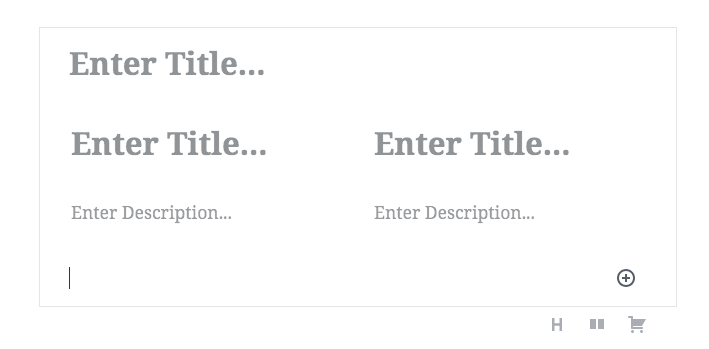
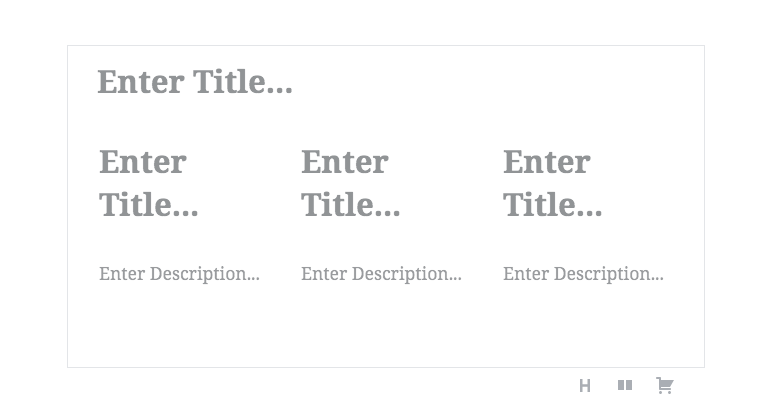
The template below should produce a 3 column layout when added. It creates a two column layout until you edit as html then switching back to visual the 3rd column appears until page reload.
const TEMPLATE = [
    [ 'core/heading', {} ],
    [ 'core/columns', {}, [
        [ 'core/column', {}, [
            [ 'core/heading', {} ],
            [ 'core/paragraph', {} ],
        ] ],
        [ 'core/column', {}, [
            [ 'core/heading', {} ],
            [ 'core/paragraph', {} ],
        ] ],
        [ 'core/column', {}, [
            [ 'core/heading', {} ],
            [ 'core/paragraph', {} ],
        ] ],
    ] ],
];
<InnerBlocks template={ TEMPLATE } />
Gist of full block: https://gist.github.com/belcherj/b458cba2a26f6a98e75687b187bb42bd
To Reproduce
Steps to reproduce the behavior:
- Add the block in the gist above to your site
- Go to Gutenberg editor and add the block
- Observe that only two columns appear
- See error
Expected behavior
Three columns should appear.
Screenshots
This is the error state:
Should look like this, looks like this after going to html view and back to visual until page is reloaded.
Desktop (please complete the following information):
- OS: All
- Browser Chrome
- Version Latest
Additional context
- Gutenberg Version: 3.5.0
 belcherj
All 3 comments
There's a columns attribute which you can pass to the template explicitly. This ensures the block renders with all the columns :)
It looks like the block doesn't infer the column count from the data passed in.
For example:
const TEMPLATE = [
    [ 'core/heading', {} ],
    [ 'core/columns', {
        columns: 3,
    }, [
        [ 'core/column', {}, [
            [ 'core/heading', {} ],
            [ 'core/paragraph', {} ],
        ] ],
        [ 'core/column', {}, [
            [ 'core/heading', {} ],
            [ 'core/paragraph', {} ],
        ] ],
        [ 'core/column', {}, [
            [ 'core/heading', {} ],
            [ 'core/paragraph', {} ],
        ] ],
    ] ],
];
 haszari
on 23 Aug 2018
haszari
on 23 Aug 2018
is there anyway we can control width of Column too.
like i want to have image(core/image) in one column and content (core/paragraph) in another.
i can have them in 1:3 ratio ?
 jiteshdhamaniya
on 31 Dec 2018
jiteshdhamaniya
on 31 Dec 2018
is there anyway we can control width of Column too.
like i want to have image(core/image) in one column and content (core/paragraph) in another.
i can have them in 1:3 ratio ?
core/column has a width attribute taking a number between 0 – 100(%). see here.
btw. i can't confirm the columns attribute in core/columns. maybe it got removed?
 jnz31
on 29 Jan 2020
jnz31
on 29 Jan 2020
Related issues
 nylen
·
3Comments
nylen
·
3Comments
 maddisondesigns
·
3Comments
maddisondesigns
·
3Comments
 davidsword
·
3Comments
davidsword
·
3Comments
 JohnPixle
·
3Comments
JohnPixle
·
3Comments
 aaronjorbin
·
3Comments
aaronjorbin
·
3Comments
Most helpful comment
There's a
columnsattribute which you can pass to the template explicitly. This ensures the block renders with all the columns :)It looks like the block doesn't infer the column count from the data passed in.
For example: