Gutenberg: Layout Settings - not allowing fullwidth / no sidebar
In my Layout Settings section, selecting the layout with no sidebars or columns results in the default layout (which for me includes the right sidebar).
To Reproduce
Steps to reproduce the behavior:
- In page editor, scroll down to the Layout Settings section.
- Next to Select Layout, choose the one with no sidebars or separate columns.
- Save it.
- See that it still has sidebar. :(
Expected behavior
Page will not have sidebar.
Computer Info:
- iOS - Yosemite
- Chrome browser - fully updated on version 67
- WP - fully updated on version 4.9.8
- Gutenberg - version 3.4.0
 lauracgeorge
All 4 comments
I don't see Layout Settings, could you be referring to Document Settings > Page Attributes > Template? (screenshot)
May I ask which theme you are testing with or if you are using a plugin that adds customized Layout Settings?
 designsimply
on 9 Aug 2018
designsimply
on 9 Aug 2018
@designsimply So sorry! Perhaps it is another plugin too. I've had my site for so long and plugins are often designed to flow into your standard WP dashboard so seamlessly that I can't remember which things are native to WP and which aren't. Let me attach a screenshot for you:
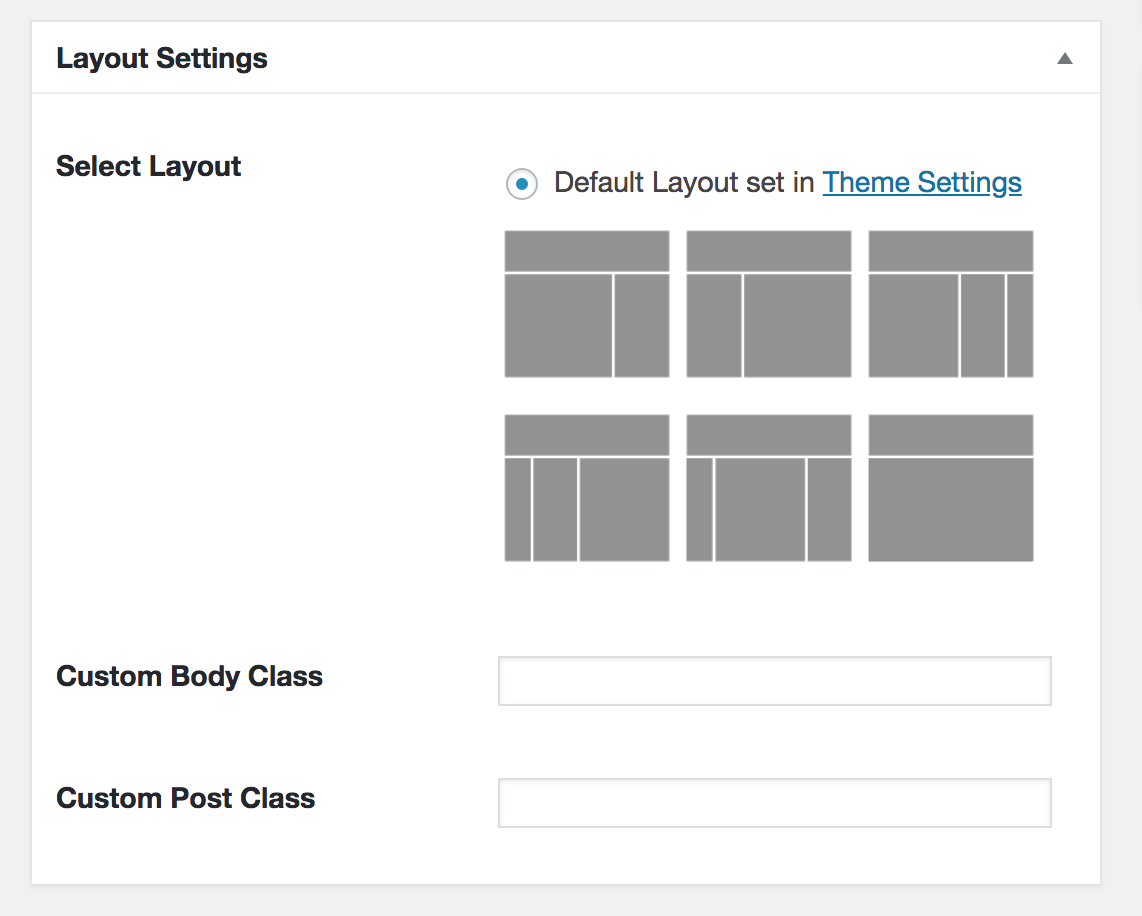 I think it's the same thing as Page Attributes > Template like in your screenshot, just that I've somehow got it pulled out with some little pictures and maybe a few more options.
My theme is a custom child theme on the Genesis framework. I'm not sure which plugin this would be, but if it's a plugin then alas! I'm sure I'm up to the mercy of the plugin creators to make the necessary coding changes to get everything running smoothly again. In the meantime, I've deactivated Gutenberg to save me the headache for another couple weeks at least.
lauracgeorge
on 9 Aug 2018
Hi, @lauracgeorge!
This sounds like it may relate to the custom Genesis child theme you are using.
If you are still unable to select the full-width page layout from the Genesis layout options only when Gutenberg is active, you are welcome to get in touch with the StudioPress support team to share further information (such as the URL of the page this is affecting): https://my.studiopress.com/help/. We'd be happy to look into this further for you.
 nickcernis
on 12 Oct 2018
nickcernis
on 12 Oct 2018
Thank you @nickcernis!!
Closing with Nick's note to post details to https://my.studiopress.com/help/.
designsimply
on 8 Feb 2019
Related issues
 aaronjorbin
·
3Comments
aaronjorbin
·
3Comments
 franz-josef-kaiser
·
3Comments
franz-josef-kaiser
·
3Comments
 pfefferle
·
3Comments
pfefferle
·
3Comments
 cr101
·
3Comments
cr101
·
3Comments
 spocke
·
3Comments
spocke
·
3Comments
Most helpful comment
Hi, @lauracgeorge!
This sounds like it may relate to the custom Genesis child theme you are using.
If you are still unable to select the full-width page layout from the Genesis layout options only when Gutenberg is active, you are welcome to get in touch with the StudioPress support team to share further information (such as the URL of the page this is affecting): https://my.studiopress.com/help/. We'd be happy to look into this further for you.