Gutenberg: When the interface is RTL, should code editors also be RTL?
Over the course of some testing, I noted that Gutenberg isn't being consistent with the way it treats code when the interface language is RTL.
If you edit a block as HTML, it reads right-to-left:

The Code block also reads right-to-left:
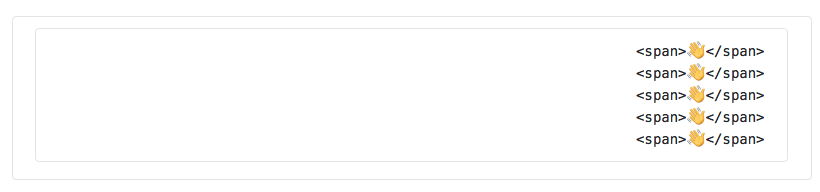
Meanwhile, the code in the Custom HTML block reads left-to-right:
_(The visual issue below has been filed separately in #8680)_

I'm not fluent in any languages that read right-to-left, but my guess is that we should be consistent about this one way or another. Can someone clarify which we should use?
Thanks!
 kjellr
All 6 comments
Code for RTL locales should read LTR.
There are some screenshots in #WP44053 that highlight when and where code should be LTR for RTL locales.
 ntwb
on 8 Aug 2018
ntwb
on 8 Aug 2018
Thanks for including that thread, @ntwb — that's helpful. It sounds like the examples I included above should be LTR in RTL locales then.
One more clarifying question: In the other thread, you noted:
To clarify, the "Text" editor is not a "code editor", you can add code but it is designed as a "plain text" editor that allows you to inspect any HTML code that may be within the text of your post.
In the case of Gutenberg however, we call the "Text" editor the "Code" editor. It currently reads RTL in RTL locales. Should that be LTR as well?
kjellr
on 8 Aug 2018
In the case of Gutenberg however, we call the "Text" editor the "Code" editor. It currently reads RTL in RTL locales. Should that be LTR as well?
Yes, I think it should be, here's a screenshot of it from https://he.wordpress.org/gutenberg/

cc: @yoavf
ntwb
on 9 Aug 2018
It's tricky. Once you start adding RTL text (i.e in Hebrew), then editing it while in LTR mode becomes very difficult.
That's just how the mix of ltr HTML code and RTL text works.
The way it's solved n the classic editor is by adding a text direction button to enable users to quickly switch between directions. cc @azaozz
 yoavf
on 9 Aug 2018
yoavf
on 9 Aug 2018
Can someone clarify for me what action needs to be taken here for this issue to be closed?
 aduth
on 31 May 2019
aduth
on 31 May 2019
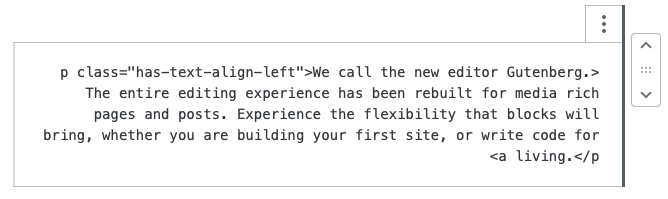
Another instance of this is when you chose "Edit as HTML" for an individual block in an RTL context:

 koke
on 7 Nov 2019
koke
on 7 Nov 2019
Related issues
 maddisondesigns
·
3Comments
maddisondesigns
·
3Comments
 mhenrylucero
·
3Comments
mhenrylucero
·
3Comments
 aaronjorbin
·
3Comments
aaronjorbin
·
3Comments
 hedgefield
·
3Comments
hedgefield
·
3Comments
 cr101
·
3Comments
cr101
·
3Comments
Most helpful comment
Code for RTL locales should read LTR.
There are some screenshots in #WP44053 that highlight when and where code should be LTR for RTL locales.