Describe the bug
This is probably not a Gutenberg bug, but it did bring up this issue of editing the slug.
I use Yoast SEO and edited the slug using that plugin tool (as Gutenberg didn't have an obvious place to do it?) The slug did not save, and the post had the mydomin.com/?p=xx address.
To Reproduce
Steps to reproduce the behavior:
- Go to 'new post'
- Add some content
- Edit the slug with Yoast SEO plugin widget (as no option - feature request?)
- Edit the time to publish to a future time, for me is was 7am next day
- Press 'Schedule'
- The Post URL remains the domain.com/?p=post_id
Expected behavior
A. Ability to edit the slug (without using Yoast SEO plugin); and/or
B. Yoast plugin hook to edit the slug to work with the plugin/ editor
Desktop (please complete the following information):
- OS: Windows 10
- Browser Chrome
- Version 67.0.3396.99
Additional context
- Gutenberg Version 3.4.0
 cclambie
All 9 comments
There's is an option to edit the slug. It appears when you click the title of the post. I'm closing for now, let me know how this works for you. Thanks.
 youknowriad
on 7 Aug 2018
youknowriad
on 7 Aug 2018
Thanks @youknowriad I see it now, that is not intuitive at all, but fair enough, I guess users could learn to find it there.
cclambie
on 10 Aug 2018
Yes, it needs some iteration and there are open issues considering updates. Thanks for the feedback.
youknowriad
on 10 Aug 2018
Just wanted to +1 on this issue. I think where the slug editing takes place is fine, but hover/click-in visibility is a poor choice.
Glad Google found this thread so I could find the answer!
 JasonPokines
on 12 Sep 2018
JasonPokines
on 12 Sep 2018
This is a really poor experience. I looked all over the place for this. Clicked, poked, and dug for 3 minutes before googling. This needs to be fixed.
I'd suggest an option at the Document level. Seems most appropriate.
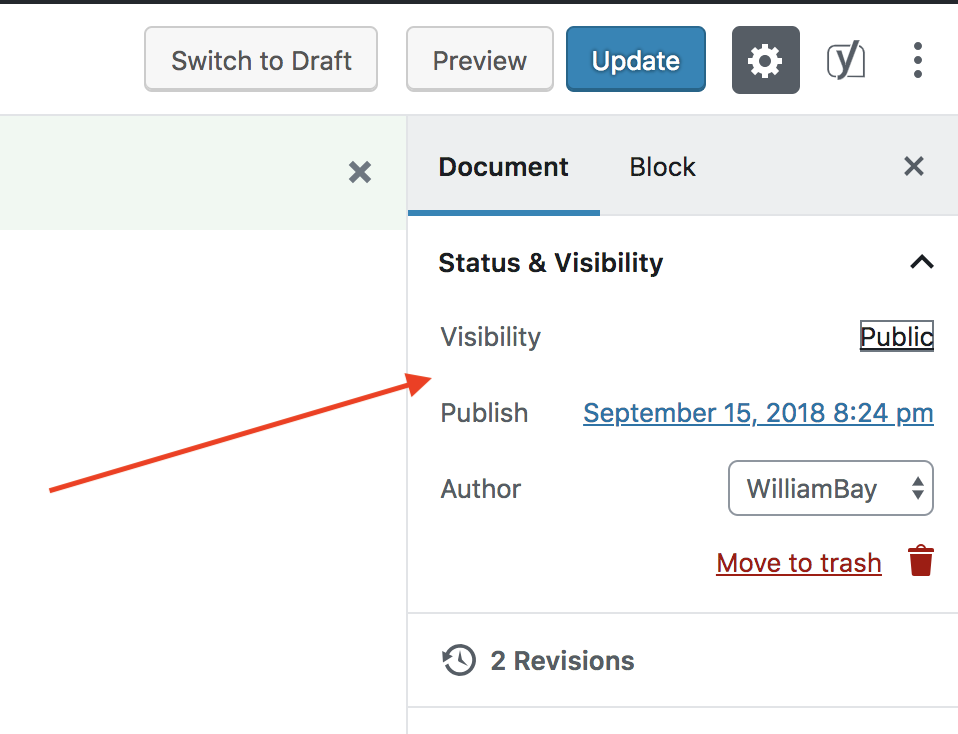
 bahia0019
on 20 Sep 2018
bahia0019
on 20 Sep 2018
This is a really poor experience. I looked all over the place for this. Clicked, poked, and dug for 3 minutes before googling. This needs to be fixed.
I'd suggest an option at the Document level. Seems most appropriate.
Totally agree. It is the aim to make it simpler, isn't it?
 itssri
on 30 Sep 2018
itssri
on 30 Sep 2018
Also coming here to say that it's not intuitive and thank god for Google bringing me here. Additionally, if you have a long prefix like we do four our blog, the box to place the permalink is SUUUUPER tiny. Not a good UI.

 pinksharpii
on 9 Nov 2018
pinksharpii
on 9 Nov 2018
Can someone clue me in here, I'm working with a CPT and I've been looking for this mysterious way to edit the slug for a very long time. No amount of clicking or poking around seems to reveal it to me.
 Hube2
on 3 Jan 2019
Hube2
on 3 Jan 2019
To view and edit the slug, you need to be in the Code Editor view.
- Click on the Show more tools button on the upper right corner of the toolbar and click on Code Editor

- Click on the title and the slug/permalink will appear above.

In either Visual or Code Editor, clicking on the title also shows the permalink on the sidebar.

 stormwild
on 3 Jan 2019
stormwild
on 3 Jan 2019
Related issues
 spocke
·
3Comments
spocke
·
3Comments
 moorscode
·
3Comments
moorscode
·
3Comments
 maddisondesigns
·
3Comments
maddisondesigns
·
3Comments
 nylen
·
3Comments
nylen
·
3Comments
 wpalchemist
·
3Comments
wpalchemist
·
3Comments
Most helpful comment
This is a really poor experience. I looked all over the place for this. Clicked, poked, and dug for 3 minutes before googling. This needs to be fixed.
I'd suggest an option at the Document level. Seems most appropriate.