Gutenberg: Link box stay open after pressing enter, cursor jumps to top of page
After using the editor to link text, the pop up link box stays open and the cursor returns to the top of the post/page instead of remaining where the edit was made.
To Reproduce
Highlight text, click link icon, add link, hit enter. Cursor/page moves to the top of the document, link box stays open until page is refreshed.
Expected behavior
Link box should close and the cursor/page location should stay in place.
Desktop (please complete the following information):
- OS: Mac High Sierra 10.13.14
- Browser Chrome
- Version 68
Gutenberg Version 3.4.0
 commandrea
All 12 comments
Yes, it happened to me also. Had to add it manually.
OS Windows 10
Browser: Mozilla Firefox
 oscarcarrillou
on 3 Aug 2018
oscarcarrillou
on 3 Aug 2018
Yeah, I've had this happen. It also doesn't always add the link, so I've been doing most of them manually.
OS: Sierra/Windows 10
Browser: Safari, Chrome
Multiple versions, including the most recent
 ltbennight
on 3 Aug 2018
ltbennight
on 3 Aug 2018
Good find! I tested and found some slightly different behavior. In my case, I couldn't get the link button to work at all if I switched to "Fix Toolbar to Top" _during the same session_ where I try to add a link.
Are you using a fixed toolbar by chance?
Video: 1m55s
Seen at http://alittletestblog.com/wp-admin/post.php?post=14112&action=edit&revision=14122 running WordPress 4.9.8 and Gutenberg 3.4.0 using Chrome 67.0.3396.99 on macOS 10.13.6.
 designsimply
on 4 Aug 2018
designsimply
on 4 Aug 2018
I could not reproduce this. Added paragraph, pasted text, selected text, click on link icon, typed in url, pressed return. Box closes, No jump, and I was able to continue typing as before.
Chrome 67 on Windows 7
version 4.9.8,
Version 3.4.0
 abwdvm
on 4 Aug 2018
abwdvm
on 4 Aug 2018
@abwdvm thanks for testing! Do you notice any problems if you select "Fix Toolbar to Top" in the more menu as a first step?
designsimply
on 4 Aug 2018
No errors. Tried it several times (1st step second etc). Looks to me like it works correctly.
abwdvm
on 4 Aug 2018
I tested this as well, and I wasn't able to see the same behaviour that OP @commandrea had mentioned.
I noticed something different instead after linking a text. Here is what I did and what I noticed:
- Added a hyperlink to a text
- Clicked on another word and clicked on the link button
- Enabled
Fix toolbar to topmode - Clicked on that word again to notice that the link popup was still there. (Is this expected?)
- Clicked on the link button again, while the word was highlighted already.
- Clicked outside of the text (meaning, disabled the text selection/highlight)
- Double-clicked on the text again, to notice that a link popup shows up with a link that was added to the last word/text.
Noting that the link was not actually inserted to the second word/text, but the link popup is confusing by having the last link.
Hoping I am making sense here. :) Adding GIF for clarity.
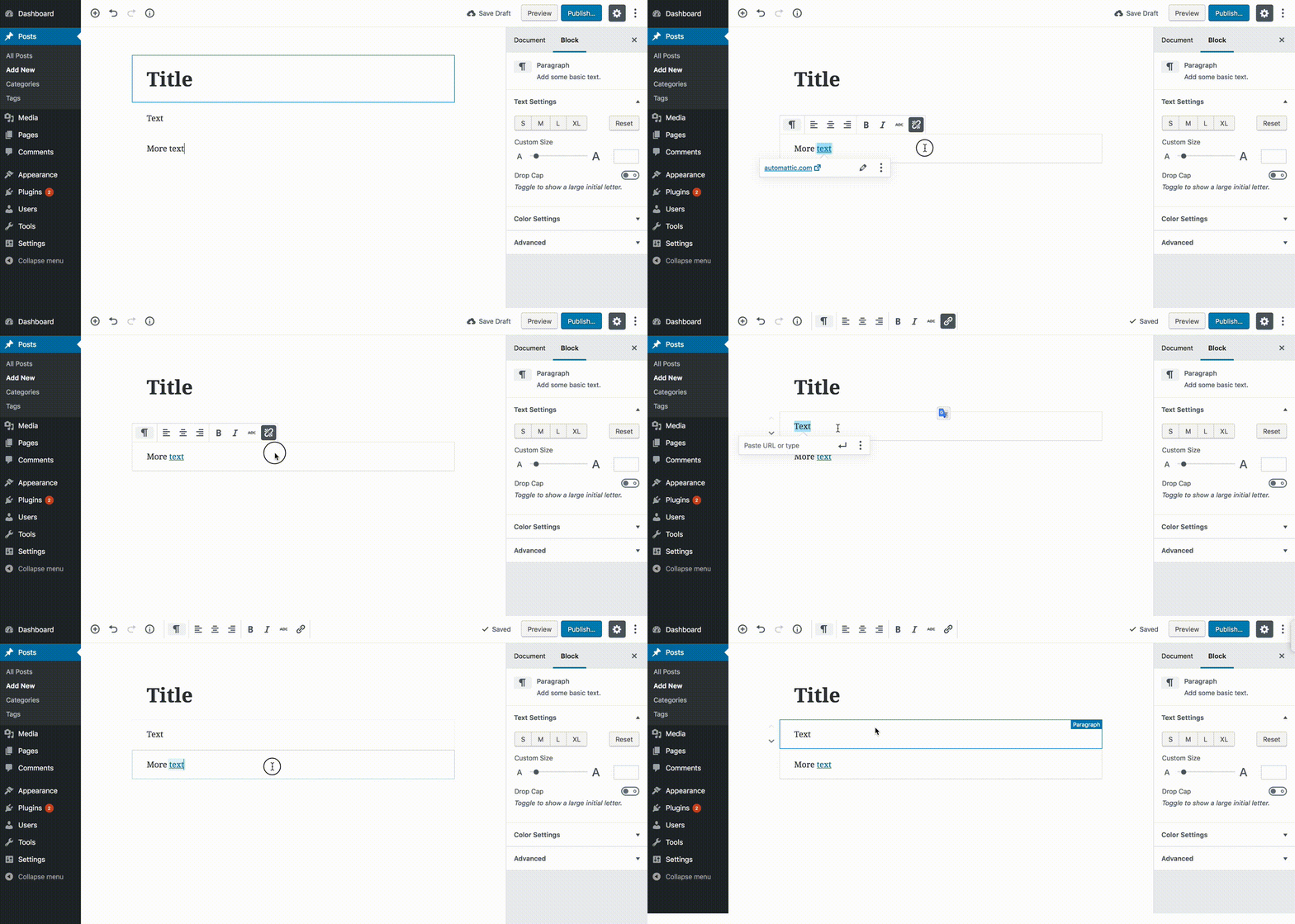
The original video is available here. http://cld.wthms.co/dRTmAF
Tested on a local install of WordPress. WordPress 4.9.8 and Gutenberg 3.4.0 using Chrome 67.0.3396.99 on macOS 10.13.6
 arunsathiya
on 4 Aug 2018
arunsathiya
on 4 Aug 2018
Additionally, to note, I had to click twice on each text to highlight it. You can notice that on the GIF or the video. Unsure if this has happened in the past, but if this is a new bug, I am happy to log it as a fresh issue.
Tested on a local install of WordPress. WordPress 4.9.8 and Gutenberg 3.4.0 using Chrome 67.0.3396.99 on macOS 10.13.6
arunsathiya
on 4 Aug 2018
@arunsathiya, thank you for testing!
Clicked on that word again to notice that the link popup was still there. (Is this expected?)
I think this might be the same as the issue reported in #7992.
Additionally, to note, I had to click twice on each text to highlight it.
I tested just now with WordPress 4.9.8 and Gutenberg 3.8.0-rc.1 using Chrome 68.0.3440.106 on macOS 10.13.6 couldn't reproduce the issue you mentioned about needing to double click a word two times in order to highlight it. If you are still seeing that problem with the latest version of Gutenberg and it's annoying, you could report it and we could try to get more eyes on it for testing.
designsimply
on 10 Sep 2018
I think this might be the same as the issue reported in #7992.
Sounds about right. To note, I wasn't able to reproduce that issue anymore.
Also, I tested what I mentioned on this comment anymore - maybe it was a one-off thing, or has been fixed since.
I tested just now with WordPress 4.9.8 and Gutenberg 3.8.0-rc.1 using Chrome 68.0.3440.106 on macOS 10.13.6 couldn't reproduce the issue you mentioned about needing to double click a word two times in order to highlight it. If you are still seeing that problem with the latest version of Gutenberg and it's annoying, you could report it and we could try to get more eyes on it for testing.
Tested again, and looks like that is fixed as well. Thanks for checking!
Tested on a local install of WordPress. WordPress 4.9.8 and Gutenberg 3.8.0 using Google Chrome Version 69.0.3497.92 (Official Build) (64-bit) on macOS 10.13.6
arunsathiya
on 17 Sep 2018
Closing this as seems resolved. Please, reopen if you can reproduce again.
 mtias
on 12 Nov 2018
mtias
on 12 Nov 2018
This is not fixed.
 alane019
on 12 Feb 2019
alane019
on 12 Feb 2019
Related issues
 ellatrix
·
3Comments
ellatrix
·
3Comments
 BE-Webdesign
·
3Comments
BE-Webdesign
·
3Comments
 spocke
·
3Comments
spocke
·
3Comments
 hedgefield
·
3Comments
hedgefield
·
3Comments
 nylen
·
3Comments
nylen
·
3Comments
Most helpful comment
Yes, it happened to me also. Had to add it manually.
OS Windows 10
Browser: Mozilla Firefox