Gutenberg: Page Attributes for a Custom Post Type
Describe the bug
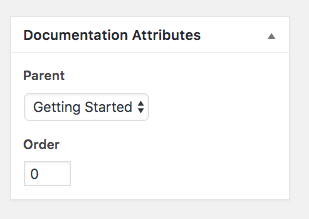
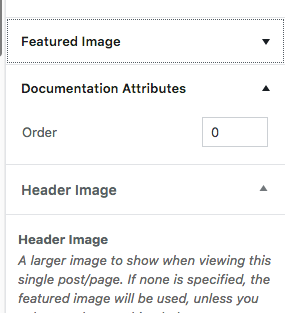
I cannot set a post type as a child to another when the post type has hierarchal capabilities.
I created a "documentaiton" post type and found this bug when trying to set the parent of one.
As you can see below It works via the classic editor but not Gutenberg.
To Reproduce
Steps to reproduce the behavior:
- Create a post type and give it WP REST API capabilities, so gutenberg works.
- Add hierarichal capabilities to the post type
- Try making a post a child of another
- See error
Expected behavior
I want the parent dropdown.
Desktop (please complete the following information):
- iMac 2011, MacOs High Sierra
- Browser Chrome
Additional context
Searching I found this issue was considered solved. :/
 saltnpixels
All 12 comments
@saltnpixels thanks for including screenshots and steps! Can you note which version of Gutenberg you tested with so that's included with this issue for reference? May I also ask where you found this issue was considered solved?
 designsimply
on 31 Jul 2018
designsimply
on 31 Jul 2018
Thanks for Responding.
I did a google search and I figured if it was merged then that means it was fixed.
4175
I am using gutenberg 3.3.0
saltnpixels
on 31 Jul 2018
Ace. Thanks. I added the Needs Testing label to see if we can get some help testing and verifying that this is a regression.
designsimply
on 31 Jul 2018
Just tested this, and it sends an unbound request for the post type to http://gutenberg.test/wp-json/wp/v2/documents?context=edit&per_page=-1&exclude=58&parent_exclude=58&_fields=id%2Cparent%2Ctitle&orderby=menu_order&order=asc
The problem is the per_page=-1 bit, as it triggers the protection at https://github.com/WordPress/gutenberg/blob/master/lib/rest-api.php#L491
 Clorith
on 3 Aug 2018
Clorith
on 3 Aug 2018
This seems to working now.
saltnpixels
on 22 Aug 2018
i'm having this same issue. i just installed the latest version about 5 hours ago, so i'm assuming that's the latest version (and most likely the version that is launched tomorrow). any word on if this will be working by then?
 tracyapps
on 5 Dec 2018
tracyapps
on 5 Dec 2018
so... is there any update on this? i really can't believe no one else needs to make custom post type pages for their sites.
tracyapps
on 15 Jan 2019
I've just installed a fresh WP and the 'parent' field is missing even in the default Pages post type.
There is any workaround for this?
 viniciusbig
on 17 Jan 2019
viniciusbig
on 17 Jan 2019
I am still learning when it comes to dev, but I can test if you can walk me through some more detailed instructions for the first two testing steps:
- Create a post type and give it WP REST API capabilities, so gutenberg works.
- Add hierarichal capabilities to the post type
@viniciusbig am I right that I wouldn't need step 1 for your case since you're testing with the default Pages post type and it already has WP REST API capabilities? (sorry if this sounds like an obvious quesiton!) Also, did you do step 2 from the original testing steps?
designsimply
on 17 Jan 2019
Yeah... I.ve tried again and its working. Sorry to open this thread again.
My custom post type has REST capabilities and therefore, Gutenberg functionality.
I've installed everything again trying to reproduce and its working as expected with regular pages and my new post type!
(I'm sure the field was not there before, but I could not reproduce anymore)
viniciusbig
on 21 Jan 2019
No problem! Thanks tons for the follow-up!
Closing based on the last reply, but @tracyapps please do comment again if you are still having trouble and I will loop back around.
designsimply
on 26 Jan 2019
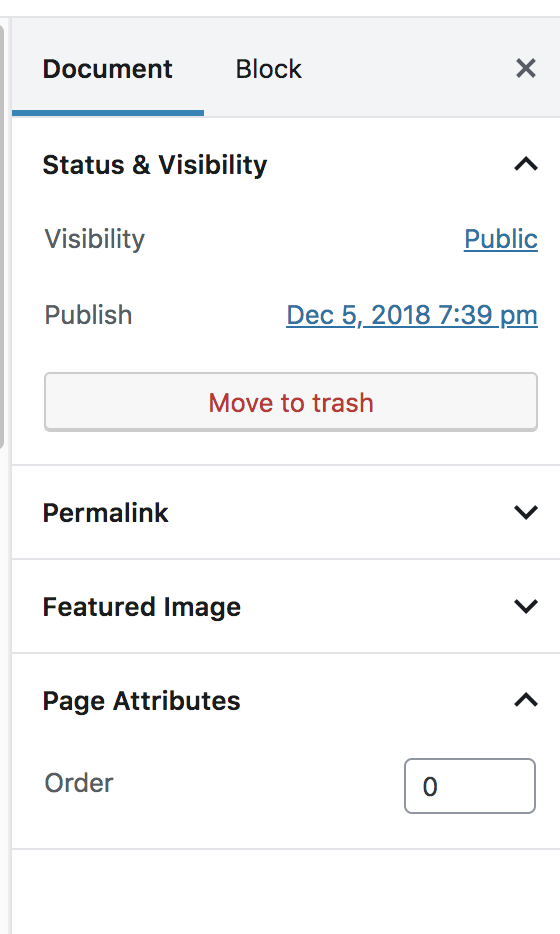
I am having the same problem as everyone else. I'm using latest WP version. I have enabled 'show_in_rest' and page attributes for my heirarchical post type. The page attribute box shows up, but only the "Order" field is visible. No option to set a parent. I can correctly set the parent if I switch back to the classic editor. Has this issue resurfaced?
UPDATE:
I found the answer here. You have to set the 'parent_item_colon' label for the post type. Mine was set like 'parent_item_colon' => ''; and I changed it to 'parent_item_colon' => 'Parent Page'; and the menu reappeared.
 lindsaywebstudio
on 16 Nov 2019
lindsaywebstudio
on 16 Nov 2019
Related issues
 JohnPixle
·
3Comments
JohnPixle
·
3Comments
 aduth
·
3Comments
aduth
·
3Comments
 youknowriad
·
3Comments
youknowriad
·
3Comments
 BE-Webdesign
·
3Comments
BE-Webdesign
·
3Comments
 pfefferle
·
3Comments
pfefferle
·
3Comments
Most helpful comment
I am having the same problem as everyone else. I'm using latest WP version. I have enabled 'show_in_rest' and page attributes for my heirarchical post type. The page attribute box shows up, but only the "Order" field is visible. No option to set a parent. I can correctly set the parent if I switch back to the classic editor. Has this issue resurfaced?
UPDATE:
I found the answer here. You have to set the 'parent_item_colon' label for the post type. Mine was set like
'parent_item_colon' => '';and I changed it to'parent_item_colon' => 'Parent Page';and the menu reappeared.