Gutenberg: More Menu shows overly verbose shortcut
Describe the bug
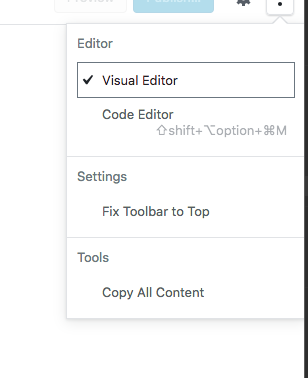
Shortcut menu shows too long shortcut description.
Expected behavior
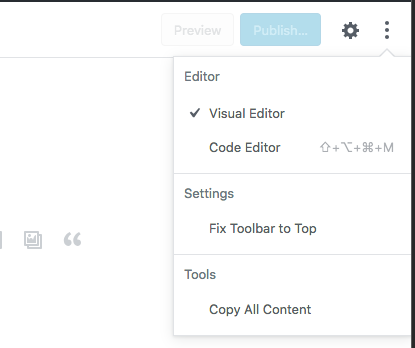
Something like this:
Desktop (please complete the following information):
MacOS and Chrome
@tofumatt @iseulde I think maybe you were looking at this recently?
 jasmussen
All 6 comments
The issue with showing just the shortcuts is that they aren’t clear to many users; @iseulde pointed out that the new Mac keyboard doesn’t even show those icons. I think we could remove the icons and fit the content but that would be the clearer fix I think.
- Matt (Sent from mobile)
On 14 May 2018, at 18:29, Joen Asmussen notifications@github.com wrote:
Describe the bug
Shortcut menu shows too long shortcut description.Expected behavior
Something like this:
Desktop (please complete the following information):
MacOS and Chrome
@tofumatt @iseulde I think maybe you were looking at this recently?
—
You are receiving this because you were mentioned.
Reply to this email directly, view it on GitHub, or mute the thread.
 tofumatt
on 14 May 2018
tofumatt
on 14 May 2018
That's a good point.
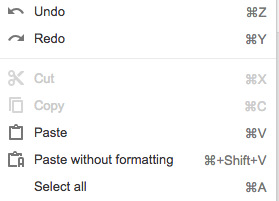
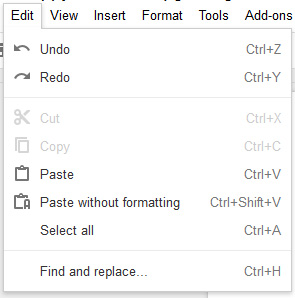
Let's do what Google Docs does here, and go halfway. That is, Shift and Option we spell out (capitalized), but we use the ⌘ for Command on Mac. Can a Windows user sign into Docs and see what they use for Control on Windows? Is it "Ctrl"?
Screenshots:

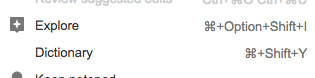
Would also be nicer to see if we can make the width of the menu wider if necessary to accommodate the shortcut on the right.
jasmussen
on 14 May 2018
On Windows Google Docs uses "Ctrl"
 mrleemon
on 14 May 2018
mrleemon
on 14 May 2018
Let's also please change this shortcut... It would be nice for everything that is not common to have the same combination across WordPress. This can be the access combination or something else, ideally 2 modifiers. We can also try to use something that would be uncommon to use as a modifier but is available on all keyboards. I've seen apps use cmd+esc or something unique like that.
 ellatrix
on 14 May 2018
ellatrix
on 14 May 2018
We do use just the clover symbol for command on Mac (check out shortcuts like Command+B) for bold.
tofumatt
on 15 May 2018
Just looked into CMD/CTRL+ESC... Not so simple to make it work with Mousetrap and TinyMCE. We'll have to do this on our own and see if the esc key was pressed or not.
ellatrix
on 15 May 2018
Related issues
 pfefferle
·
3Comments
pfefferle
·
3Comments
 BE-Webdesign
·
3Comments
BE-Webdesign
·
3Comments
 davidsword
·
3Comments
davidsword
·
3Comments
 maddisondesigns
·
3Comments
maddisondesigns
·
3Comments
 wpalchemist
·
3Comments
wpalchemist
·
3Comments
Most helpful comment
Let's also please change this shortcut... It would be nice for everything that is not common to have the same combination across WordPress. This can be the access combination or something else, ideally 2 modifiers. We can also try to use something that would be uncommon to use as a modifier but is available on all keyboards. I've seen apps use cmd+esc or something unique like that.