Gutenberg: User guide and keyboard shortcuts documentation
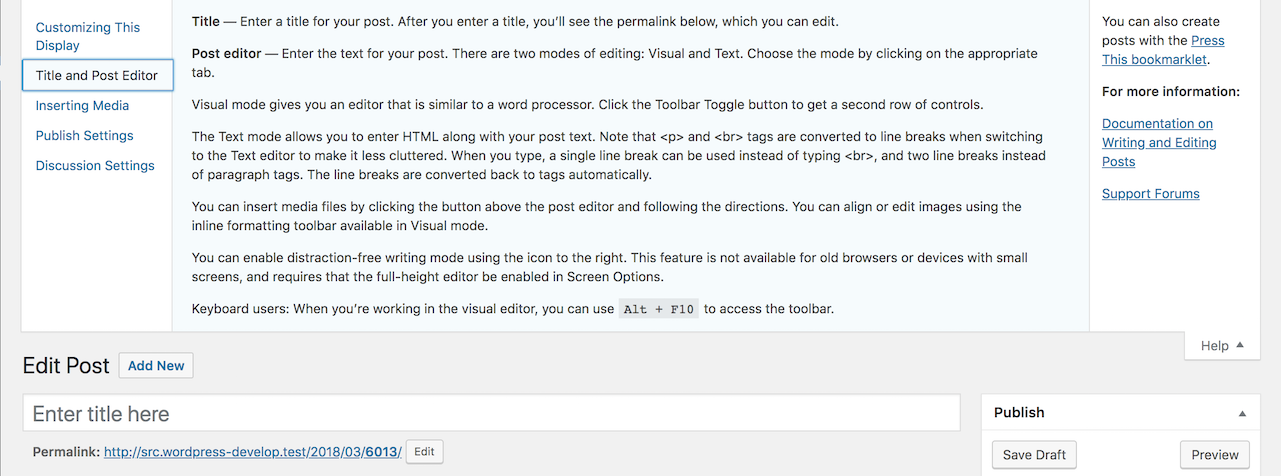
In the Classic editor, there's the Help section with a (limited) user guide about:
- editing the title and the post
- inserting media
- publish settings
- discussion settings
there's also a modal with a list of all the available keyboard shortcuts:

To my knowledge, in Gutenberg there's no help or user guide at all, not sure if this was discussed at some point. I'd strongly recommend to start thinking at a user guide. Whether it lives in the admin or on an external page / handbook, it should be easily discoverable.
As per keyboard and screen reader users, they need a well documented list of all the available keyboard shortcuts in Gutenberg, plus a guide to some of the available accessibility features, e.g. the Ctrl + backtick shortcut to navigate through the main editor regions.
We've discussed this during today's accessibility meeting and agreed the list of keyboard shortcuts is essential to effectively use the editor and should be available since version 1.
 afercia
All 12 comments
Related:
https://github.com/WordPress/gutenberg/issues/71 and https://github.com/WordPress/gutenberg/issues/2980
not the same thing though, since 2980 is about displaying shortcuts within the various menus, close to the related control.
afercia
on 5 Mar 2018
See also https://github.com/WordPress/gutenberg/pull/4411 for some more shortcuts.
afercia
on 5 Mar 2018
Building on #3218, I think this UI element should incorporate customization as well (per https://github.com/WordPress/gutenberg/issues/3218#issuecomment-369668603), as it keeps that control close to the user.
Choosing where to fold this into the UI might be a bit of a challenge, but for now, it might make the most sense to have it under the post triple dot:

Again, I certainly think there are better ways to introduce the keyboard shortcut palette, and I'll continue mocking up some suggestions.
 nic-bertino
on 6 Mar 2018
nic-bertino
on 6 Mar 2018
@nic-bertino , maybe it can be under Tools > Keyboard Shortcuts? It makes sense to have a similar modal, a la Classic Editor.
 postphotos
on 7 Mar 2018
postphotos
on 7 Mar 2018
Considering a list of keyboard shortcuts is mainly meant for keyboard and assistive technologies users, I'd consider to improve the current experience and avoid a modal. Modals are always tricky for those users.
Adding the design label because both the help / user guide and the list of shortcuts need some thinking 🙂
afercia
on 7 Mar 2018
@afercia with regards to the design of this, are there any accessible good examples in other applications we could learn from?
 karmatosed
on 17 Apr 2018
karmatosed
on 17 Apr 2018
@karmatosed not off the top of my head. In Gmail for example, typing ? makes a list of keyboard shortcuts appear but that's not exactly what I'd like to see in Gutenberg. Maybe we should first consider if we want the Help section in Gutenbreg or on .org.
In the first case, maybe use the "screen takeover" (the one meant for plugins)? Regardless, I'd tend to think the most important thing is that the link or button to access the Help section should be easily discoverable. /Cc @rianrietveld for her experience in documentation 🙂
afercia
on 18 Apr 2018
My experience is that not many people discover the help text, as it is now in the classic editor.
So a better icon/text to help text is definitely needed.
Thinking of all the stuff we need to explain, I wonder if we should integrate all the help text inside the Gutenberg editor. That will become a usability nightmare I guess, fitting everything in modals, screen takeover, whatever.
Thinking out load and maybe totally out of context:
All the shortcuts, AT manuals, etc can be placed in documentation on WordPress.org. Why not just have a clear icon for help and link to the docs applicable in the right language? So keep everything on .org (and translate there too) . And don't burden the UI with complicated constructions.
 rianrietveld
on 18 Apr 2018
rianrietveld
on 18 Apr 2018
My experience is that not many people discover the help text, as it is now in the classic editor.
So a better icon/text to help text is definitely needed.
This is pretty reflective of my own experience.
All the shortcuts, AT manuals, etc can be placed in documentation on WordPress.org. Why not just have a clear icon for help and link to the docs applicable in the right language? So keep everything on .org (and translate there too) . And don't burden the UI with complicated constructions.
@rianrietveld do you imagine it as a link to an external source?
karmatosed
on 18 Apr 2018
@karmatosed
do you imagine it as a link to an external source?
Yes, make it as simple as that
rianrietveld
on 18 Apr 2018
We now have both the modal listing available shortcuts and "tips" guiding specific areas of the interface. Let's focus any ideas and enhancements on new issues.
 mtias
on 7 Oct 2018
mtias
on 7 Oct 2018
@mtias Maybe I missed something but didn't there used to be a bunch of extra shortcuts? I don't see them listed in the shortcuts section. Stuff like using markdown style to auto select different blocks etc
 jcklpe
on 12 Nov 2018
jcklpe
on 12 Nov 2018
Related issues
 nylen
·
3Comments
nylen
·
3Comments
 JohnPixle
·
3Comments
JohnPixle
·
3Comments
 youknowriad
·
3Comments
youknowriad
·
3Comments
 maddisondesigns
·
3Comments
maddisondesigns
·
3Comments
maddisondesigns
·
3Comments
maddisondesigns
·
3Comments
Most helpful comment
My experience is that not many people discover the help text, as it is now in the classic editor.
So a better icon/text to help text is definitely needed.
Thinking of all the stuff we need to explain, I wonder if we should integrate all the help text inside the Gutenberg editor. That will become a usability nightmare I guess, fitting everything in modals, screen takeover, whatever.
Thinking out load and maybe totally out of context:
All the shortcuts, AT manuals, etc can be placed in documentation on WordPress.org. Why not just have a clear icon for help and link to the docs applicable in the right language? So keep everything on .org (and translate there too) . And don't burden the UI with complicated constructions.