Gutenberg: JS Console error when adding new block
Issue Overview
A console error is thrown when trying to add a new block to the editor or when opening an existing post with certain blocks such as gallery and cover image
Steps to Reproduce (for bugs)
Situation 1
- To a clean WordPress install (version 4.9.2) add the Gutenberg plugin (version 2.1.0)
- Add a new post
- Click on 'Add Block'
- The error appears in console
Situation 2
- To a clean WordPress install (version 4.9.2) add the Gutenberg plugin (version 2.1.0)
- Open the Gutenberg demo post.
- The error appears in console.
OS: MacOS High Sierra 10.13.3
Browser: Chrome Versie 63.0.3239.132
WordPress: 4.2.9
Theme: Twentyseventeen 1.4
Gutenberg plugin: 2.1.0
Expected Behavior
Current Behavior
Possible Solution
Screenshots / Video
Screenshot for situation 1

Screenshot for situation 2

Related Issues and/or PRs
Todos
- [ ] Tests
- [ ] Documentation
 YourMark
All 4 comments
I'm seeing this too on my latest pull from master. Started a new post and I get this error every time I click on the inserter:
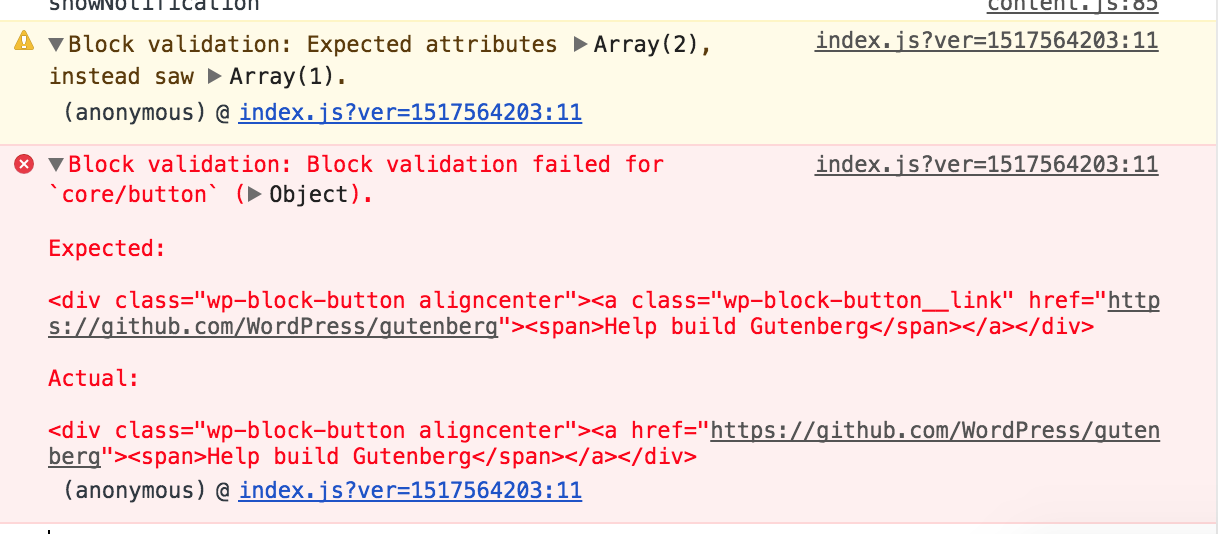
It's weird because it seems to be referencing the button from the demo post...
 hedgefield
on 2 Feb 2018
hedgefield
on 2 Feb 2018
@youknowriad this seems to be related to the deprecation API for blocks. We need to make sure that we display errors using console.error only when it was not possible to properly parse the block. Otherwise, we should rather use console.info to inform that we updated HTML code to the latest version.
 gziolo
on 2 Feb 2018
gziolo
on 2 Feb 2018
It's weird because it seems to be referencing the button from the demo post...
I think it's referencing to saved reusable blocks.
At least for me it threw gallery error and my only saved block was a gallery. When I deleted it the error stopped appearing.
 ktmn
on 3 Feb 2018
ktmn
on 3 Feb 2018
Closing because I tested with WordPress 4.9.6 and Gutenberg 3.1.1 using Chrome 67.0.3396.87 on macOS 10.13.5 and was unable to see the "Block validation" console error after clicking 'Add block' on a new post or opening the Gutenberg demo post. Please re-open if this problem is still happening for you!
 designsimply
on 3 Jul 2018
designsimply
on 3 Jul 2018
Related issues
 spocke
·
3Comments
spocke
·
3Comments
 jasmussen
·
3Comments
jasmussen
·
3Comments
 ellatrix
·
3Comments
ellatrix
·
3Comments
 maddisondesigns
·
3Comments
maddisondesigns
·
3Comments
 moorscode
·
3Comments
moorscode
·
3Comments
Most helpful comment
@youknowriad this seems to be related to the deprecation API for blocks. We need to make sure that we display errors using
console.erroronly when it was not possible to properly parse the block. Otherwise, we should rather useconsole.infoto inform that we updated HTML code to the latest version.