Gutenberg: Interface for Custom Taxonomy is blank
Issue Overview
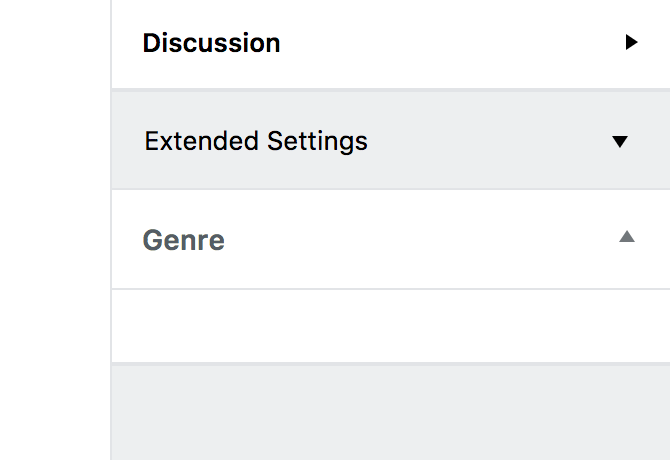
The interface for Custom Taxonomies, under "Extended Settings", is blank and doesn't work.
Steps to Reproduce
- Create a simple custom taxonomy, assign it to the "post" format.
- Create some terms in that taxonomy.
- Edit a Post using Gutenberg, enter the Extended Settings.
- Try to add/check a taxonomy term.
Code used for this test:
add_action( 'init', 'create_book_tax' );

function create_book_tax() {
    register_taxonomy(
        'genre',
        'post',
        array(
            'label' => __( 'Genre' ),
            'rewrite' => array( 'slug' => 'genre' ),
            'hierarchical' => true,
        )
    );
}
Expected Behavior
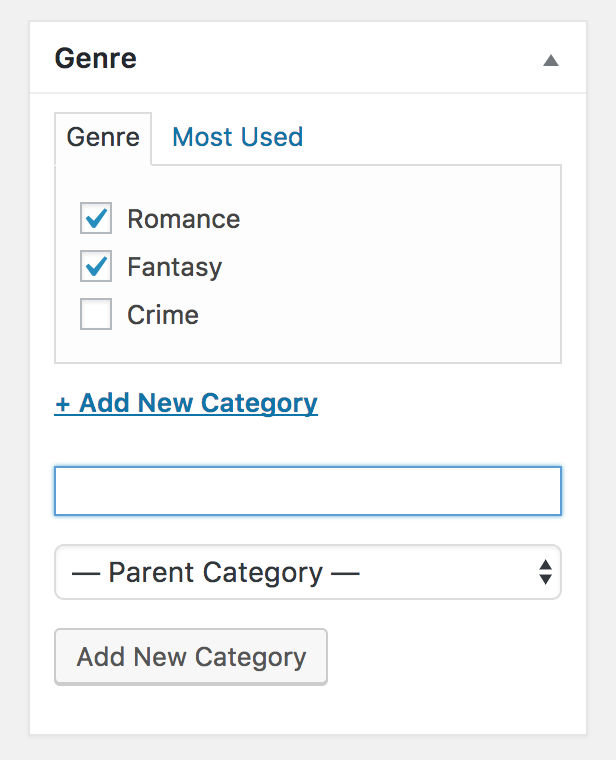
We should be able to add/check terms, similarly to Categories and Tags.
Current Behavior
The area where terms should be managed is blank.
Screenshots / Video
Custom taxonomy in the classic interface:
In the Gutenberg interface:
 ms-studio
All 4 comments
Hi @ms-studio, thank you for reporting this problem.
It looks like what you are seeing in the extended settings is a try to load the metabox for the taxonomy gender, which should not happen. This problem seems fixed on the last version in master (if the extended settings with gender still appear, please wait for the next release or test in the master branch and it should be fixed).
Gutenberg should load its own panel to manage gender inside the "Categories & Tags" panel. Unfortunately, as Gutenberg uses the rest API, for now, it is only able to use taxonomies that have show_in_rest enabled.
So if you change create_book_tax function to :
function create_book_tax() {
    register_taxonomy(
        'genre',
        'post',
        array(
            'label' => __( 'Genre' ),
            'rewrite' => array( 'slug' => 'genre' ),
            'hierarchical' => true,
            'show_in_rest' => true,
        )
    );
}
You should be able to see Gutenberg management panel for Gender as the following picture shows:

I hope this fixes the problem, I'm closing the issue for now, if a problem persists feel free to open it and I will debug it further.
 jorgefilipecosta
on 30 Jan 2018
jorgefilipecosta
on 30 Jan 2018
@jorgefilipecosta thanks for the clarification.
This rises another question: shouldn't the value of show_in_rest become true by default when Gutenberg moves into core?
Otherwise, a great number of sites will be affected by taxonomies disappearing from the interface, while they were previously visible.
I was always using the example code from https://codex.wordpress.org/Function_Reference/register_taxonomy as a base – the show_in_rest is documented there as an optional argument, but it isn't even included in the example code. I wouldn't be surprised if many thousands of websites have registered taxonomies without enabling them for the rest API, and expect them to be visible.
ms-studio
on 2 Feb 2018
Hi @ms-studio, the show_in_rest problem does not happen only in taxonomies, it happens also in custom post types and other areas. Before making the move to the core these problems should be handled e.g: by changing the default to true. Like this patch is doing https://core.trac.wordpress.org/ticket/42785.
jorgefilipecosta
on 2 Feb 2018
At Trac, I notice that the new default hasn't been implemented yet in core. It has been "moved out of the 5.0 Milestone".
Am I wrong in believing that this issue will impact at zillion of websites that are using custom taxonomies, and suddenly won't see them in Gutenberg editor?
Basically, it will affect every site using Custom Taxonomies that was implemented before 2017, and didn't revise the taxonomies declaration with the new show_in_rest parameter.
ms-studio
on 4 Nov 2018
Related issues
 nylen
·
3Comments
nylen
·
3Comments
 ellatrix
·
3Comments
ellatrix
·
3Comments
 franz-josef-kaiser
·
3Comments
franz-josef-kaiser
·
3Comments
 aaronjorbin
·
3Comments
aaronjorbin
·
3Comments
 hedgefield
·
3Comments
hedgefield
·
3Comments