Gutenberg: Confirmation popup displays when closing browser tab when page hasn't changed
Issue Overview
If I open an existing page, and then decide to close it straight away (because maybe I opened the wrong one), I'm prompted with a popup message, even when the page hasn't been touched or edited.
This happens on both Drafts and Published pages.
I raised a similar issue back in November (#3447). This was closed in favour of #3296, advising that it had been fixed in v1.7. Subsequently, #3296 has now also been closed. This issue has obviously resurfaced again.
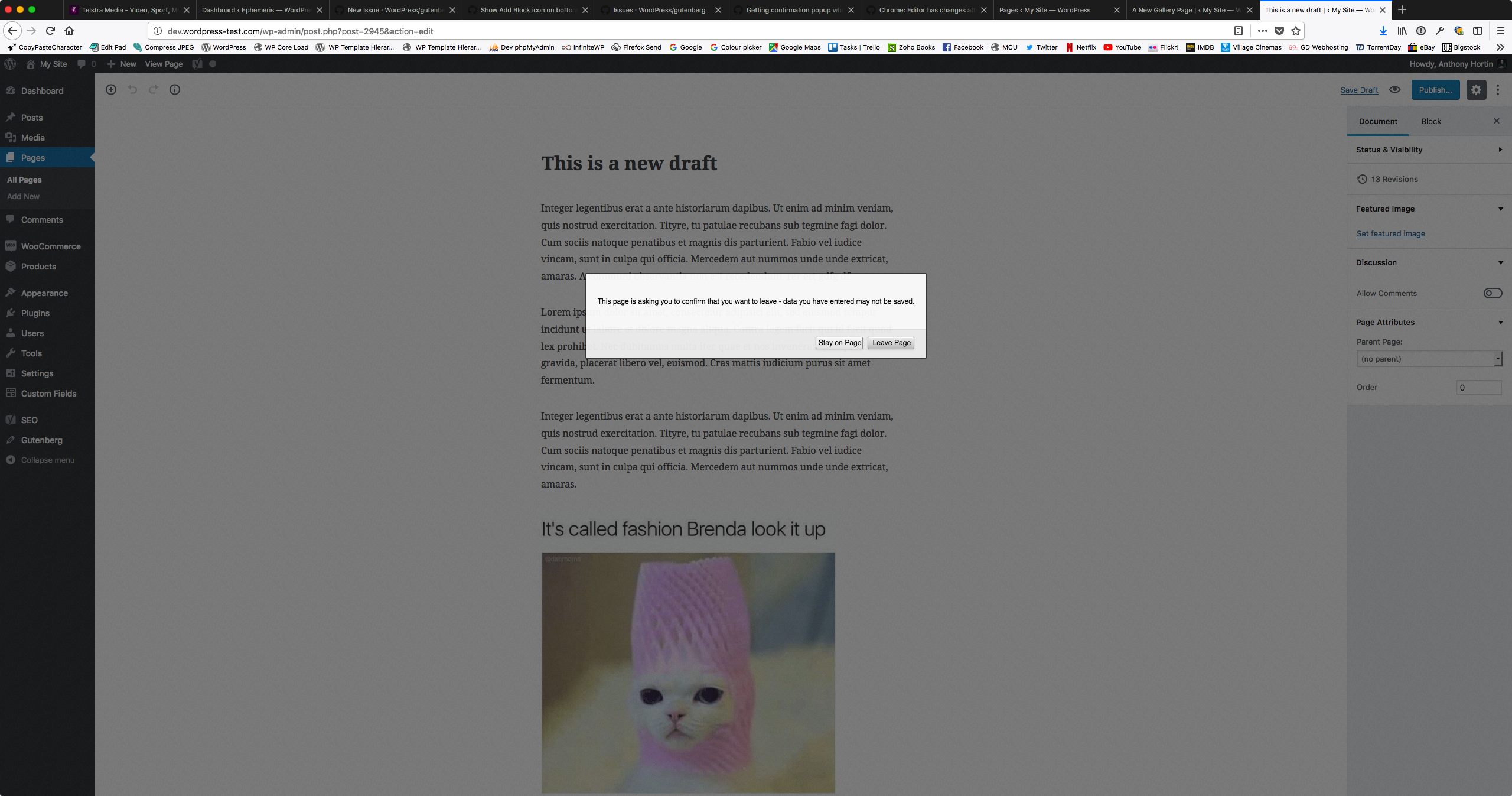
Steps to Reproduce (for bugs)
- Open existing page in a new browser tab
- Close new browser tab
- View popup that appears
Expected Behavior
If I haven't edited the page, I shouldn't be advised that I could be losing changes by closing the tab
Current Behavior
I'm advised that I could lose changes by continuing on, even those nothing has changed
Possible Solution
Don't mark the page as dirty when it hasn't changed
Related Issues and/or PRs
3447
3296
_Firefox Quantum 57.0.4 (64-bit)
WordPress 4.9.2
Gutenberg 2.1.0_
 maddisondesigns
All 16 comments
@maddisondesigns: What blocks are being used on that page?
 pento
on 26 Jan 2018
pento
on 26 Jan 2018
That particular page had paragraph blocks, image blocks and a Text Column block

maddisondesigns
on 26 Jan 2018
@maddisondesigns It looks like you have some plugins active in your screenshots. Can you see if the issue reproduces without active plugins?
 danielbachhuber
on 26 Jan 2018
danielbachhuber
on 26 Jan 2018
@danielbachhuber I did some more testing as per your suggestion.
When I deactivated all other plugins, I couldn't replicate the issue.
I then tried activating the plugins individually with Gutenberg....
Gutenberg+WooCommerce - Couldn't replicate
Gutenberg+Yoast SEO - Could replicate
Gutenberg+ACF Pro - Could replicate
So it seems like anything that added Custom Meta Boxes causes the issue to trigger. I hope that helps.
maddisondesigns
on 27 Jan 2018
I am also noticing this with WordPress 4.9.4, Gutenberg 2.3.0, ACF Pro 5.6.9
https://youtu.be/YqPGOfa5ZiA?t=43s
 petertwise
on 9 Mar 2018
petertwise
on 9 Mar 2018
Possibly related: https://github.com/WordPress/gutenberg/issues/5520
_Edit: nope. this seems to be a separate issue._
petertwise
on 9 Mar 2018
FYI, this issue is not resolved in 2.4.0, despite some of the other "dirty forms" + meta box issues having been resolved.
petertwise
on 15 Mar 2018
Not resolved in 2.6.0 either. Updating page content in both simple and repeater fields, content is saved but we still get warning on clicking the view post link (link text has also changed from View Page to View Post when edits have been saved to a page)
 sokratesagogo
on 29 Mar 2018
sokratesagogo
on 29 Mar 2018
Still an issue with Gutenberg 3.2 apparently 😞
 swissspidy
on 7 Jul 2018
swissspidy
on 7 Jul 2018
This seems to be an issue in the 3.9 version as well.
 ovidiul
on 5 Oct 2018
ovidiul
on 5 Oct 2018
same issue here
 signaturesteve
on 9 Oct 2018
signaturesteve
on 9 Oct 2018
Stopping by to test and help keep an eye on this issue as I think it's important and would also like to note that steps to reproduce may be tricky pin down (especially if the problem happens intermittently or if it depends on very specific set of circumstances we haven't thought of yet here, such as changing data in meta boxes or block validation issues due to update from past plugin versions) and I'd like to keep this issue going even if I can't reproduce it straight away. Also would like to note that some recent improvements have been made around refactoring state (#10844) so it would be cool to check back in to see if others are still experiencing the issue after 4.3 (or 4.3.0-rc.1 if you help with pre-release testing!) becomes available.
I tested just now with the testing steps from the original report and I was unable to replicate the problem:
- Open existing page in a new browser tab
- Close new browser tab
- View popup that appears
Tested with WordPress 4.9.8 and Gutenberg 4.2.0 using Firefox 63.0.1 on macOS 10.13.6.
If you are still experiencing this issue and if you are willing to provide additional details, it would be helpful to note a list of active plugins on your site, whether the unwarranted save prompt occurs consistently or not, and the type of content in the posts where the prompt is shown. Also, if you see any warnings about block validation in your browser console _at the time you open the post_, please note them or grab a screenshot if possible.
Plus, would like to say thank you to @maddisondesigns for raising issues like this one!
 designsimply
on 9 Nov 2018
designsimply
on 9 Nov 2018
whether the unwarranted save prompt occurs consistently or not, and the type of content in the posts where the prompt is shown.
I'm able to replicate this issue consistently if I click into the Classic Editor block. Clicking into other blocks and leaving the the post or page doesn't trigger the prompt. I'm able to replicate in posts, pages, and a CPT. Here are the steps:
- Open existing post with Classic Editor block
- Click into Classic Editor block
- Prompt appears warning that "changes may not be saved"
Tested with WordPress 4.9.8 and Gutenberg 4.2.0 using Chrome 70.0.3538.77 on macOS 10.14.1
Active plugins on the tested site:
- Akismet Anti-Spam
- Duplicate Post
- Featured Images in RSS w/ Size and Position
- Gravity Forms
- Gravity Forms + Custom Post Types
- Gravity Forms Authorize.Net Add-On
- Gravity Forms MailChimp Add-On
- Gravity Forms Stripe Add-On
- Jetpack by WordPress.com
- Pure Chat
- Recent Posts Widget With Thumbnails
- Regenerate Thumbnails
- Safe Redirect Manager
- Two Factor
- VaultPress
- Yoast SEO
I see this error in the console when I open a post I can replicate the issue with of these posts (I don't see this error on posts I cannot replicate the issue on):
plugin.js?v=20150715&wp-mce-4800-20180716:68 Uncaught TypeError: editor.getParam(...).join is not a function
    at initAtDCore (plugin.js?v=20150715&wp-mce-4800-20180716:68)
    at Hx.<anonymous> (plugin.js?v=20150715&wp-mce-4800-20180716:311)
    at jg.c.fire (VM2607 tinymce.min.js:2)
    at Hx.fire (VM2607 tinymce.min.js:2)
    at ax (VM2607 tinymce.min.js:2)
    at VM2607 tinymce.min.js:2
    at VM2607 tinymce.min.js:2
    at VM2607 tinymce.min.js:2

 wrightcj03
on 9 Nov 2018
wrightcj03
on 9 Nov 2018
I just tested with 5.0-beta3-43878 and wasn't able to replicate this issue using my original steps outlined above
- Open existing page in a new browser tab
- Close new browser tab
- View popup that appears
I tried with both ACF Pro and Yoast activated
maddisondesigns
on 9 Nov 2018
I am able to reproduce this every time on pages that have a meta box. It happens if I open the page and try to navigate away, or if I make an edit and save, then try to navigate away. It happens every single time, 100% of the time. I am using Gutenberg version: 4.6.1.
 KustomKode
on 5 Dec 2018
KustomKode
on 5 Dec 2018
I think this has been fixed in the last versions of ACF.
Closing, let's reopen if it comes up again.
 youknowriad
on 25 Dec 2018
youknowriad
on 25 Dec 2018
Related issues
youknowriad
·
3Comments
 nylen
·
3Comments
nylen
·
3Comments
 aaronjorbin
·
3Comments
aaronjorbin
·
3Comments
 franz-josef-kaiser
·
3Comments
franz-josef-kaiser
·
3Comments
 wpalchemist
·
3Comments
wpalchemist
·
3Comments