Gutenberg: "Publishing failed" message fixed by changing to "Day and name" permalink structure?
Issue Overview
As noted in a comment to another thread I installed Gutenberg 1.0.0 onto a WP 4.8.1 Multisite installation and found that after activating Gutenberg in two different sites on the same WP MS server, I could successfully publish in one site but not in the other.
The first site (deepdark.blue) gave me a "Publishing failed" message when I tried to publish a post and an "Updating failed" message when I tried to save the post or add an image via drag-and-drop.
Using Google Chrome (on a Mac) I opened Developer Tools and then the Network tab. After seeing an error message after "Publishing failed" I could see that the Header message was:
Request URL:http://deepdark.blue/wp-json/wp/v2/posts/84
Request Method:PUT
Status Code:404 Not Found
Remote Address: <removed>:80
Referrer Policy:no-referrer-when-downgrade
I then activated Gutenberg on a second test site (danyork.org) on the same WP MS server and found that I could immediately use Gutenberg to add new posts without any issues.
While the two test sites had different themes, they had similar plugins activated. Based on some other older posts I saw online, I looked at permalinks. The second site had "Day and name" selected for the permalink structure. The first site did _not_. It was using "Month and name".
I switched the first site to have a permalink structure of "Day and name" and ... ta da... Gutenberg worked fine from that point onward, including saving and publishing the post that had failed before.
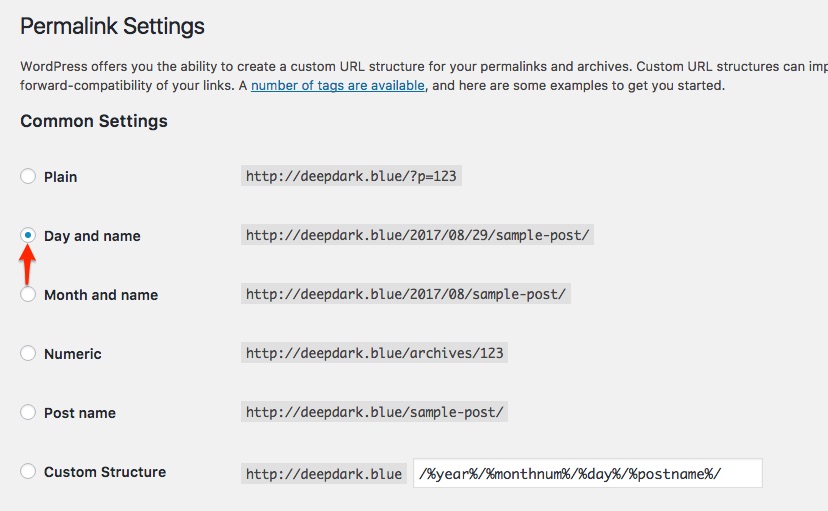
HOWEVER, I was not able to reproduce the error by switching the second site back to "Month and name" and having Gutenberg _fail_.
And, after switching the first site _to_ "Day and name" and having Gutenberg work, I then switched in _back_ to "Month and name" ... _but publishing still worked_.
So I cannot reproduce the issue after fixing it. There may be something else completely different going on here.
Steps to Reproduce (for bugs)
I don't have any other test sites running on the server right now and don't have time today to set one up, but in the hope that perhaps someone else can test this, I would need to:
- Create a new site and set the permalink settings to "Month and name"
- Activate Gutenberg
- See if a post can be created and published.
- If _not_, does switching the Permalink settings to "Day and name" solve the issue?
Expected Behavior
Gutenberg should work for all sites on a WP Multisite server.
Current Behavior
It worked for one site but not for another. (There are additional sites on that particular server, but they are production sites and I don't want to activate the plugin there.)
Possible Solution
_I don't have any suggestions._
Todos
Questions that occur to me:
- The home site into which the plugin was installed (via Network Admin -> Plugins -> Add New) has a permalink structure of "Day and name". Even though the plugin was NOT activated for that site, nor did I "Network Activate", did Gutenberg somehow learn that configuration?
- Why would I be getting a 404 error on the wp-json URL with this difference in permalinks?
- [ ] Tests
- [ ] Documentation
 danyork
All 11 comments
This issue is not specific to Gutenberg, it's global to any WP REST API usage, I don't know if your webserver is Nginx but I think there's a known issue with the API when using Nginx and keeping the plain permalinks. Others may be more aware of permalink related API issues
 youknowriad
on 29 Aug 2017
youknowriad
on 29 Aug 2017
Just my 2¢€: I got the same problem Gutemberg. The issue was caused by http/https mixed content. Forcing everything through https solved it.
 tybor
on 11 Sep 2017
tybor
on 11 Sep 2017
@danyork Were you able to track down the true source of this issue?
 danielbachhuber
on 23 Jan 2018
danielbachhuber
on 23 Jan 2018
I am going to close this as without more feedback it could relate to the existing issues. That all said, closing doesn't mean we can't reopen if we have more information.
 karmatosed
on 3 Apr 2018
karmatosed
on 3 Apr 2018
Unfortunately, I happened to come across the same error as @danyork. Switching from custom to plain permalink worked for me, other permalink structures produced the same error. I've switched back and got error back.
 EugeneNeuron
on 24 Oct 2018
EugeneNeuron
on 24 Oct 2018
Today after the upgrade to WordPress 5.0 on a WP multi-site server, I experienced this exact issue again. On a site where the permalink was set to "Post name", I tried to edit a post in Gutenberg and got the "Updating failed" error. I then went into the Permalinks and changed the setting to be "Day and Name" - and the editing of the post then worked fine.
Curiously, if I then went to the Permalinks setting and changed back to the previous setting ("Post name", in this case), then it still worked.
So perhaps the _action_ of changing the permalink structure was enough to make this work?
danyork
on 6 Dec 2018
To follow up on my last comment, I had this "Updating failed" problem tonight with another site on the same WP Multisite server after the upgrade to WordPress 5.0. This time, what I did was this:
In Permalinks settings, changed it from "Month and name" to "Day and name" and pressed "Save changes". I received the message "Permalink structure updated."
Changed it from "Day and name" back to "Month and name" and pressed "Save changes". I received the message "Permalink structure updated."
Switched back to the tab where I was editing the post and had the error message. Pressed "Update" and.. ta da... the updating worked perfectly fine.
I have no idea why making this change would cause Gutenberg to work properly, but it does.
danyork
on 7 Dec 2018
I just updated a site to 5.1.1 and I cannot save any page/post unless I turn permalinks off. With any permalink setting enabled, I get (replacing the real domain):
General
Request URL: http://www.example.com/wp-admin/post.php?post=567&action=edit&meta-box-loader=1&_wpnonce=2b3355fc1b&_locale=user
Request Method: POST
Status Code: 302 Found
Remote Address: 64.29.151.221:80
Referrer Policy: strict-origin-when-cross-origin
Response Headers
Cache-Control: no-cache, must-revalidate, max-age=0
Connection: Keep-Alive
Content-Type: text/html; charset=UTF-8
Date: Sat, 13 Apr 2019 20:02:46 GMT
Expires: Wed, 11 Jan 1984 05:00:00 GMT
Keep-Alive: timeout=10, max=100
Location: http://www.example.com/wp-admin/post.php?post=567&action=edit&message=4
Referrer-Policy: strict-origin-when-cross-origin
Transfer-Encoding: chunked
X-Frame-Options: SAMEORIGIN
X-Redirect-By: WordPress
This is a generic shared hosting account (aplus.net).
Should this be reopened? Is there any more information I can provide that would be helpful?
 dougreese
on 13 Apr 2019
dougreese
on 13 Apr 2019
is there a solution for this?
simple permalink works, advanced or custom permalinks won't let me publish.
Also I realised that if i add index.php/%postname% as custom permalink, it works again. But than I have the index.php in the URL
Could be the forcing all thru https. I have just enabled the SSL on this VPS
It returns this error in dev tools>network:
{"code":"wp_die","message":"El enlace que has seguido ha caducado.<\/p><p><a href=\"\/wp-admin\/post.php?post=318&action=edit\">Por favor, int\u00e9ntalo de nuevo.<\/a>","data":{"status":403},"additional_errors":[]}
 adi-do
on 28 Jun 2019
adi-do
on 28 Jun 2019
I have it solved. I'll put it down here for others.
My .htaccess was correct, with proper permissions. No firewall. But having those 2 issues:
- "Publishing failed" error when using "pretty permalinks" (https://wordpress.org/support/article/using-permalinks/#mod_rewrite-pretty-permalinks)
- Needed to use "ugly permalinks" (not SEO) or "almost pretty permalinks" (/index.php/ in URL) in order to get rid of the first error.
My problem was in the apache2.conf file. Only had to change
<Directory /var/www/>
    ...
    AllowOverride All
    ...
</Directory>
as of HERE.
Maybe you have to look into the vhosts conf's too.
adi-do
on 29 Jun 2019
huhu my site upgrade wp 5.4.1 >> post & page published to 404. Woocommerce/products is ok
I tried to deactived all plugin but not solve
 thenaynhe
on 2 May 2020
thenaynhe
on 2 May 2020
Related issues
 ellatrix
·
3Comments
ellatrix
·
3Comments
 aaronjorbin
·
3Comments
aaronjorbin
·
3Comments
 cr101
·
3Comments
cr101
·
3Comments
 aduth
·
3Comments
aduth
·
3Comments
 pfefferle
·
3Comments
pfefferle
·
3Comments
Most helpful comment
I have it solved. I'll put it down here for others.
My .htaccess was correct, with proper permissions. No firewall. But having those 2 issues:
My problem was in the apache2.conf file. Only had to change
as of HERE.
Maybe you have to look into the vhosts conf's too.