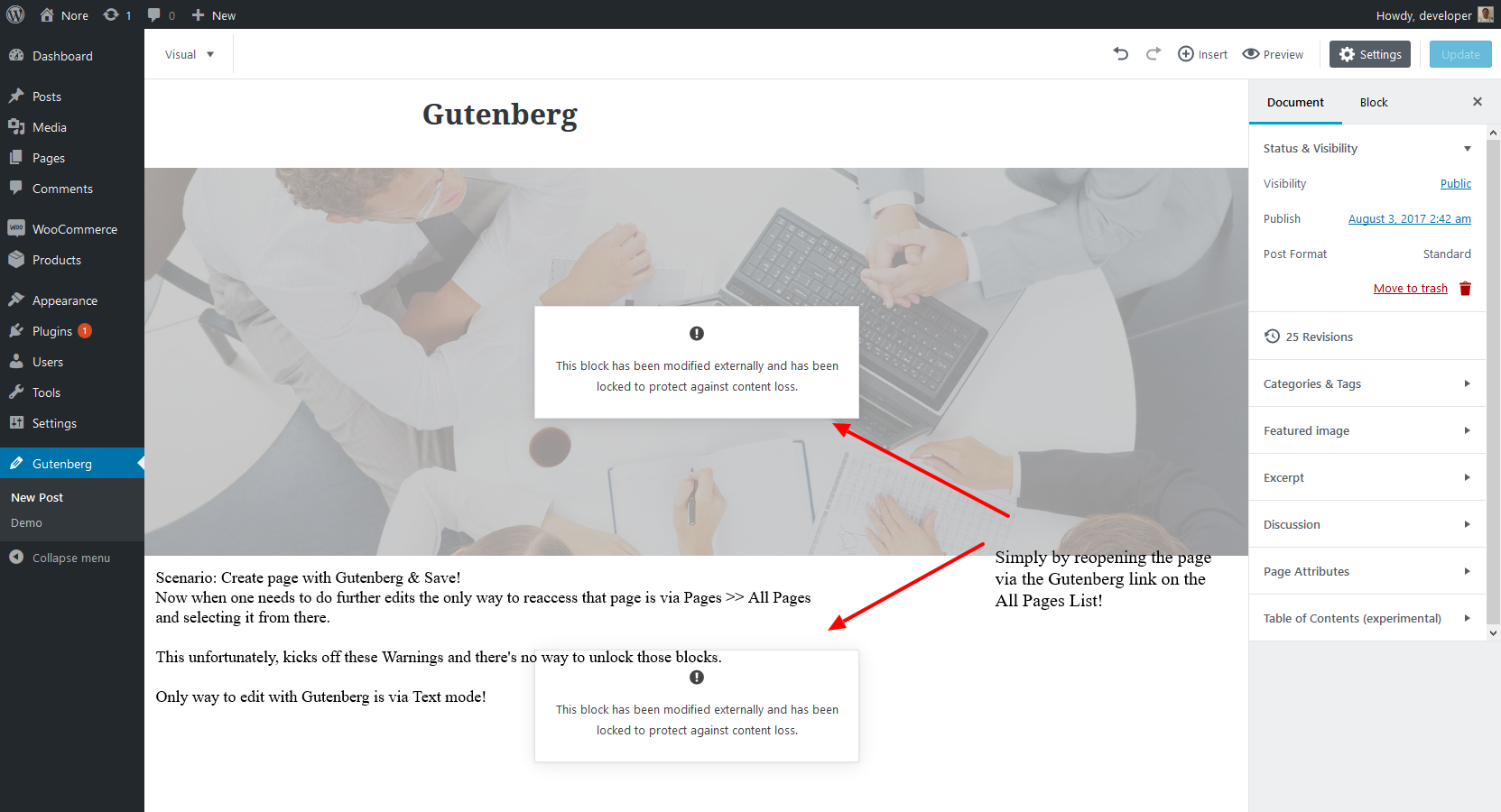
Gutenberg: Warning: Modified Externally & Locked!
Not sure if this has been reported here yet - cross ref: https://wordpress.org/support/topic/block-content-warning-message/
 WPDevHQ
All 13 comments
@WPDevHQ can you share the content of this post (the contents of the Text view?)
There should be more information about this warning in the browser console. This is an area of the code that we are actively working on; right now it is set to be very aggressive about preserving content rather than potentially overwriting changes.
 nylen
on 3 Aug 2017
nylen
on 3 Aug 2017
Sure, here's the raw data: https://gist.githubusercontent.com/WPDevHQ/8e98134e0cdd0bbcf982d63d2b302369/raw/0a89bd4bedb644f7c0b7b6777d5ac32953002662/gutenberg-locked-warning.md
Not seeing much in the console other than errors in parsing and Unknown pseudo classes
WPDevHQ
on 3 Aug 2017
Thanks for the report. We will look into it.
nylen
on 4 Aug 2017
This should be much improved now.
 mtias
on 18 Aug 2017
mtias
on 18 Aug 2017
I appear to be getting the same thing whenever I add an "Additional CSS Class" to a block (and then save and reopen via Gutenberg link).
For example:
<!-- wp:core/separator -->
<hr class="wp-block-separator separator-bottom" />
<!-- /wp:core/separator -->
Appears in the Visual editor as externally modified.
 nonsalant
on 15 Sep 2017
nonsalant
on 15 Sep 2017
I get this error whenever I add 2 images in the same block.
I have a "large-img" and "small-img" in my custommade block - when I save, it's all fine. But when I refresh - the "small-img" url has been replaces with the "large-img" - so that I have a duplicate.
And I get the error: "This block appears to have been modified externally. Overwrite the external changes or Convert to Classic Text to keep your changes."
It's ONLY my images!
All the text-fields are fine...
Frustrating!
 Kuckovic
on 18 Sep 2017
Kuckovic
on 18 Sep 2017
I've been experiencing this issue as well, except for me it's paragraph blocks that always reopen as modified externally.
I've narrowed this down to
tags — I think Gutenberg uses
tags as part of the block validation process before the tags are stripped out by something else.
 leo-ji
on 19 Sep 2017
leo-ji
on 19 Sep 2017
@leo-ji yes, the paragraphs is a known issue that happens whenever removep occurs on blocks through opening a post in the classic editor. We are working on a fix for it.
mtias
on 20 Sep 2017
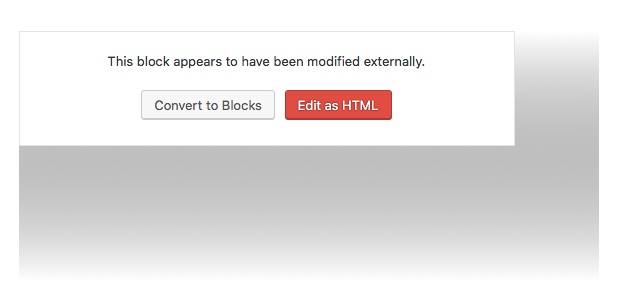
I want to love Gutenberg. This warning function forces me to do something I don't want to - convert to Block or Edit as HTML. Provide a Cancel option and let me go back to where I was - the original block. This is annoying. Remember, you don't want to make assumption and force the user to do things certain way.
 ombion
on 29 Jun 2018
ombion
on 29 Jun 2018
The new version coming out next week should have improvements on this area!
mtias
on 29 Jun 2018
I've updated the plugin with its latest release for my WP installation, and I'm still getting this same annoying warning message multiple times in multiple places. This has gotta be a bug because the same message also happens on those blocks where the code was not modified externally as the message warns. Just take this feature off! It's useless and only brings problems.
ombion
on 11 Jul 2018
Hi @ombion , can you provide some information:
- The minimal repeatable steps necessary to produce a warning message.
- The full contents of your console log (instructions for Chrome
- A list of other plugins currently activated for your site
 aduth
on 11 Jul 2018
aduth
on 11 Jul 2018
Aduth, I'd love to help. That request will take some time to provide you the proper info. I'm on a super tight deadline at the moment, so I'd have to get back to this later.
In the meanwhile, one thing I notice, and this may help. On some of the blocks when I apply CSS class under the Advanced > Additional CSS Class box, those tend to act up. Gutenberg somehow detects this as "externally" modified, and theoretically it is not because the modification is done according to what the system allows.
ombion
on 11 Jul 2018
Related issues
 BE-Webdesign
·
3Comments
BE-Webdesign
·
3Comments
 wpalchemist
·
3Comments
wpalchemist
·
3Comments
 franz-josef-kaiser
·
3Comments
franz-josef-kaiser
·
3Comments
 jasmussen
·
3Comments
nylen
·
3Comments
jasmussen
·
3Comments
nylen
·
3Comments
Most helpful comment
The new version coming out next week should have improvements on this area!