Attributes
- None, Left, Right, Center, Full Width?
- Display as dropdown
- Show post counts
States
Selected:

Neutral:

Questions:
- Should we include alignment?
- If yes, should alignment be a default setting in the Block Level Formatting bar?
Related to #1011.
 melchoyce
All 17 comments
This would be a dynamic block like "Latest Posts", right?
Regarding the alignment, I don't think it's necessary as it doesn't make much sense for this block IMHO.
 swissspidy
on 26 Jun 2017
swissspidy
on 26 Jun 2017
This would be a dynamic block like "Latest Posts", right?
Correct :)
melchoyce
on 26 Jun 2017
Should post counts be part of the link?
 mtias
on 27 Jun 2017
mtias
on 27 Jun 2017
I have some almost-working code locally for adding an archives block*. It uses wp_get_archives(), just like the existing widget in WordPress. That function puts the count outside the link.
Perhaps we could improve that function in core to make it more accessible, i.e. add some screen reader text to the count. In that case, having it outside the link makes more sense for a11y and also styling reasons.
* What's missing is the part to fetch this via the REST API. Probably worth waiting for #780.
swissspidy
on 27 Jun 2017
Should post counts be part of the link?
They are currently in widgets, but I don't think they need to be.
Perhaps we could improve that function in core to make it more accessible, i.e. add some screen reader text to the count. In that case, having it outside the link makes more sense for a11y and also styling reasons.
Awesome 🙌
melchoyce
on 27 Jun 2017
Post Type selector please. 😂
 marsjaninzmarsa
on 5 Jul 2017
marsjaninzmarsa
on 5 Jul 2017
Updated the mockups to unlink the post counts.
melchoyce
on 8 Jul 2017
If yes, should alignment be a default setting in the Block Level Formatting bar?
On #1803 it seems the decision is to put the alignment controls in the block toolbar instead of the inspector.
 westonruter
on 9 Jul 2017
westonruter
on 9 Jul 2017
This looks good to me so removing the 'feedback' label as looks ready to implement.
 karmatosed
on 4 Sep 2017
karmatosed
on 4 Sep 2017
As the project moves towards merge proposal, we are moving issues that aren't needed for that to projects. This doesn't mean they won't get done, they totally can and that's why we're moving to projects. This allows us to focus on the issues that have to happen to Gutenberg. I am closing this but it will live in projects.
karmatosed
on 7 Nov 2017
Similar to #1462, I wanted to take a look at rethinking the Archive widget rather than just porting it over. I ended up with two ideas: an archive list, and an archive grid.
Archive List
The current archive widget seems to be popular on blogs, especially things like food/craft/lifestyle blogs. However, if you've been running your blog for a while, you end up with a gigantic list of months. Additionally, there's no way to see what posts were written within that month — just the number. To see the posts, you need to click into the archive for that month. What if you could see which posts were written that month?
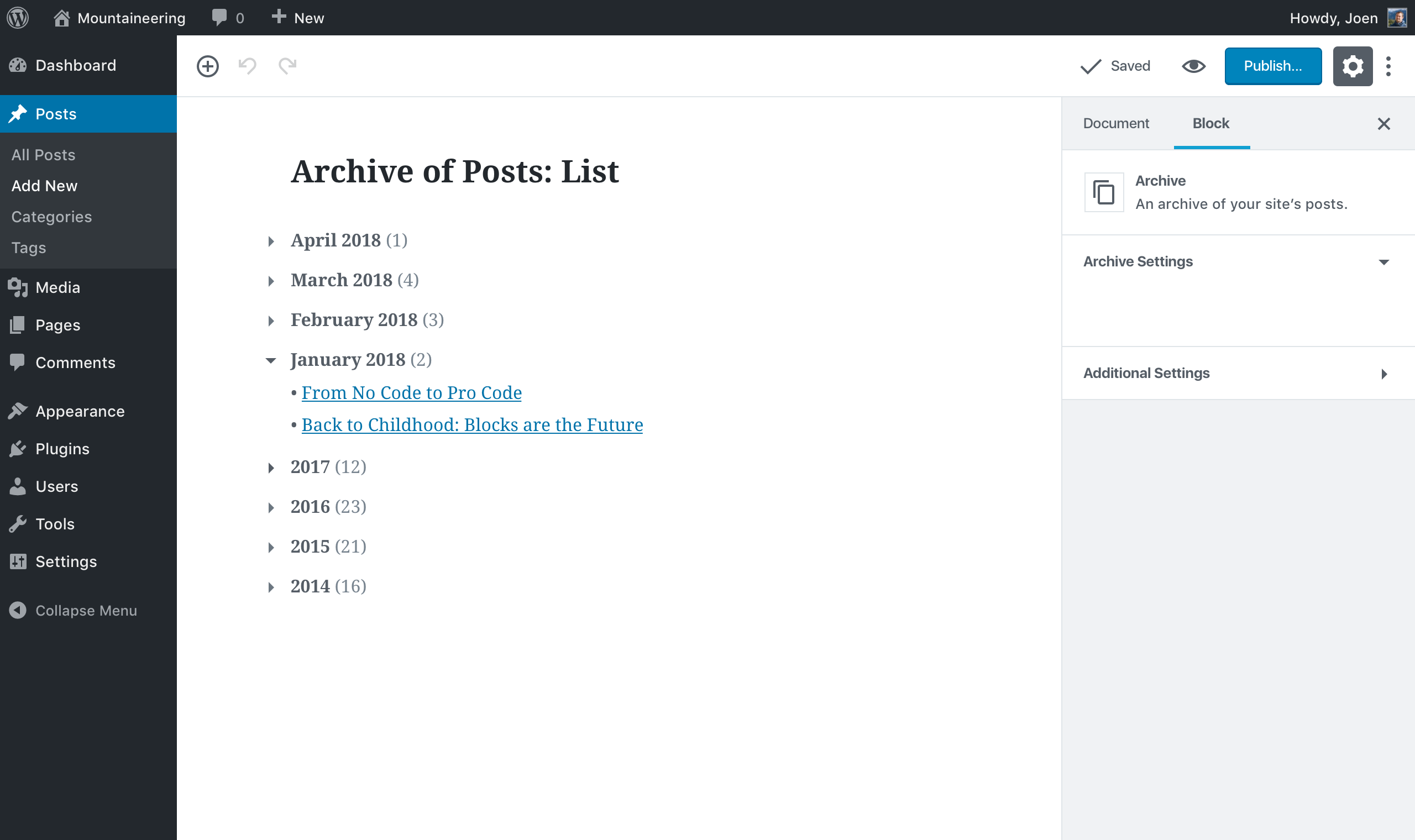
To solve these problems, I:
- Swapped links to the month archives for accordions.
- Started with months from your current year, then dropped down to the year for older posts. Previous years have an extra level of depth, so you open them and see the available months from that year.
This should help both condense the lists for long-time bloggers, and help people find the posts they're browsing for faster.
Archive Grid
While a list is great for a sidebar or a narrower widget area, blocks can also exist within post and page content. This is where a grid comes in handy, so you can have a more dynamic approach to listing out your archive without needing to code up a custom template.
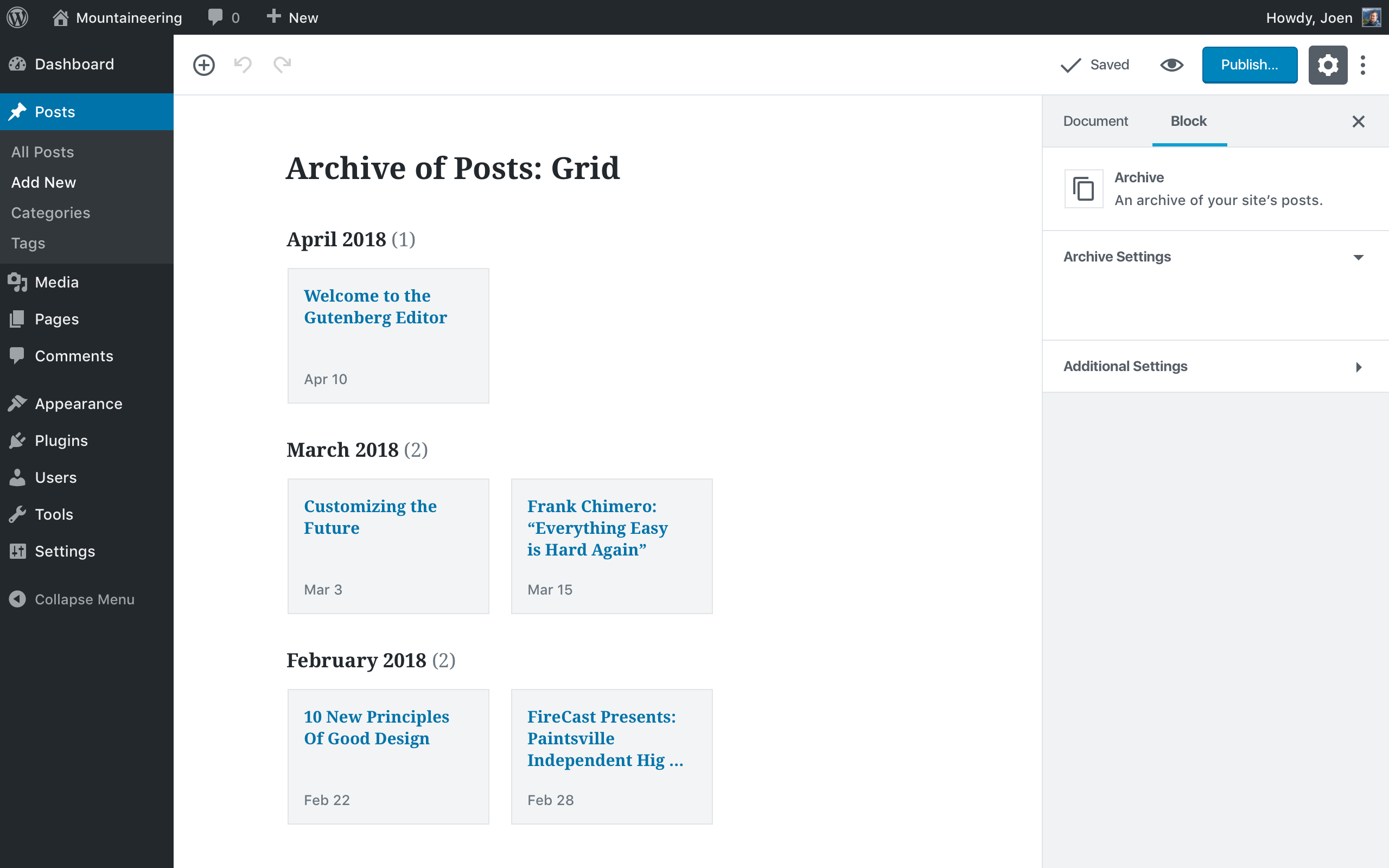
This particular mockup is inspired by Tumblr's default archive pages. Thinking that we could load the current year, then include a "load more" button or year-based pagination at the end of the current year's list.
Both of these still need some work — for example, you can see neither has settings yet — but I wanted to get the conversation started as soon as I had something to show.
melchoyce
on 28 Apr 2018
Thinking levels here.
Level 1 - post with images.
Level 2 - Latest posts showing an excerpt and featured image.
Level 3 - Archive. Showing latest posts + featured images in an archive grid by month.
As this would be a mix of text and images. Giving the option to the user to use images along the various levels.
Mels Archive Grid is very interesting as it shows a lot nicer looking archive page. The user would then have the option to make a simple list, open most recent post links or to create a grid.
 paaljoachim
on 30 Apr 2018
paaljoachim
on 30 Apr 2018
https://en.blog.wordpress.com/2018/ shows the featured image as the background of the post block, which I quite like. It's very subtle, but helps you distinguish between posts and brings in some extra character.
melchoyce
on 1 May 2018
We should also consider adding a Query block
 rchipka
on 9 May 2018
rchipka
on 9 May 2018
This PR: #7966
Has block options such as Number of items, display author, display date, display excerpt etc that could also be added to Archive block.
paaljoachim
on 15 Jul 2018
I am not convinced we need to add those to the archive block @paaljoachim. I don't think every block needs those settings that could have. What data are you using to think that would be a good step? Is there any prior example you think means it should to be a consideration?
karmatosed
on 16 Jul 2018
Hey Tammie. I just wanted to mention it. I am thinking about consistency. As there will be certain blocks that will reuse specific settings.
paaljoachim
on 16 Jul 2018
Related issues
 davidsword
·
3Comments
davidsword
·
3Comments
 cr101
·
3Comments
cr101
·
3Comments
 hedgefield
·
3Comments
hedgefield
·
3Comments
 pfefferle
·
3Comments
pfefferle
·
3Comments
 mhenrylucero
·
3Comments
mhenrylucero
·
3Comments
Most helpful comment
Similar to #1462, I wanted to take a look at rethinking the Archive widget rather than just porting it over. I ended up with two ideas: an archive list, and an archive grid.
Archive List
The current archive widget seems to be popular on blogs, especially things like food/craft/lifestyle blogs. However, if you've been running your blog for a while, you end up with a gigantic list of months. Additionally, there's no way to see what posts were written within that month — just the number. To see the posts, you need to click into the archive for that month. What if you could see which posts were written that month?
To solve these problems, I:
This should help both condense the lists for long-time bloggers, and help people find the posts they're browsing for faster.
Archive Grid
While a list is great for a sidebar or a narrower widget area, blocks can also exist within post and page content. This is where a grid comes in handy, so you can have a more dynamic approach to listing out your archive without needing to code up a custom template.
This particular mockup is inspired by Tumblr's default archive pages. Thinking that we could load the current year, then include a "load more" button or year-based pagination at the end of the current year's list.
Both of these still need some work — for example, you can see neither has settings yet — but I wanted to get the conversation started as soon as I had something to show.