Gutenberg-mobile: Multiple component updates with invalid states when splitting list item
Describe the bug
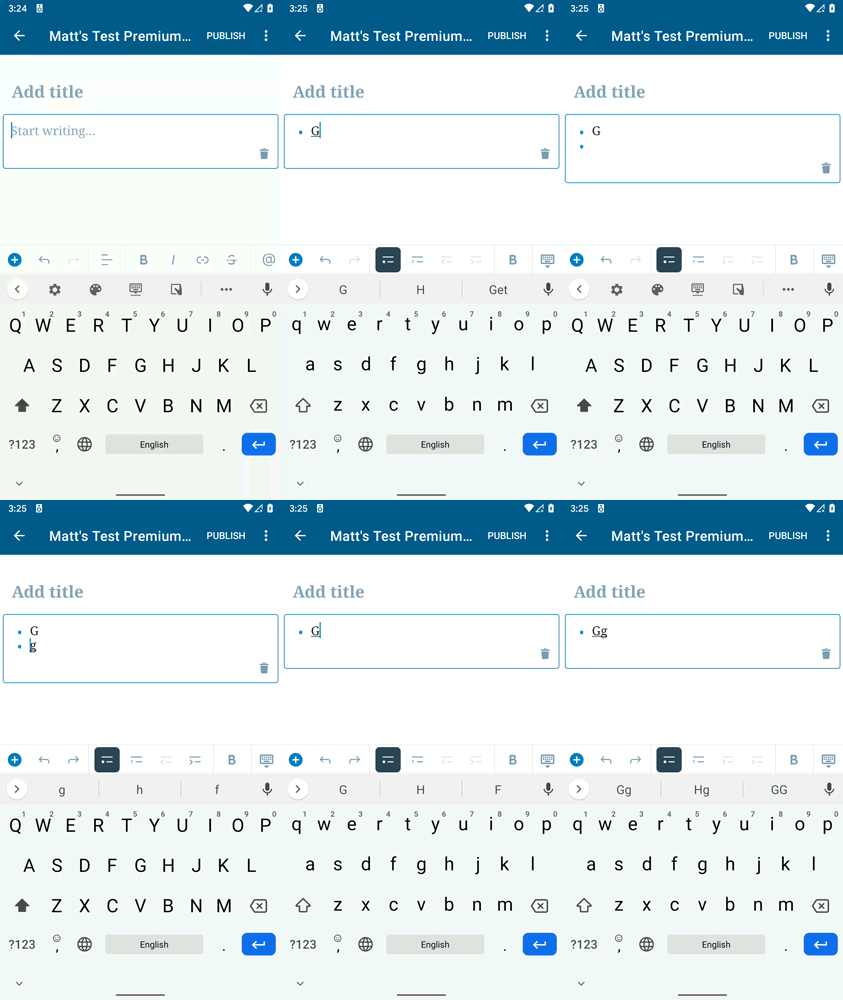
On Android, splitting a list item appears to cause multiple updates to the text. This causes a number of issues including (a) sometimes ending up in an unexpected state after splitting list items (see Step 5 in the steps to reproduce) and (b) it can take multiple undo actions to "undo" the splitting of a list item (see Steps 6, 8, 10, 12, and 14).
When I tested this on production (a) did not occur, but (b) still did. I suspect that (a) is due to a race condition.
To Reproduce
Steps to reproduce the behavior:
- Create a new list
- Type two letters in the list item ("gg")
- Put your cursor between the two letters ("g|g")
- Tap Enter
- On a release build, I see the list properly split in two (two list items, each with a single "g". On a debug build, however, I briefly see a second list item with the "g", but then the "g" in the second list item disappears, so the result is that the first list item properly has a single "g", but the second list item is empty instead of having a single "g" as it should.
- Tap undo
- Observe that the "g" in the second list item reappeared, but the bullet for the second list item is now missing
- Tap undo a second time
- Observe that the bullet for the second list item returns, so now the second list item appears both with the bullet and single "g" letter. This is how it should have looked immediately after step 4.
- Tap undo a third time.
- Observe that the "g" in the second list item disappears, but the second list item remains (now it is empty), and the cursor has returned to the first list item.
- Tap undo a fourth time
- Observe that the second list item disappears, and the first (and only) list item is unchanged (only has a single "g")
- Tap undo a fifth time
- Observe the first and only list item now has the two letters with the cursor between them, like it was in Step 3.
Expected behavior
- Tapping Enter to split a list item should always result in the text after the cursor (if any) being present in the second list item); and
- Tapping "undo" one time immediately after splitting a list item should undo the splitting of the list item.
Screenshots
This gif follows the steps to reproduce outlined above.
Smartphone (please complete the following information):
- Device: Pixel, Pixel 3
- OS: Android 10
- Version alpha-219
 mchowning
All 10 comments
Possibly related to #65
mchowning
on 1 May 2020
I see the expected behavior (clear split, one-undo-returns to joint line) on (production) WPAndroid 15.0-rc-3 running on Pixel 2XL Android 10. Same on the demo app (against Metro) on 7495fbf3, same device/OS. Except for the slowness on the Metro case, I see no visual artifacts, broken/empty lines or similar.
Is the issue still happening for you @mchowning ?
 hypest
on 12 Jun 2020
hypest
on 12 Jun 2020
I see the expected behavior (clear split, one-undo-returns to joint line) on (production) WPAndroid 15.0-rc-3
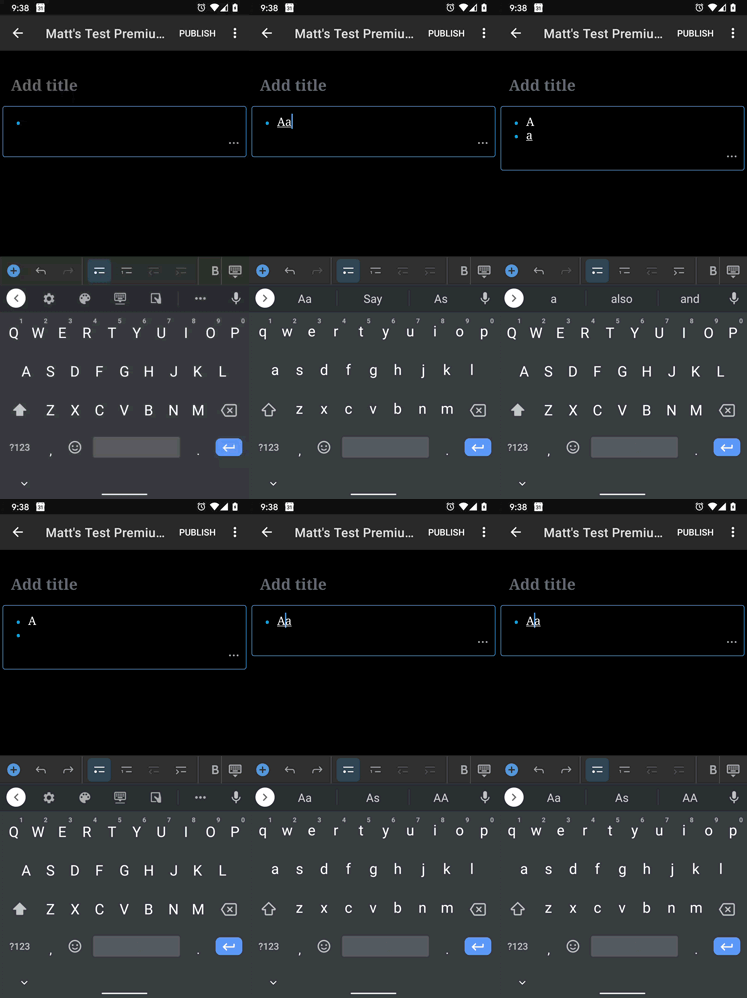
Just did a quick test using WPAndroid 15.0-rc-3 on a Pixel 3 running Android 10, and I had to press undo 5 times to "undo" splitting a list item. I wonder why I'm seeing that issue and you're not @hypest . 🤔
mchowning
on 12 Jun 2020
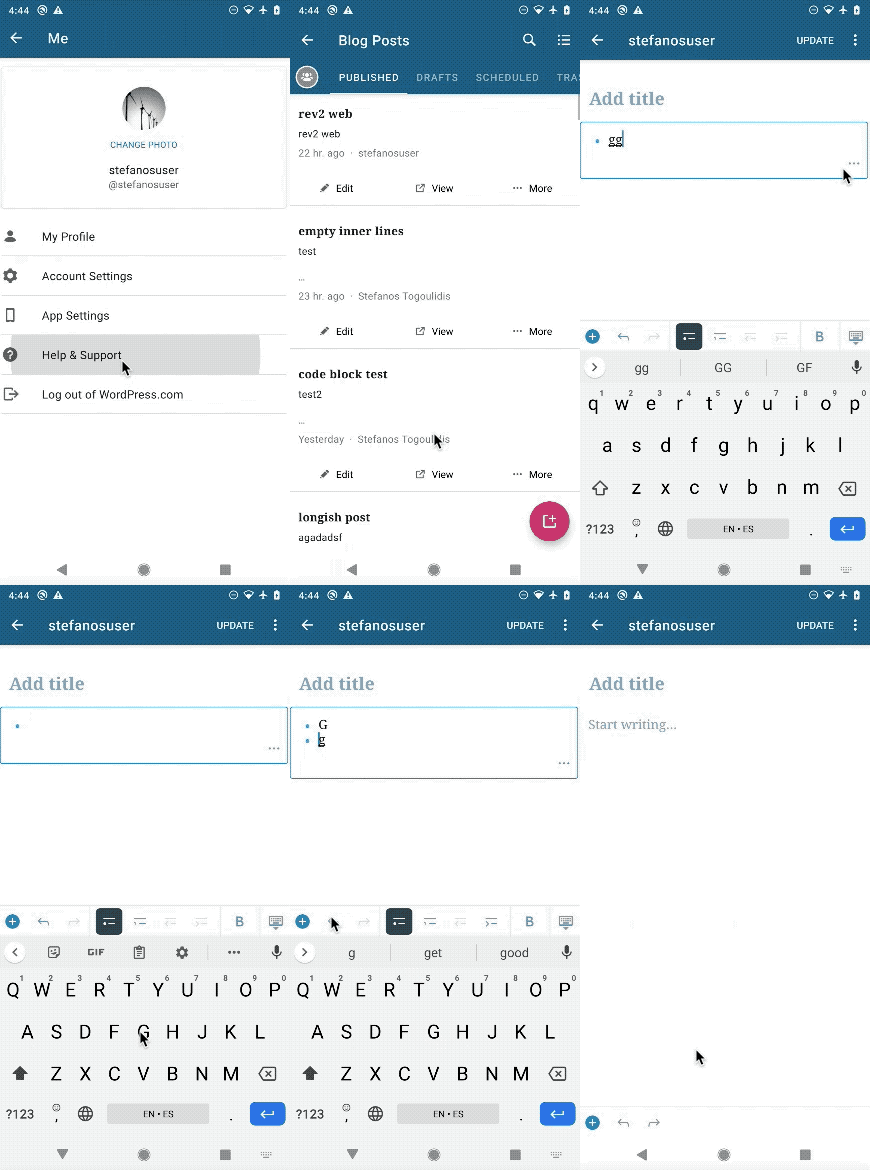
For reference, here's a GIF from my run (using the APK from https://github.com/wordpress-mobile/WordPress-Android/releases/tag/15.0-rc-3):
hypest
on 12 Jun 2020
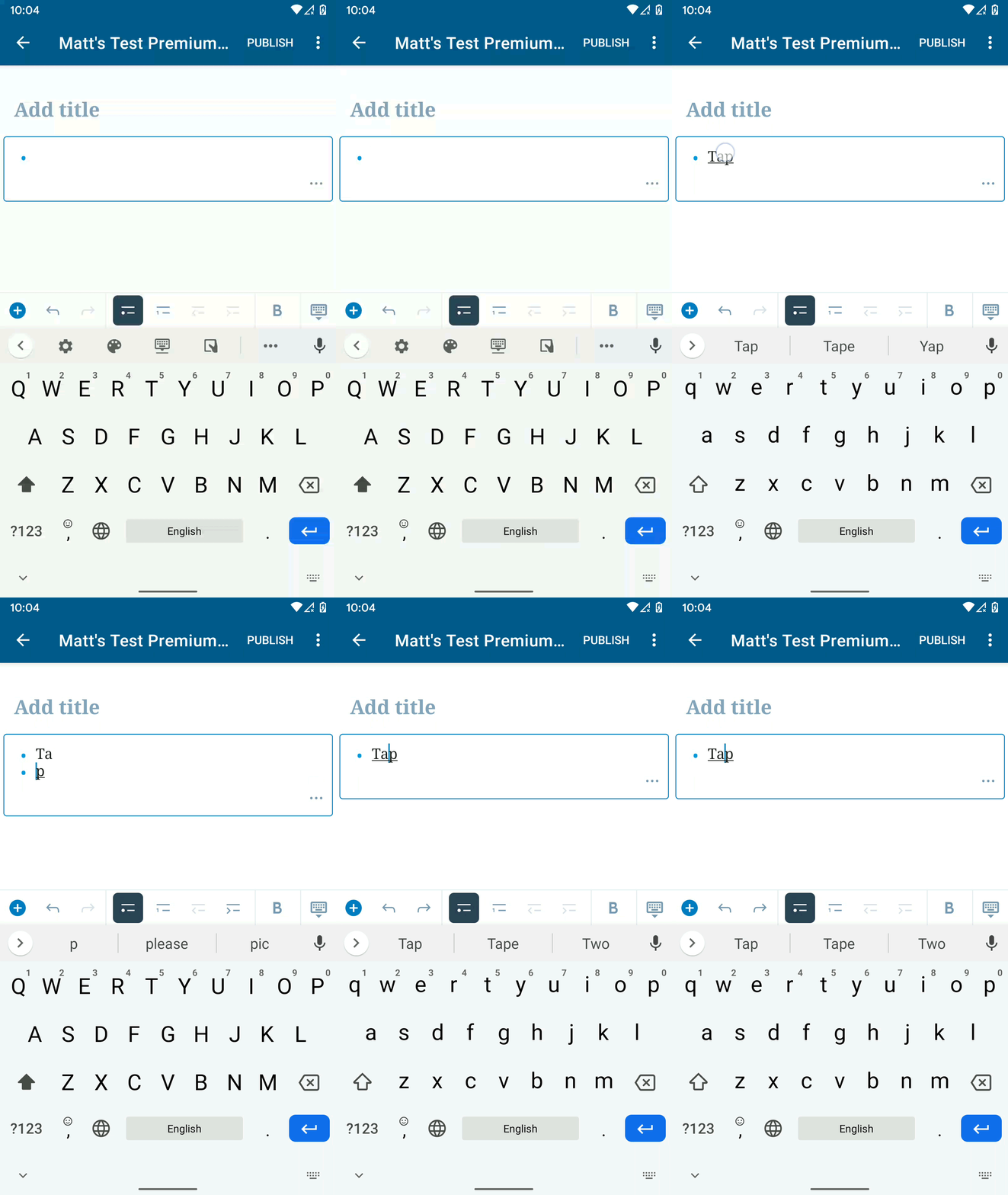
Ok, did some more testing, and apparently it makes a difference whether you move the cursor to the middle of the word by tapping or scrolling with the spacebar!?!? 😱
tapping (1 undo) | scrolling with spacebar (5 undos)
---- | ----
 |
| 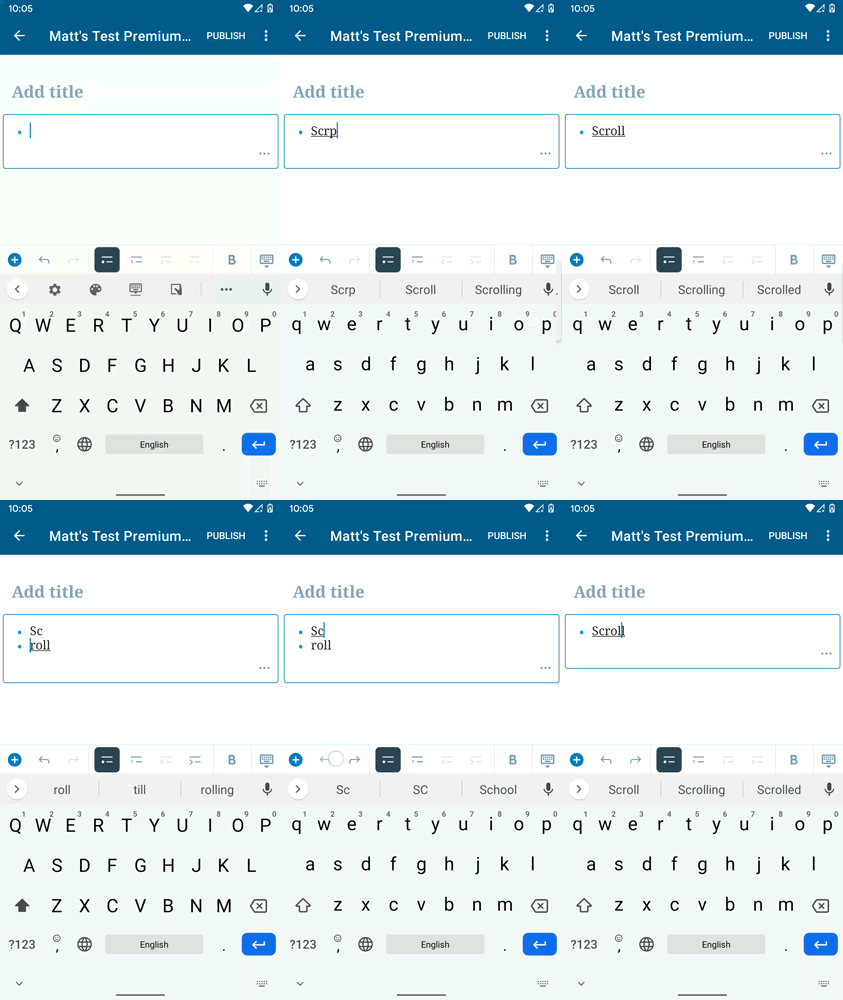
This test was with the 15.0-rc3 on a Pixel 1 running Android 10 (my earlier comment was with a Pixel 3) fwiw.
mchowning
on 12 Jun 2020
Aha, interesting. If the "tap to set cursor" works, I'm thinking of lowering the priority on this ticket since I assume tapping to set cursor is the most common flow?
At least we now have more specific steps to try and reproduce. Lemme try this on my side. Edit: hmm, can't repro on my side by using the spacebar-sliding method.
hypest
on 12 Jun 2020
I'm thinking of lowering the priority on this ticket since I assume tapping to set cursor is the most common flow?
I agree @hypest . Went ahead and lowered this to Medium, but I'm not opposed to making it Low if you think that's more appropriate.
can't repro on my side by using the spacebar-sliding method
So weird! I can't deny that it seems more likely I have something going on with my end compared to the idea that how you set the cursor really does make a difference here, but I've reproduced this on both the release 15.0-rc3 apk from github and the one distributed on the Play Store beta channel on two different Pixel devices (1 and 3). I'm not sure what else to try. If someone else tries this and can't recreate it we should probably just close this and we can reopen it if someone else encounters it.
mchowning
on 12 Jun 2020
If someone else tries this and can't recreate it we should probably just close this and we can reopen it if someone else encounters it.
Let's give this a shot. @cameronvoell , can you try to reproduce this issue when you get the chance? Thanks!
hypest
on 16 Jun 2020
Let's give this a shot. @cameronvoell , can you try to reproduce this issue when you get the chance? Thanks!
I am able to reproduce the multiple undo behavior ((b) from description ) follow the steps precisely from the description with scrolling spacebar, but not the "unexpected state" ((a) from description).
I can only reproduce (b) when I do the "scrolling with the spacebar". Tapping or moving the cursor with the arrow keys on my tablet do not reproduce the issue. It would be interesting to see why the spacebar scroll is different, but I agree this is less priority since the tap to move cursor works fine, and the scrolling with spacebar seems to only cause the issue if I follow the description steps exactly, and does not create extra undo's other times.
 cameronvoell
on 18 Jun 2020
cameronvoell
on 18 Jun 2020
In https://github.com/wordpress-mobile/gutenberg-mobile/issues/2373#issuecomment-659798095 I learned that Aztec on Android doesn't handle input from Gboard well, especially in relation to Enter and Backspace keyboard events. Since this issue is also only present using the Gboard and also relates to the Enter key event, I'd say that once we fix that issue, there's a decent chance this will also be fixed.
Here's a quick summary of my tests:
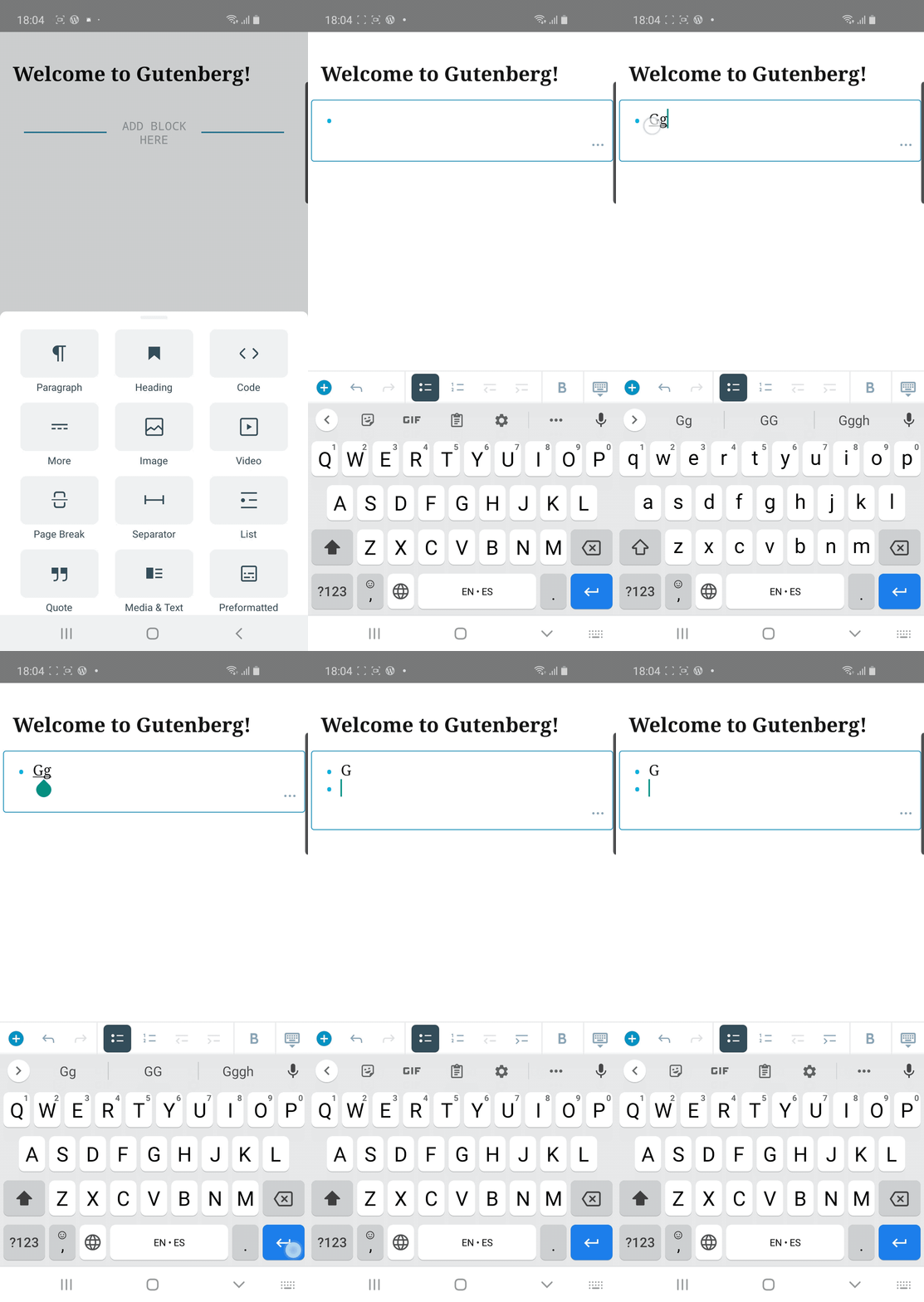
Gutenberg demo app on a Samsung Galaxy S10 running Android 10
When placing the cursor by _tapping_, I could reproduce on the second attempt.
See gif
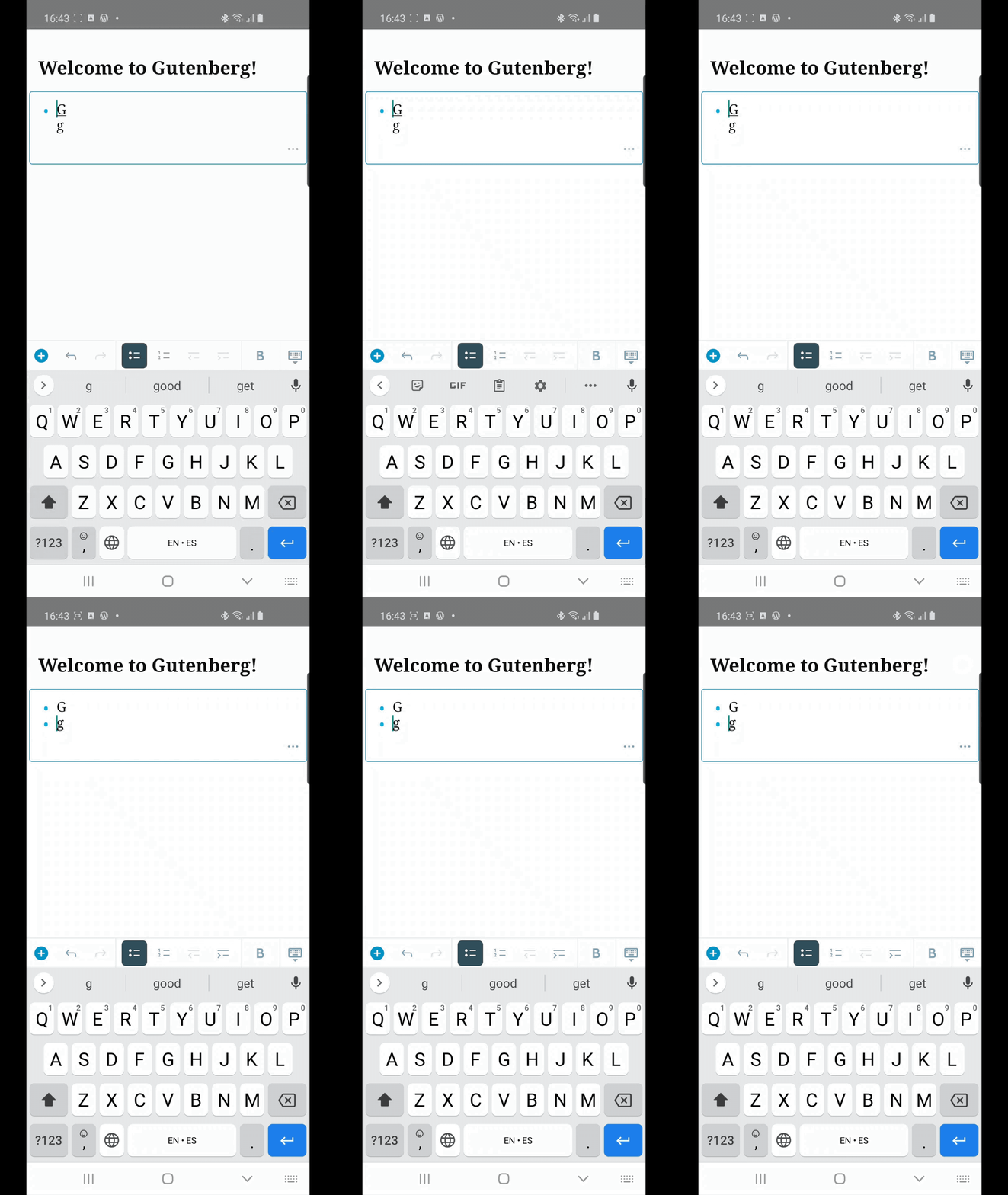
When placing the cursor by scrolling the spacebar, I could often reproduce on the first go. I don't have a gif of this.
Also, after hitting Enter to create the second list item, the app sometimes got in a loop.
See gif
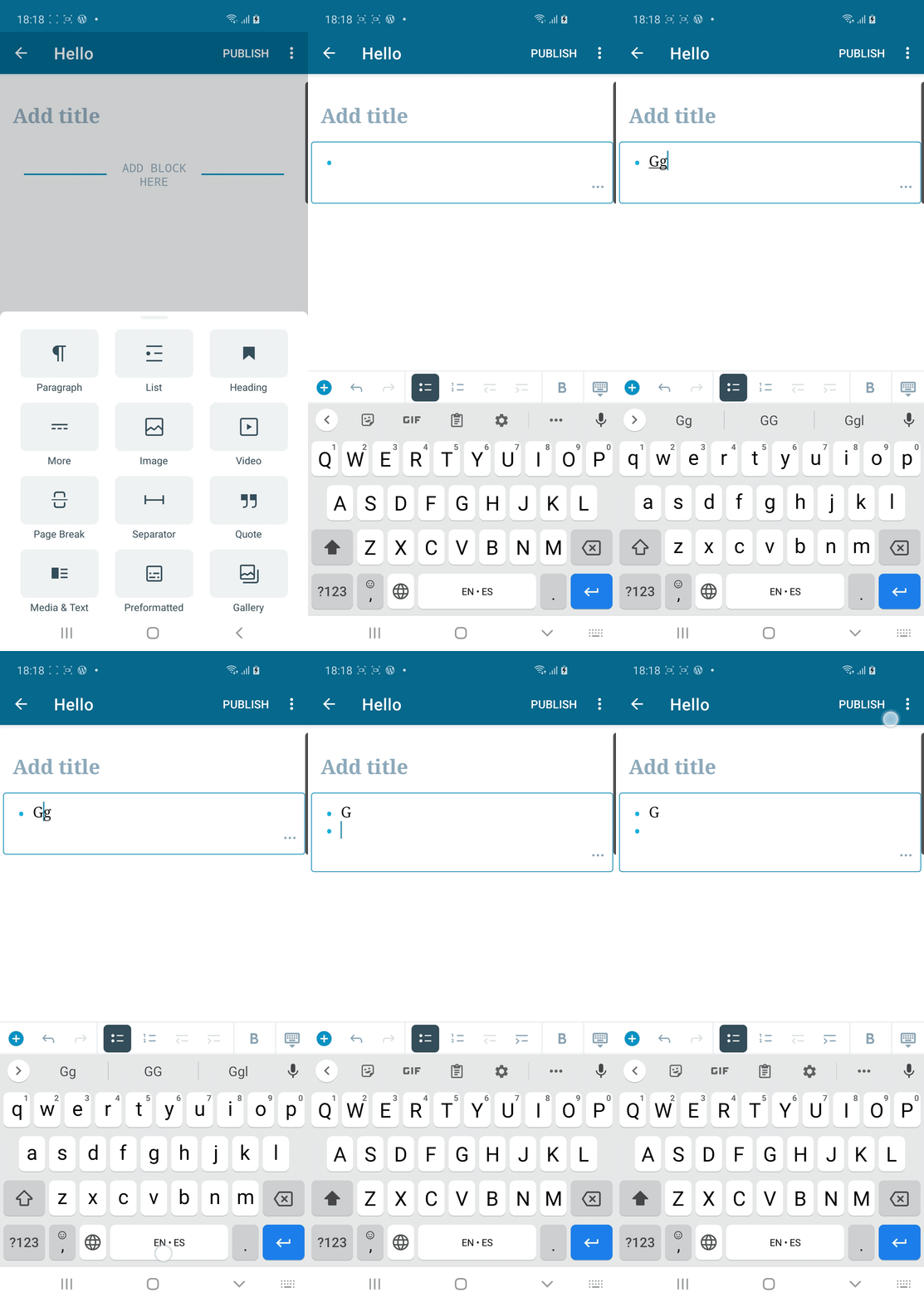
WPAndroid 15.2.1 on a Samsung Galaxy S10 running Android 10
Similar results to Gutenberg demo app tests above.
See gif
 guarani
on 21 Jul 2020
guarani
on 21 Jul 2020
Related issues
 mzorz
·
3Comments
mzorz
·
3Comments
 designsimply
·
4Comments
designsimply
·
4Comments
 Tug
·
3Comments
Tug
·
3Comments
 iamthomasbishop
·
3Comments
iamthomasbishop
·
3Comments
 koke
·
4Comments
koke
·
4Comments
Most helpful comment
I am able to reproduce the multiple undo behavior ((b) from description ) follow the steps precisely from the description with scrolling spacebar, but not the "unexpected state" ((a) from description).
I can only reproduce (b) when I do the "scrolling with the spacebar". Tapping or moving the cursor with the arrow keys on my tablet do not reproduce the issue. It would be interesting to see why the spacebar scroll is different, but I agree this is less priority since the tap to move cursor works fine, and the scrolling with spacebar seems to only cause the issue if I follow the description steps exactly, and does not create extra undo's other times.