Gutenberg-mobile: Fallback to browser for unsupported blocks
Let's discuss about having a better fallback mechanism for unsupported blocks. We are currently making some UI enhancements about this but we are not providing a way for the user to continue editing the page. So how about we provide a link for the user to open the block editor in browser or a web view just like we do in post preview?
 pinarol
All 27 comments
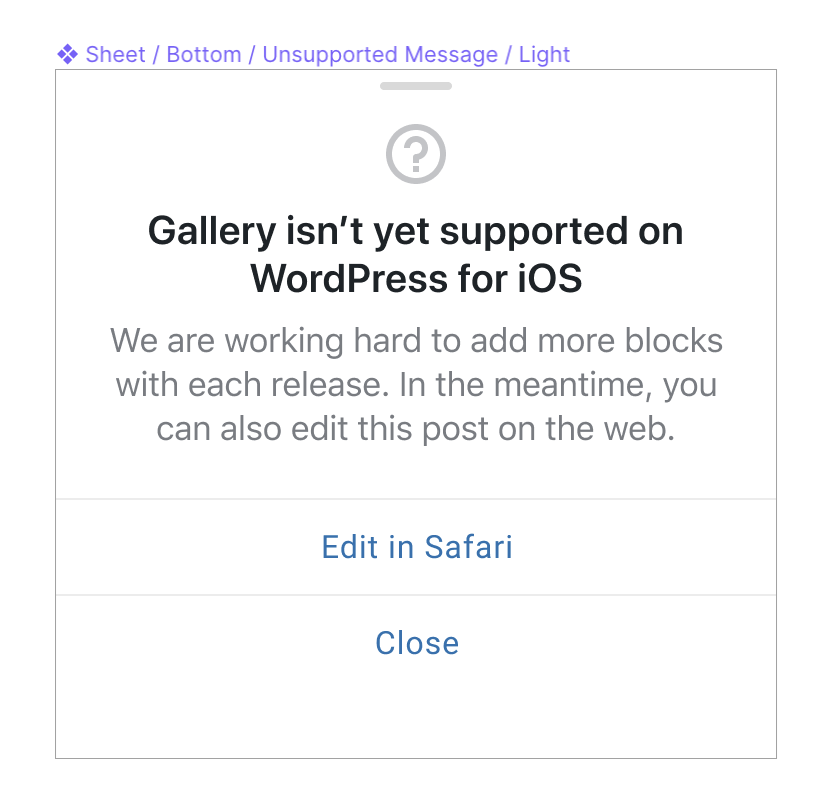
Let me drop here the initial design from @iamthomasbishop
pinarol
on 23 Oct 2019
This does seem a lot better than what we have now. My only concern is that this is a pretty large "block" with a lot of text. So for any post that had more than one or two unsupported blocks it seems like a lot of the displayed post would just be repeating all of this text over and over again. For this reason, although I like the "We are working hard..." text, I would lean toward omitting it to make these blocks smaller.
 mchowning
on 23 Oct 2019
mchowning
on 23 Oct 2019
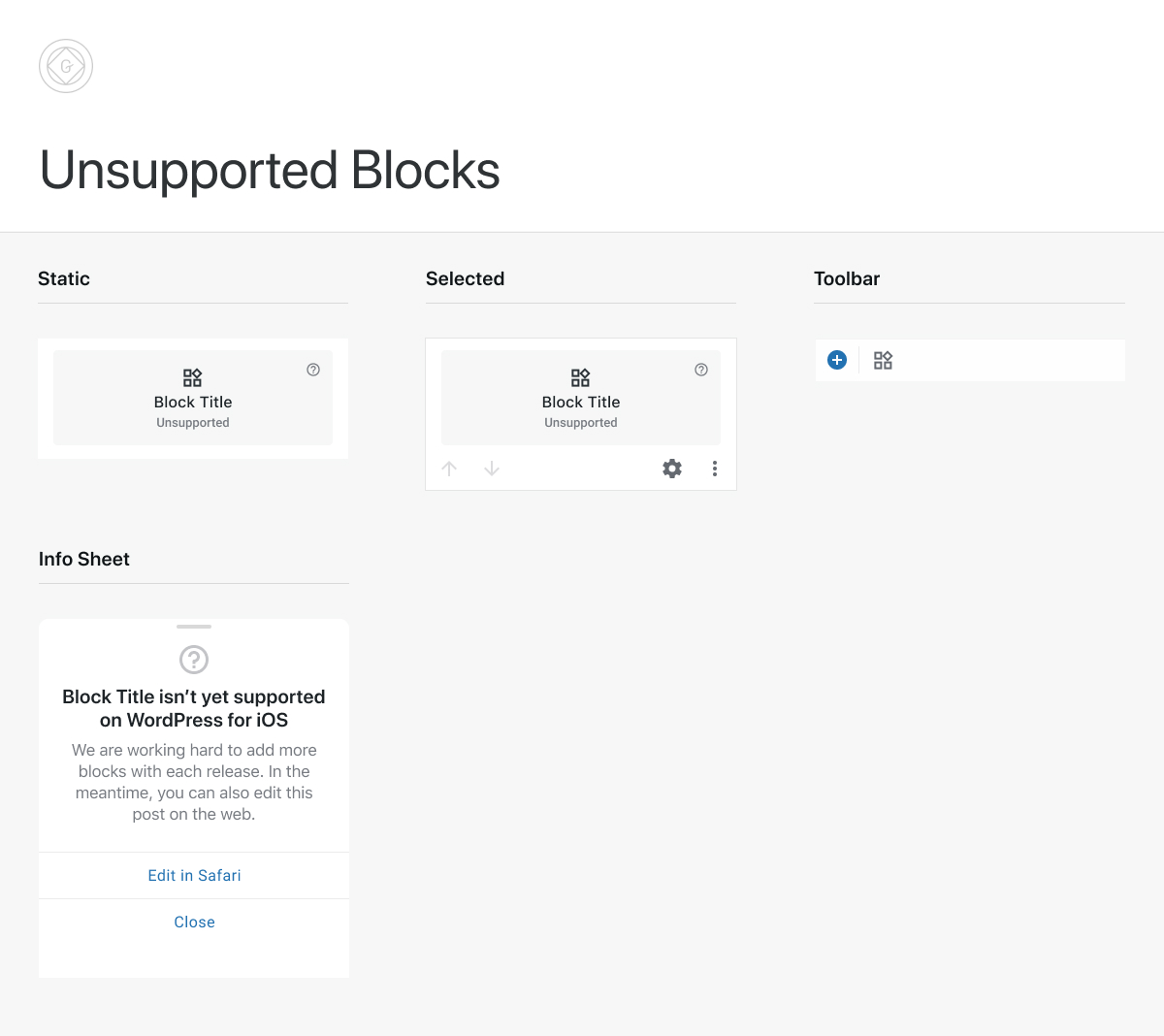
@mchowning To clarify, this is the sheet that would display when the user taps on an unsupported block – not the canvas block itself.
 iamthomasbishop
on 23 Oct 2019
iamthomasbishop
on 23 Oct 2019
@mchowning To clarify, this is the sheet that would display when the user taps on an unsupported block – not the canvas block itself.
Thanks for clarifying @iamthomasbishop. In that case I love it! 😄
mchowning
on 23 Oct 2019
What are our fallback options here for editing that content?
- Open the post in Gutenberg Web in a Webview
- Open the post in Gutenberg Web in the Browser
- Open the post in Aztec
- Open the post in HTML editor 😬
Did I miss anything?
 maxme
on 23 Oct 2019
maxme
on 23 Oct 2019
@mchowning Here is a design blueprint of the UI elements, hopefully this helps to visualize:
iamthomasbishop
on 23 Oct 2019
In general, I like the idea. It's going to take a while to add support for most things, so having a better fallback makes a lot of sense. My main concern is that depending on what 'Edit is Safari' means here, this could be a lot of work. If we're just sending the user to wp-admin/calypso in a browser it should be fine, but if we want to make only that block editable on a browser, it would be a much bigger effort.
The We are working hard... copy might be accurate for the the things we have planned, but I'm hesitant to show it and give false hopes that a certain unsupported block might be supported soon.
this is the sheet that would display when the user taps on an unsupported block
This might get annoying if it always pops up on first tap. It might work better if it only happens when tapping on the (?) icon, or tapping on the block while selected. Maybe I've just been annoyed by the placeholder image on the demo content asking to upload when I just want to select 😁
 koke
on 23 Oct 2019
koke
on 23 Oct 2019
If we're just sending the user to wp-admin/calypso in a browser it should be fine, but if we want to make only that block editable on a browser, it would be a much bigger effort.
I think the latter would certainly be better, but I was expecting the former would be our starting point (and assumed that would also be tricky, but I've got no idea of the relative difficulty).
The We are working hard... copy might be accurate for the the things we have planned, but I'm hesitant to show it and give false hopes that a certain unsupported block might be supported soon.
Fair point. We can certainly fine-tune the copy – I'm not tied to this wording whatsoever.
This might get annoying if it always pops up on first tap.
It shouldn't. You'd select the block first then tapping on the (?) (potentially also the Unsupported label) would show the sheet. I raised this same concern on this issue-in-progress.
iamthomasbishop
on 23 Oct 2019
If we're just sending the user to wp-admin/calypso in a browser it should be fine, but if we want to make only that block editable on a browser, it would be a much bigger effort.
I'm not sure what you mean here by a much bigger effort. If we reuse what we have for previews: upload an autosave for published post or update drafts, depending on post status. We would "only" have to wait for the autosave or draft to be uploaded and open the browser at the right URL.
Of course there is no offline support in that case.
maxme
on 23 Oct 2019
Sorry, I skipped the part if we want to make only that block editable on a browser, got it now :)
maxme
on 23 Oct 2019
Of course there is no offline support in that case.
@maxme Could we do a connectivity check and hide the ability to edit-in-browser in the case of poor/no connectivity? This could get tricky.
iamthomasbishop
on 23 Oct 2019
Could we do a connectivity check and hide the ability to edit-in-browser in the case of poor/no connectivity?
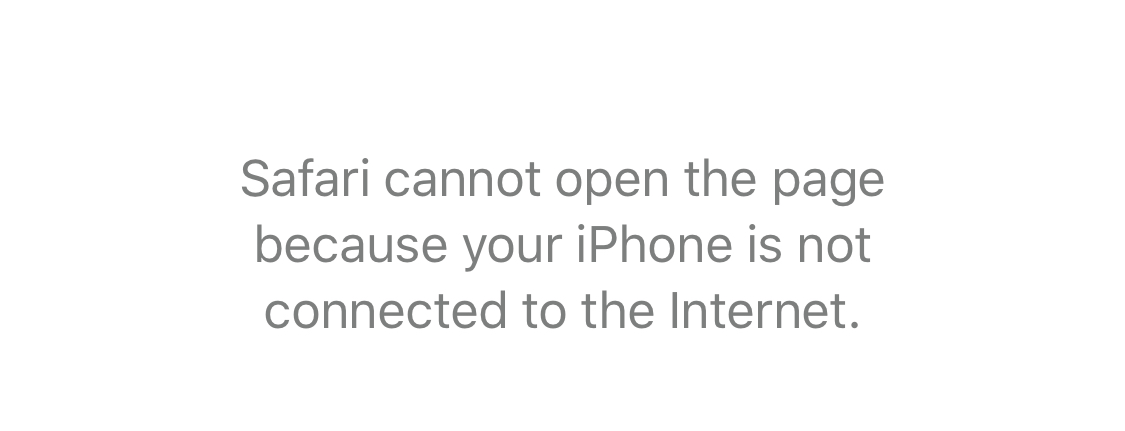
@iamthomasbishop we can check for "no connection" (and IIRC on iOS it's not reliable), but we can't check for a poor connection, UX will be very poor in that case (user will click edit-in-browser and might get a blank page or a browser connection error).
maxme
on 23 Oct 2019
If we reuse what we have for previews: upload an autosave for published post or update drafts, depending on post status
BTW I just realized that this might not work on Jetpack sites... autosave was broken for Jetpack when we implemented previews. Currently in the apps, previews are disabled in certain cases. We'll probably hit the same problem here 😬.
maxme
on 23 Oct 2019
I'd only consider these two options:
- Open the post in Gutenberg Web in a Webview
- Open the post in Gutenberg Web in the Browser
If we're just sending the user to wp-admin/calypso in a browser it should be fine, but if we want to make only that block editable on a browser, it would be a much bigger effort.
I don't think we should even try to make only the block editable, I'm not sure that makes sense (editing a block out of context).
Also, let's please stay focused on improving the existing experience/removing the dead end. It's not going to be ideal, it's not going to have offline support, but allowing users to edit in the web when we don't have native support for the blocks they are using gives them a path forward to complete the task they were trying to perform.
 elibud
on 23 Oct 2019
elibud
on 23 Oct 2019
@iamthomasbishop Browsers have their own ways to handle lack of connection so maybe we don’t need to worry in case we redirect to OS browser
pinarol
on 23 Oct 2019
@pinarol That is a good point. Maybe we're okay for the first version to let the browser handle that scenario. The scenario that worries me the most is when the user starts editing in the browser while they have a poor connection and something gets lost in translation, especially when the apps can't see those changes and do anything w/ them. But I think we can probably improve for these scenarios in subsequent iterations. 👍
iamthomasbishop
on 23 Oct 2019
The poor connection scenario is a good consideration, since, if I'm understanding correctly, the post content will be uploaded, then re-downloaded in entirety as part of this flow to the mobile web. I'm curious about our authentication mechanisms in these contexts and whether differences may pose obstacles to implementing.
Tangentially, would there be value in displaying content, where possible, for unsupported blocks, rather than just a generic message? I wonder if there are any "low hanging fruits", or what a design for that would look like. I'm thinking something that makes it clear that the block is not editable, but still renders something more meaningful to the user.
 mkevins
on 24 Oct 2019
mkevins
on 24 Oct 2019
I tested Gutenberg Web editor in no connectivity, it has a backup mechanism that will allow you store your changes locally when network is down. And if you refresh your page when the network is back on it is offering you to restore your changes.

pinarol
on 24 Oct 2019
@mkevins
Tangentially, would there be value in displaying content, where possible, for unsupported blocks, rather than just a generic message? I wonder if there are any "low hanging fruits", or what a design for that would look like. I'm thinking something that makes it clear that the block is not editable, but still renders something more meaningful to the user.
If we were able to display the block's contents, that essentially makes it a supported block. Unless I'm missing something, I don't know if there is such a thing as a "middle-ground" here. I guess technically a block that can be displayed but doesn't allow editing could be considered unsupported in a way, but that's much closer to a fully-supported block. If we can find a way to do that, I'm all ears.
iamthomasbishop
on 24 Oct 2019
can be displayed but doesn't allow editing
This is what I'm wondering about. I wonder if there is value in presenting something, assuming minimal effort is required, for a given block type. My thinking is, if the user spent effort creating content on web, it might be more reassuring to _see_ that content while editing on mobile, even if they can't edit it.
As an example, imagine if image block was not yet supported (i.e. users can't change the link url, the alt text, etc.), but paragraph _is_ supported. If during the early development of the image block, merely displaying it is solved, but the editing is not solved yet. When a user is editing a post that contains images and paragraphs, I'm thinking it might be valuable to the user to know _which_ picture is above or below the paragraph they're editing.
OTOH, I wonder if this would be a "tease" that would invite more issues that its worth. Also, I wonder if prioritizing the mere display of a block would constrain the development process or somehow interfere with the natural design / engineering "negotiation". My guess is that it would depend on the block and how minimal the "display only" requirements are.
I have mixed feelings about the idea, but I wonder what others think about it.
mkevins
on 25 Oct 2019
Rendering unsupported blocks individually via browser/webview is a whole other project on its own, I recommend not focusing on that for this particular issue.
What we can do here is just implementing a kind of fallback mechanism to meet the minimum needs of the user. My idea is just redirecting the user to OS Browser or a WebView which is still complicated in so many ways. Unfortunately I haven't come up with a nice solution which I can confidently say that it'll be better than the current state.
The biggest problem is data loss. Unsupported blocks are very eligible for data loss because users simply don't see what's inside, thus, it is almost impossible for them to spot that they are really seeing/editing their latest changes.
The second biggest problem is we are constructing the url on the client side so it can break in the future when some query parameters change, ideal way of doing this would be fetching this url from a back end service.
Data loss scenarios
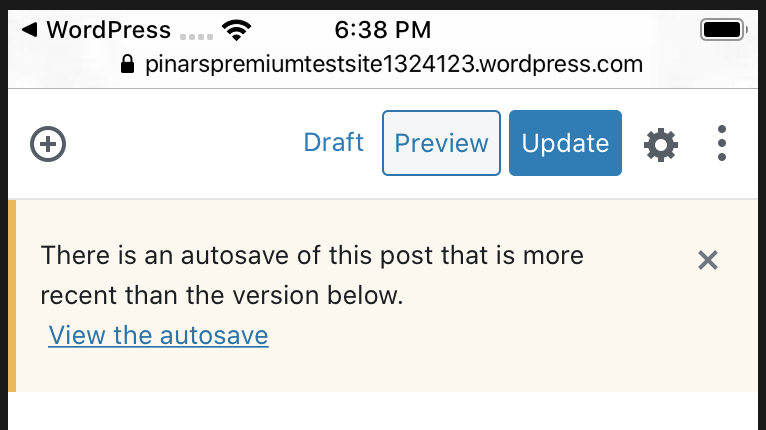
User can forget updating the post in the browser/webview, there's an autosave mechanism on the web editor but when user comes back to the app they won't be able to see the last auto-saved version they had on web, they need to tap Update button to reflect their changes to mobile app. If they forget tapping Update they can simply re-open the post with the app and save/override their changes. And remember, they'll be changing unsupported content, so they won't see them on mobile and detect that they are outdated.
Let's say user didn't forget tapping the Update button in the browser, there's still problem. Because, we are not re-fetching the contents of a post every time we open the editor. So user needs to pull to refresh in the post list screen and it is quite possible that they won't. And considering that the changes will be on unsupported blocks, it will be almost impossible for them to understand that they are overriding their changes they just made on web. Because they will only see the unsupported placeholder.
We can use WebView and somehow refresh the post list when user closes the WebView, but this time if the user forgets saving their changes on WebView they won't be able to reach the same WebView. If we use Browser we have an advantage about this, the Browser will be there until they close it manually. They can re-open the WebView but the best scenario is they will see this manual restore link providing some autosaved content. If they are lucky, they quickly notice they forgot saving changes on WebView and use this link to restore:
So I don't see an ideal way of doing this. Browser scenario seems better than WebView to me atm, because that way we are not encouraging going back and forth between web-mobile and simplifying our use cases. User would probably just keep on editing in browser and not come back to app.
But, we need to make user close the post in the app completely before redirecting to Browser. And we would be forcing them to publish/discard their changes in the middle of their edit. This could be tolerable if we had a clean scenario for the rest.
However, considering async/sync saving scenarios, making sure that the post is persisted can get complicated, especially if the post has an ongoing media upload it can get really tricky. Should we wait for media upload to end before re-directing to browser? Apparently it'd be awkward. Should we not let user to redirect to Browser in this case? Maybe. Or should we just open the browser with some invalid image/video blocks because they have ongoing uploads? What happens when user saves the post on web while we have ongoing uploads on mobile. There are tricky scenarios like that :(
The more I think about it the more I find problems, so I am starting to think like maybe we shouldn't touch this one :( I'll do some more experiments for the case of redirecting to browser and see how it is looking. We should prolly discard all async saving scenarios and try saving in a sync way before redirecting to Browser.
pinarol
on 25 Oct 2019
I think this last comment resumes very well many possible user-facing issues for this idea in general.
My first thought would be that an internal Web-View would make more sense to not lose the mobile app context, but then many many users don't understand differences between Native apps and Web-Views. This could harm us too.
I don't like much the Safari approach because of the risk of many users not coming back to the app, maybe not even noticing, but it makes sense that it might be a better (simpler) option.
Is it an option to bundle the actual Gutenberg-Web app, and run it locally on a web-view?
This is probably yet another can of worms, but it might be worth considering if we want to avoid some of the syncing and connectivity issues.
My personal opinion is to focus on the most used-currently unsupported blocks to minimize this bad user-experience.
 etoledom
on 28 Oct 2019
etoledom
on 28 Oct 2019
@pinarol @etoledom It's seeming pretty clear there is a _lot_ that could go wrong while the user is transitioning between editing within the app and editing in a web-view or browser, so my initial instinct is always to say let's sink all available efforts into getting us more block. However, assuming we'll _always_ have unsupported blocks, we should probably figure out a usable flow.
Forgive me if I'm duplicating thoughts here, but here's how I'm thinking about a decent flow here: I'm wondering if it would make sense to utilize the in-app web-view in the form of a Bottom Sheet or Modal Sheet (iOS) by _closing the editor session on the app_ when the user chooses to perform this option. This could limit the potential danger of mixed save states, etc. In this scenario, we could alert them that we are saving a local copy – while they're doing this, the app closes the editor and sends them to the web-view or browser. In other words, there is only one active session so the risks are seemingly smaller. Although, maybe we could alert in this way using the external browser, as well.
I agree with @etoledom that users aren't always aware of the difference or shift to/from an app to browser, however an in-app web-view in the form of a Bottom or Modal Sheet would make most a lot of sense to me here because it limits context-switching. It'd essentially be "swapping" our editor for one in the web-view, and when they close, we could direct them back to their Posts/Pages list, where existing functionality could attempt to sort out some of the post status complexity.
if the user forgets saving their changes on WebView they won't be able to reach the same WebView.
@pinarol Does auto-save on the web side save us from this? Is there a prompt for the user to save/discard the post on the web? If there is, maybe we're mostly okay because they can go back to their posts list (on the app or web) to see the latest change.
iamthomasbishop
on 28 Oct 2019
I propose we start with a first simple iteration. It won't be perfect, but it will be better than nothing for certain posts (Web Templates, I'm looking at you).
Proposition:
- Add a "Edit this post in the Web editor" button in the unsupported block bottom sheet. When this button is pressed:
- Ask the user if they want to save or cancel. If they cancel, nothing happen.
- Locally save the post and synchronously upload the post, show a loading indicator (like we do for preview). If it fails or timeout, show a dialog, back to the editor.
- Open Gutenberg Web in the Web Browser.
- User should be able to edit this post then hit save or back.
- When the user is back to the app, we have to make sure to refresh the post.
- At this point the user should be on the Post list and the Post model should be up to date.
Note about step 3: the idea is to not use the auto save feature, it's broken on Jetpack, not supported on Self hosted and we would need a patch in Calypso / Gutenberg to open the post with a specific revision of the post.
maxme
on 19 Nov 2019
Should we also consider a per-block HTML view as part of a fallback option?
Being able to see and edit an HTML snippet of the unsupported block still with the visual context of the surrounding blocks might be a good help (much better than nothing, or the full HTML view).
On the negative side, editing the HTML code of an unsupported block could easily break it and we won't be able to show any warning about it.
cc @maxme @hypest
etoledom
on 10 Feb 2020
Should we also consider a per-block HTML view as part of a fallback option?
It can help, but it will only help a small part of our user base. I wouldn't focus on that solution until we have a good visual way of editing these unsupported blocks. And like you said, a block can easily break. Unsupported blocks are more likely to be complex, "simple text" blocks should be covered by gb-mobile.
maxme
on 10 Feb 2020
We have implemented an Unsupported Block Editor capable of acting as a fallback mechanism for unsupported blocks.
There are a few items remaining that are described here: https://github.com/wordpress-mobile/gutenberg-mobile/issues/2358
Closing this since the feature is already implemented (https://github.com/WordPress/gutenberg/pull/21150 https://github.com/WordPress/gutenberg/pull/25238)
etoledom
on 16 Oct 2020
Related issues
 radex
·
3Comments
radex
·
3Comments
 mzorz
·
3Comments
mzorz
·
3Comments
 wptester9845
·
4Comments
wptester9845
·
4Comments
 Tug
·
3Comments
mzorz
·
4Comments
Tug
·
3Comments
mzorz
·
4Comments
Most helpful comment
We have implemented an Unsupported Block Editor capable of acting as a fallback mechanism for unsupported blocks.
There are a few items remaining that are described here: https://github.com/wordpress-mobile/gutenberg-mobile/issues/2358
Closing this since the feature is already implemented (https://github.com/WordPress/gutenberg/pull/21150 https://github.com/WordPress/gutenberg/pull/25238)