Gutenberg-mobile: [iOS] Unable to copy & paste text from mobile Gutenberg
Tested on iPhone (iOS 12.2) and iPad Pro (iOS 12.3b) using WPiOS 12.3 beta (this bug is not present in 12.2). Tested Android on Pixel 2, bug is not present.
I’m not exactly sure what the cause is, but text copied from _inside the editor_ isn’t always pastable. The only case that is working is paste without formatting Inside the editor. Pasting external text _into_ the editor works.
Example: https://cloudup.com/cd7zwlKVU2S
Steps to reproduce (inside editor):
- Open a post or page that contains text
- Highlight text, select
copyfrom edit menu - Create a new block, tap to show edit menu, tap
paste - Notice that nothing is pasted
- Tap to show edit menu, tap
paste without formatting - Notice text is pasted
Pasting from external text works:
- Copy text from another editor, web page, etc.
- Try pasting into GB
- Notice the text is pasted, although the caret goes to the start of the pasted content
Pasting to external editor:
Additionally, when trying to paste from the editor into an external text input/editor, the text from the clipboard is not able to paste. I tested this on (all iOS) Safari text input, Evernote, Apple Notes, Google Docs to confirm.
- Copy text from post or page in mobile GB
- Open external editor, such as Google Docs or Evernote, etc.
- Try pasting clipboard
- Notice text is not pasted
 iamthomasbishop
All 13 comments
@mkevins any ideas about what might be causing this?
 koke
on 29 Apr 2019
koke
on 29 Apr 2019
I did some tests and the selected text gets copied, but then pasting doesn't trigger any of the expected methods.
I tried copying on the classic editor and it works, the only difference I could see in the copied attributed string was the paragraph properties containing a Aztec.HTMLParagraph:
Classic, working:
(lldb) po storage.attributedSubstring(from: selectedRange)
WordPress{
    NSFont = "<UICTFont: 0x7f8c96cbe280> font-family: \"Noto Serif\"; font-weight: normal; font-style: normal; font-size: 16.00pt";
    NSParagraphStyle = "Alignment 4, LineSpacing 0, ParagraphSpacing 8, ParagraphSpacingBefore 8, HeadIndent 0, TailIndent 0, FirstLineHeadIndent 0, LineHeight 0/0, LineHeightMultiple 0, LineBreakMode 0, Tabs (\n    8N,\n    16N,\n    24N,\n    32N,\n    40N,\n    48N,\n    56N,\n    64N,\n    72N,\n    80N,\n    88N\n), DefaultTabInterval 0, Blocks (\n), Lists (\n), BaseWritingDirection -1, HyphenationFactor 0, TighteningForTruncation NO, HeaderLevel 0, paragraphProperties: []";
}
Gutenberg, not working:
(lldb) po storage.attributedSubstring(from: selectedRange)
excited{
    NSFont = "<UICTFont: 0x7f8c96cbe280> font-family: \"Noto Serif\"; font-weight: normal; font-style: normal; font-size: 16.00pt";
    NSParagraphStyle = "Alignment 4, LineSpacing 0, ParagraphSpacing 8, ParagraphSpacingBefore 8, HeadIndent 0, TailIndent 0, FirstLineHeadIndent 0, LineHeight 0/0, LineHeightMultiple 0, LineBreakMode 0, Tabs (\n    8N,\n    16N,\n    24N,\n    32N,\n    40N,\n    48N,\n    56N,\n    64N,\n    72N,\n    80N,\n    88N\n), DefaultTabInterval 0, Blocks (\n), Lists (\n), BaseWritingDirection -1, HyphenationFactor 0, TighteningForTruncation NO, HeaderLevel 0, paragraphProperties: [<Aztec.HTMLParagraph: 0x600002dcf8a0>]";
}
What I was missing is that RCTAztecView overrides the onPaste method, and it will only accept plain text or HTML.
A quick solution would be to ensure that we copy HTML when we copy from within Gutenberg, but I think we'll want to allow pasting attributed strings from other apps (e.g. Notes), so we also need a solution for that.
koke
on 29 Apr 2019
I am also able to reproduce this on the iOS simulator running the WordPress iOS app.
 mkevins
on 30 Apr 2019
mkevins
on 30 Apr 2019
Reproduced on iPhone SE, (iOS 12.2) running WPiOS 12.3.
Copying (or cutting) text works - the text is copied - in both Block and Classic editor. Pasting works in Classic editor content area. (But not in Title field - see https://github.com/wordpress-mobile/WordPress-iOS/issues/11670)
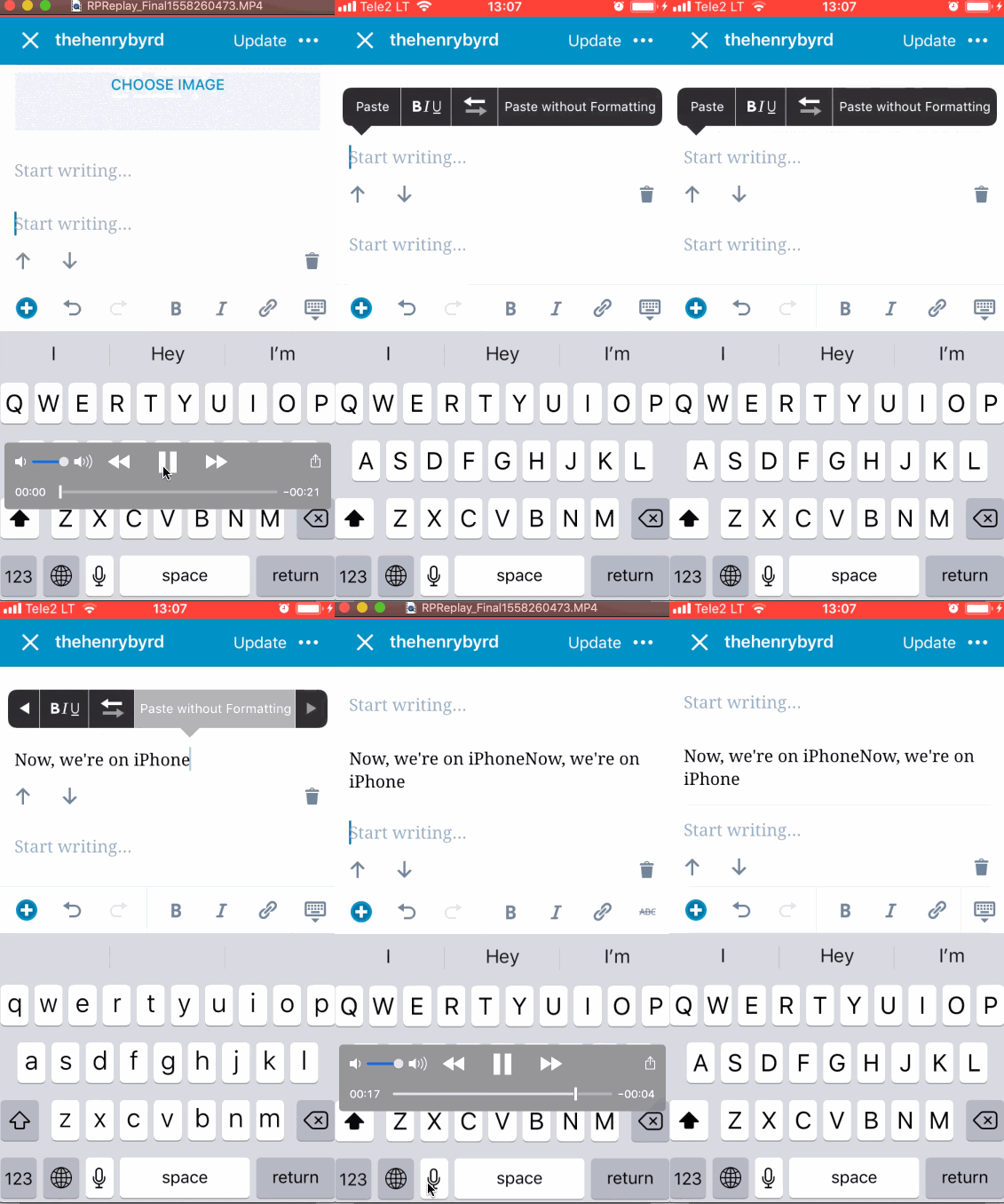
In Block editor, "Paste" doesn't work, but "Paste without Formatting" does work.
Here's how this looks in a paragraph block in Block editor, after copying text:
2041349-zen
 thehenrybyrd
on 19 May 2019
thehenrybyrd
on 19 May 2019
This was also reported in the WordPress-iOS repo at https://github.com/wordpress-mobile/WordPress-iOS/issues/11682 and in https://github.com/wordpress-mobile/WordPress-iOS/issues/11670 it was noted that text cannot be copied from the edit area and pasted into the title area on the same post.
From those issues, I counted at least 6 user reports noted including a mention in app reviews and wanted to note it's one of the highest user-reported issues at the moment. I see it's slated for work in 1.6 and I think that means it should ship with 12.6 if all goes well. 👍 Thank you!
 designsimply
on 24 May 2019
designsimply
on 24 May 2019
I've investigated this and determined that there are two separate underlying issues going on with copy and paste on iOS. The first issue is that styled text is not copied to the clipboard from the block editor in a format that can be pasted as styled text. Another, more recent issue is that paste is not falling back to plain text when the clipboard styles are in an incompatible format.
The first of these issues has existed since the implementation of paste on iOS. This comment in particular was a clue to checkout the exact behavior on older releases https://github.com/wordpress-mobile/gutenberg-mobile/pull/617#pullrequestreview-205427915:
One small detail I found is that pasting on the computer from notes to the simulator seems to not work.
To manually test the state of the clipboard, I performed these steps on various versions:
- Set breakpoint in JS debugger to the first line of the
onPaste(event)function inpackages/block-editor/src/components/rich-text/index.native.js. - Select "Hello World" in the paragraph block that contains the text: "Hello World!".
- Tap "Copy".
- Place the caret immediately to the left of the 'W' in the same block, and tap to bring up the paste option.
- Tap "Paste".
- Observe that the debugger paused, and check the contents within scope of
event.nativeEvent.pastedHtmlandevent.nativeEvent.pastedText.
In examining the contents of event.nativeEvent after these steps, I observed the following for various versions:
v1.0.0
event.nativeEvent.pastedHtml = ""
event.nativeEvent.pastedText = "Hello World"

v1.1.0
event.nativeEvent.pastedHtml = ""
event.nativeEvent.pastedText = "Hello World"

v1.1.3
event.nativeEvent.pastedHtml = ""
event.nativeEvent.pastedText = "Hello World"

v1.2.0
event.nativeEvent.pastedHtml = ""
event.nativeEvent.pastedText = "Hello World"

v1.5.0
event.nativeEvent.pastedHtml = ""
event.nativeEvent.pastedText = ""
A subsequent bisection between v1.2.0 and v1.5.0 revealed that the first commit to lose the fallback to plain text for internal copy / paste is a9e273c936ea695bc07f0a051c50b28c339bd0f8: Xcode 10.2 compatibility.
Bisection log:
git bisect start
# bad: [7b2bcea75a941145e14683bd133600b5e69b87ad] Merge pull request #988 from wordpress-mobile/release/1.5.0
git bisect bad 7b2bcea75a941145e14683bd133600b5e69b87ad
# good: [d9d141a9e5b1256e5ae736d596dc9dbcbe6b766d] Merge pull request #833 from wordpress-mobile/release/1.2
git bisect good d9d141a9e5b1256e5ae736d596dc9dbcbe6b766d
# bad: [4927d604ba7d1f381aecb8eac2b7f34a3282852a] Update JS bundles
git bisect bad 4927d604ba7d1f381aecb8eac2b7f34a3282852a
# good: [bdcea08390d4c966183d195c8bea4bacb5942337] Merge pull request #864 from wordpress-mobile/fix/add-request-media-improt-bridge-android
git bisect good bdcea08390d4c966183d195c8bea4bacb5942337
# bad: [6f9861649e6787e97fa31e830edd8e3dc40d2ef4] Merge pull request #883 from wordpress-mobile/release/1.2.1
git bisect bad 6f9861649e6787e97fa31e830edd8e3dc40d2ef4
# bad: [9e4550134b198a6018a46336cb5cf286055e339c] Merge branch 'develop' into issue/595-bottom-sheet-animation
git bisect bad 9e4550134b198a6018a46336cb5cf286055e339c
# good: [3a48395d021442a649e3c81dffcb9dbde8ccbbe6] Merge pull request #873 from wordpress-mobile/fix/dont-watch-files-on-bundling
git bisect good 3a48395d021442a649e3c81dffcb9dbde8ccbbe6
# skip: [6b34bbab09305a5b06531be9d8228128cd4bf773] Merge branch 'develop' into issue/595-bottom-sheet-animation
git bisect skip 6b34bbab09305a5b06531be9d8228128cd4bf773
# good: [8786108fbd9455f47903db62e4573c81b32e2372] Merge branch 'develop' into issue/595-bottom-sheet-animation
git bisect good 8786108fbd9455f47903db62e4573c81b32e2372
# good: [0afd50489268398858c5d817c3c17a00fae0e891] Merge Gutenberg master
git bisect good 0afd50489268398858c5d817c3c17a00fae0e891
# bad: [9785687fbe65a05a4788d8eab2bab7e2f22cd16e] Merge pull request #853 from wordpress-mobile/xcode-10-2
git bisect bad 9785687fbe65a05a4788d8eab2bab7e2f22cd16e
# bad: [a9e273c936ea695bc07f0a051c50b28c339bd0f8] Xcode 10.2 compatibility
git bisect bad a9e273c936ea695bc07f0a051c50b28c339bd0f8
# first bad commit: [a9e273c936ea695bc07f0a051c50b28c339bd0f8] Xcode 10.2 compatibility
I'm unsure of why updating to Xcode 10.2 results in this change in behavior. :wave: @SergioEstevao @koke , any ideas?
mkevins
on 24 May 2019
I have tested this on the simulator and confirmed that this is fixed after merging the changes in Aztec 1.6.5. :tada:
mkevins
on 28 May 2019
The latest Aztec fixes would only take care of copying plain text, right? Does copying styled text work?
koke
on 28 May 2019
The latest Aztec fixes would only take care of copying plain text, right? Does copying styled text work?
That's my observation as well. I think this issue was opened to address the more obvious problem that copy doesn't even work (thus paste doesn't _appear_ to work at all). It turns out that, for iOS, copying styled text has apparently never been implemented. A subtle clue was shown in this comment. I have checked out the commit from that time and confirmed that copying does not include styles going back to the earliest implementation.
I think that since this is a different underlying issue, it makes sense to open a separate issue regarding copying styled text. WDYT?
mkevins
on 28 May 2019
From the description of this issue, pasting plain text was already working if used “paste without formatting”. I think that’s what broke recently and was fixed. I understand the intention of this issue was to fix copying styled text.
In any case, I don’t really mind if we track the task here or in a different issue, but the remainder of it is still high priority, which is why I was surprised to see it closed
koke
on 28 May 2019
Ok, I will open a separate issue because there are two separate issues here, and I think it's worth distinguishing them. The remaining issue seems to have been present since the 1.0 release.
pasting plain text was already working if used “paste without formatting”. I think that’s what broke recently and was fixed.
To clarify, I do not think that "Paste without formatting" ever "broke", but, rather, that "Paste" seemingly suddenly stopped working _altogether_. This is because of an issue on the copy side, which resulted in incompatible clipboard contents (but "paste without formatting" still worked, perhaps because the OS is doing the work of coercing the contents to plain text in that case).
mkevins
on 28 May 2019
Attributes text copy/paste never worked in Gb mobile, because we are sending it to the JS side, that only knows how to work with plain text or HTML. To make it work we need to fill the JS paste event with html so it can be properly processed in JS.
Sent from my iPhone
On 28 May 2019, at 11:49, Matthew Kevins notifications@github.com wrote:
Ok, I will open a separate issue because there are two separate issues here, and I think it's worth distinguishing them. The remaining issue seems to have been present since the 1.0 release.
pasting plain text was already working if used “paste without formatting”. I think that’s what broke recently and was fixed.
To clarify, I do not think that "Paste without formatting" ever "broke", but, rather, that "Paste" seemingly suddenly stopped working altogether. This is because of an issue on the copy side, which resulted in incompatible clipboard contents (but "paste without formatting" still worked, perhaps because the OS is doing the work of coercing the contents to plain text in that case).
—
You are receiving this because you were mentioned.
Reply to this email directly, view it on GitHub, or mute the thread.
 SergioEstevao
on 28 May 2019
SergioEstevao
on 28 May 2019
Related issues
 mzorz
·
3Comments
mkevins
·
3Comments
mzorz
·
3Comments
mkevins
·
3Comments
 Tug
·
3Comments
designsimply
·
4Comments
Tug
·
3Comments
designsimply
·
4Comments
 etoledom
·
4Comments
etoledom
·
4Comments